인터넷은 우리에게 자유를 주었습니다. 저희는 자유를 얻기 위해 지식을 통합하고 체계화하고 공유합니다. 랜선 위 정글에서 살아남기 위해 저희는 시키는 일만 하는 꿀벌 대신 고객을 위해 창조하고 혁신하는 게릴라가 되겠습니다. Seenbuy.kr is now Aiforu.kr.
계속하려면 전제 조건 의 단계를 완료했으며 프로젝트가 Google My Business API 액세스에 대해 승인 되었는지 확인하십시오 .(To proceed, make sure you’ve completed the steps in Prerequisites and that your project has been approved for Google My Business API access.)
API 사용(Enable the API)
다음 두 가지 방법 중 하나를 통해 Google Developers 프로젝트의 개발자 콘솔에서 Google 마이 비즈니스 API를 사용하도록 설정할 수 있습니다.(You can enable the Google My Business API in the developer console of your Google Developers project through either of two methods:)
제공된 바로 가기를 사용하여 API를 활성화하십시오.(Use the provided shortcut to enable the API)
Google 마이 비즈니스 API를 사용하려면 아래 의 Google 마이 비즈니스 API 사용 버튼을 클릭하십시오 . 아래쪽 화살표를 사용하여 기존 프로젝트를 선택하거나 새 프로젝트를 작성하십시오.(To enable the Google My Business API, click the Enable the Google My Business API button below. Use the down arrow to select an existing project, or create a new project.)
전제 조건의 모든 단계를 완료하지 못한 경우 다음 오류 메시지가 표시 될 수 있습니다.(If you haven’t successfully completed all of the steps in Prerequisites, you might see the following error message:)
"문제가 발생했습니다. 다시 시도하십시오.(Something went wrong. Please try again.)"
모든 전제 조건을 완료 하고 API에 대한 액세스 권한이 부여되었지만 제공된 바로 가기를 사용할 수없는 경우 다음 단계에 따라 API를 수동으로 사용할 수 있습니다.( If you’ve completed all of the Prerequisites and have been granted access to the API, but were unable to use the provided shortcut, you can enable the API manually with the following steps. )
프로젝트에 API를 사용하려면 다음을 수행하십시오.( To enable an API for your project, do the following: )
Google API Console에서 API 라이브러리 를 엽니다 . 프롬프트가 표시되면 프로젝트를 선택하거나 새 프로젝트를 작성하십시오. API 라이브러리에는 제품군 및 인기도별로 그룹화 된 사용 가능한 모든 API가 나열됩니다.( Open the API Library in the Google API Console. If prompted, select a project or create a new one. The API Library lists all available APIs, grouped by product family and popularity. )
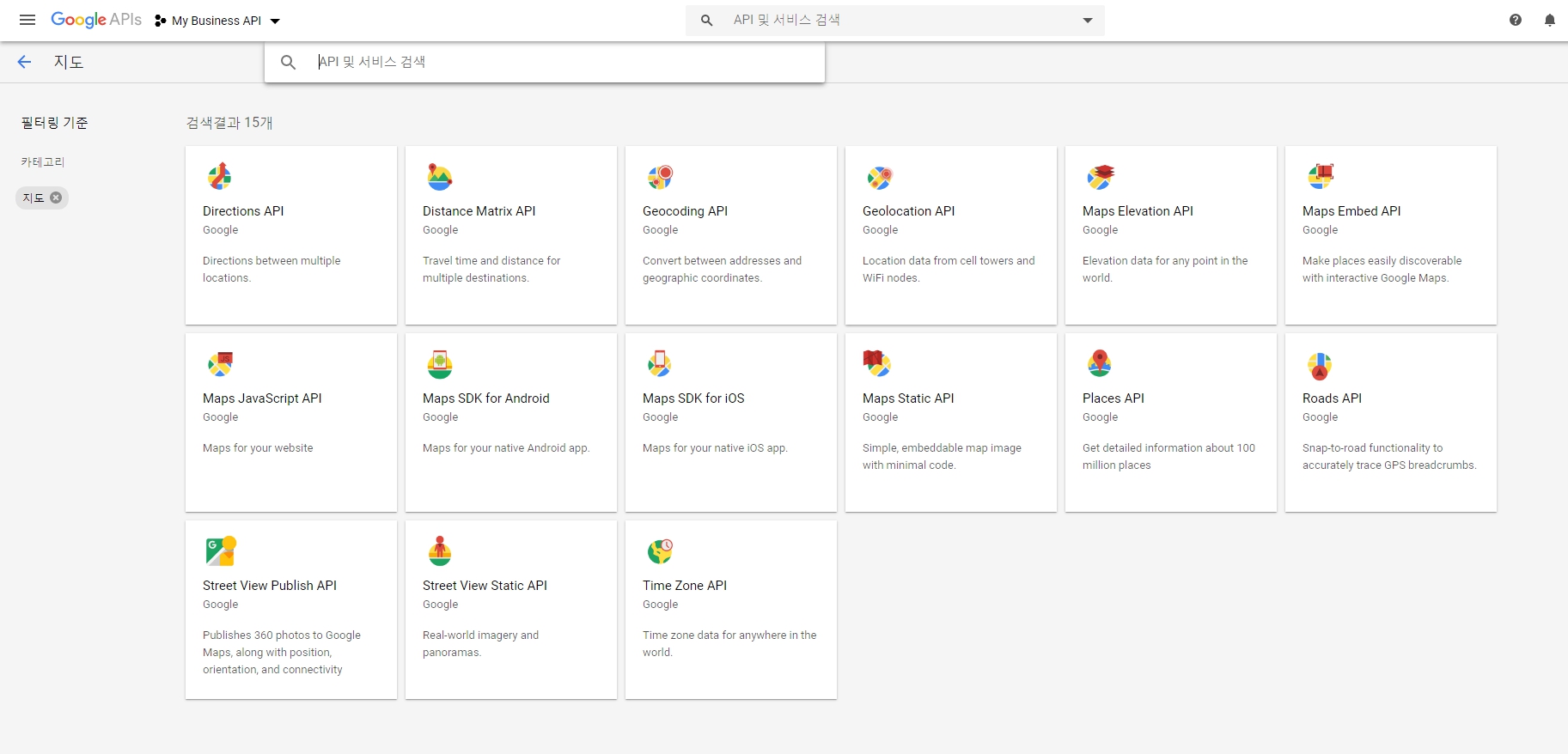
사용하려는 API가 목록에 표시되지 않으면 검색을 사용하여 찾으십시오.( If the API you want to enable isn’t visible in the list, use search to find it. ) : Q. 검색을 하여 사용하라는데, 어떤 API를 선택해야할지 모르겠습니다. API 수동활성화는 이 단계에서 멈추어서서 더 진행할 수가 없습니다.
사용하려는 API를 선택한 다음 사용 버튼 을 클릭하십시오 .( Select the API you want to enable, then click the Enable button. )
메시지가 표시되면 결제를 활성화합니다.( If prompted, enable billing. )
메시지가 표시되면 API 서비스 약관에 동의하십시오.( If prompted, accept the API’s Terms of Service. )
Q. API 라이브러리 에서 지도로 검색해도 아래와 같이 15개나 나오는데 어떤 API를 선택해서 사용해야할지 모르겠습니다.
OAuth 2.0 클라이언트 ID 요청( Request an OAuth 2.0 client ID )
앱이 비공개 비공개 데이터에 액세스하므로 OAuth 2.0 클라이언트 ID 가 필요합니다 . 이를 통해 앱은 승인을 요청하여 앱 사용자 대신 조직의 위치 데이터에 액세스 할 수 있습니다.( Because your app accesses protected, non-public data, you need an OAuth 2.0 client ID. This lets your app request authorization to access your organization’s location data on behalf of your app’s users. )
애플리케이션은 개인 사용자 데이터에 액세스하는 모든 Google My Business API 요청과 함께 OAuth 2.0 토큰을 보내야합니다.( Your application must send an OAuth 2.0 token with any Google My Business API request that accesses private user data. )
아직 수행하지 않은 경우 Google API 콘솔 의 “자격 증명”섹션으로 이동하여 자격 증명 만들기> OAuth 클라이언트 ID 를 클릭 하여 OAuth 2.0 자격 증명을 만듭니다. 당신은 자격 증명을 만든 후에는에서 클라이언트 ID 볼 수있는 자격 증명 페이지를. 클라이언트 시크릿, 리디렉션 URI, JavaScript 오리진 주소 및 이메일 주소와 같은 세부 사항을 보려면 클라이언트 ID를 클릭하십시오.( If you haven’t done so already, go to the “Credentials” section of the Google API Console and click Create credentials > OAuth client ID to create your OAuth 2.0 credentials. After you’ve created the credentials, you can see your client ID on the Credentials page. Click the client ID for details, such as client secret, redirect URIs, JavaScript origins address, and email address. )
REST 기초 학습( Learn REST basics )
API를 호출하는 방법에는 두 가지가 있습니다.( There are two ways to invoke the API: )
HTTP 요청을 보내고 응답을 구문 분석하십시오.( Send an HTTP request and parse the responses. )
클라이언트 라이브러리를 사용하지 않기로 결정한 경우 REST의 기본 사항을 이해해야합니다.( If you decide not to use client libraries, you need to understand the basics of REST. )
REST는 데이터를 요청하고 수정하기위한 편리하고 일관된 접근 방식을 제공하는 소프트웨어 아키텍처 스타일입니다. ( REST is a style of software architecture that provides a convenient and consistent approach to request and modify data. )
REST라는 용어는 ” Representational State Transfer “의 약자입니다 . Google API와 관련하여 이는 HTTP 동사를 사용하여 Google이 저장 한 데이터 표현을 검색하고 수정하는 것을 말합니다.(The term REST is short for “Representational State Transfer.” In the context of Google APIs, it refers to the use of HTTP verbs to retrieve and modify representations of data stored by Google. )
RESTful 시스템에서 자원은 데이터 저장소에 저장됩니다. 클라이언트는 서버에 리소스 생성, 검색, 업데이트 또는 삭제와 같은 특정 작업을 수행하라는 요청을 보내고 서버는 작업을 수행하고 응답을 보냅니다. 이 응답은 종종 지정된 자원을 나타내는 형식입니다.( In a RESTful system, resources are stored in a data store. A client sends a request for the server to perform a particular action, such as to create, retrieve, update, or delete a resource, and the server performs the action and sends a response. That response is often in the form of a representation of the specified resource. )
Google의 REST 방식 API에서 클라이언트는 HTTP 동사, 같은과 동작 지정 GET, POST, PUT, 또는 DELETE. 클라이언트는 다음과 같은 형식의 전역 고유 URI (Uniform Resource Identifier)로 자원을 지정합니다.( In Google’s RESTful APIs, the client specifies an action with an HTTP verb, such as GET, POST, PUT, or DELETE. The client specifies a resource by a globally unique uniform resource identifier (URI) of the following form: )
모든 API 리소스에는 고유 한 HTTP 액세스 가능 URI가 있으므로 REST는 데이터 캐싱을 가능하게하며 웹의 분산 인프라와 작동하도록 최적화됩니다.(Because all API resources have unique HTTP-accessible URIs, REST enables data caching and is optimized to work with the web’s distributed infrastructure. )
HTTP 1.1 표준 문서에서 메소드 정의 가 유용하다는 것을 알 수 있습니다 . 그들은 사양이 포함 GET, POST, PUT,와 DELETE.( You might find the method definitions in the HTTP 1.1 standards documentation useful. They include specifications for GET, POST, PUT, and DELETE. )
Google 마이 비즈니스 API의 REST( REST in the Google My Business API )
Google My Business API 작업은 REST HTTP 동사에 직접 매핑됩니다.( The Google My Business API operations map directly to REST HTTP verbs. )
Google My Business API의 특정 형식은 다음 URI에 표시되어 있습니다.( The specific format for the Google My Business API is shown in the following URI: )
https://mybusiness.googleapis.com/v4/ resourcePath ? 매개 변수 ( https://mybusiness.googleapis.com/v4/resourcePath?parameters )
API에서 지원되는 각 작업에 사용되는 전체 URI 세트는 Google My Business API 참조 설명서에 요약되어 있습니다.( The full set of URIs used for each supported operation in the API is summarized in the Google My Business API Reference documentation. )
자원 ID는 다음 형식의 자원 경로로 정의됩니다.( Resource IDs are defined by a resource path of the following form: )
accounts / {accountId} / locations / {locationId}
변수 accountId및 locationIdID의 숫자 부분을 나타냅니다.( The variables accountId and locationId represent the numeric portion of the ID. )
계정의 리소스 경로는 다음 예와 같이 나타납니다.( The resource path to an account appears as in the following example: )
계정 / 0123456789( accounts/0123456789 )
위치의 리소스 경로는 다음과 같은 형식으로 나타납니다.( The resource path for a location appears in the following form: )
JSON (JavaScript Object Notation )은 언어에 독립적 인 공통 데이터 형식으로, 임의의 데이터 구조에 대한 간단한 텍스트 표현을 제공합니다. 자세한 정보는 json.org를 참조하십시오 .
Learn JSON basics
The Google My Business API returns data in JSON format.
JavaScript Object Notation (JSON) is a common, language-independent data format that provides a simple text representation of arbitrary data structures. For more information, see json.org.
간단한 HTTP 요청 만들기
OAuth 2.0 Playground 를 사용하여 Google My Business API를 실험 할 수 있습니다 . Google 마이 비즈니스 API는 공개 API가 아니므로 놀이터에서 API를 사용하기 위해 몇 가지 추가 단계를 수행해야합니다. 웹 애플리케이션을 진행하려면 클라이언트 ID가 필요합니다.
Google API Console로 이동 하여 프로젝트를 엽니 다. 웹 애플리케이션 용 OAuth 클라이언트 ID가없는 경우 지금 작성하십시오.
The Google My Business API client libraries support the functionality of the Google My Business API. They provide functionality common to all Google APIs, such as HTTP transport, error handling, authentication, and JSON parsing.
With havin so much content do you ever run into any issues of plagorism or copyright violation? My site has a lot of unique content I’ve either created myself or outsourced but it looks like a lot of it is popping it up all
over the web without my agreement. Do you know any
methods to help prevent content from being stolen? I’d really appreciate it.



2 Comments
With havin so much content do you ever run into any issues of plagorism or copyright violation? My site has a lot of unique content I’ve either created myself or outsourced but it looks like a lot of it is popping it up all
over the web without my agreement. Do you know any
methods to help prevent content from being stolen? I’d really appreciate it.
Very good information. Lucky me I discovered your blog by accident (stumbleupon).
I’ve saved it for later!