- 인터넷은 우리에게 자유를 주었습니다. 저희는 자유를 얻기 위해 지식을 통합하고 체계화하고 공유합니다. 랜선 위 정글에서 살아남기 위해 저희는 시키는 일만 하는 꿀벌 대신 고객을 위해 창조하고 혁신하는 게릴라가 되겠습니다. Seenbuy.kr is now Aiforu.kr.
- 024042463
- 01032667931
- [email protected]
![How to solve the problem that “not provided” is displayed in [Acquisition]->[All traffic]->[Keyword] view in Google Analytics](https://aiforu.kr/wp-content/uploads/2022/02/logo-web-transparent-2.png)
![How to solve the problem that “not provided” is displayed in [Acquisition]->[All traffic]->[Keyword] view in Google Analytics](https://aiforu.kr/wp-content/uploads/2022/02/logo-web-transparent-3.png)
How to solve the problem that “not provided” is displayed in [Acquisition]->[All traffic]->[Keyword] view in Google Analytics
1. Cause of ‘not provided’
If you change the default dimension to [Keyword] in [Acquisition]->[All traffic]->[Source/Medium] and set the second dimension to [Source/Medium], you can see what search terms came from which source/medium as shown below. You can check. In my case, it is a report that I often use as a shortcut (previously, it was a ‘shortcut’, but the name has been changed to ‘designated report’ on 17.6.27) in that I can see the source (source) of the inflow keywords.

But one day, while doing search engine optimization (SEO) and looking at this shortcut to charge customers, I found that many search terms were not displayed and displayed as “not provided”. So I looked at the keyword “not provided”, how to solve it?You have provided a detailed explanation of why this occurs and how to solve it.
When a user searches while logged in, SSL search is used.
The following italicsare excerpts from the article [“not provided” keyword, how to solve it?].

What causes ‘not provided’?
Here isGoogle’s official answer to the keyword not provided.
“Generally, keywords searched by visitors are identified when recommending search engines … (syncopation)… When an SSL search is used, the keyword is given a value of (not provided).”
In other words, when a Google Account user searches while logged in, SSL searches are used, in which case the search query is encrypted to protect privacy. In particular, since most Google searches of Gmail users and iPhone/Android smartphone users are done while logged in, this number is gradually increasing.
“Not provided” is a headache for marketers who want to know what keywords were introduced.
After excluding [not provided]in this way, only 10-20% of keywords remain, which is insufficient to obtain sufficient insight or write a report.
2. Solution of not provided
[not provided] How to unlock it?!
Steps 2 to 4 are how to solve the problem within Google Analytics.
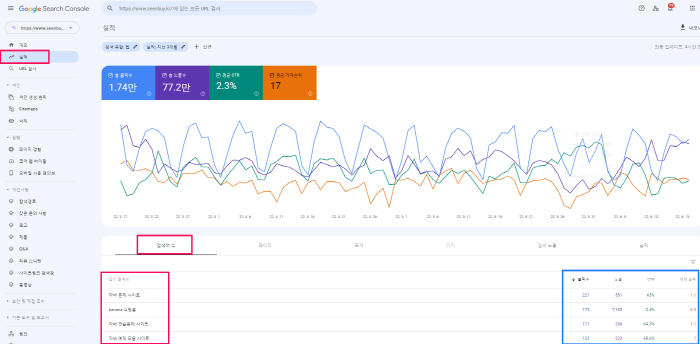
1) Linking with Google Search Console (formerly Google Webmaster Tools) to track and analyze search terms
We recommend this method. [Performance] -> [Number of search terms] shows the search terms searched on Google, and it shows the number of impressions, clicks, click-through rate, and ranking for the search term, so this is the most obvious solution.
The downside is that you can only accurately identify search terms made on Google. Search terms from Naver, Daum, etc. other than Google cannot be tracked.
2) [not provided]Check the landing page after creating the inflow segment
3) Check the Site Search report
4) Filter and landing page report
3. Another solution to not provided : Custom settings for Google Analytics
Personally, I liked “[not provided]How to unlock the seal?!” However, while looking at the solution, I remembered the customization of Google Analytics. “Customized setting of Google Analytics” seems to be a solution to not provided, so I share it. “Customized settings for Google Analytics” has the advantage of being able to check search terms and search environments (PC, mobile, etc.)
For “Customized Settings of Google Analytics”, I would appreciate if you refer to my other post, GOOGLE ANALYTICS Funnel Details: Custom Settings (find out which search terms (paths) came from which sites, as a solution to not provided).
References: 1. “not provided” keyword, how to solve it?