- 인터넷은 우리에게 자유를 주었습니다. 저희는 자유를 얻기 위해 지식을 통합하고 체계화하고 공유합니다. 랜선 위 정글에서 살아남기 위해 저희는 시키는 일만 하는 꿀벌 대신 고객을 위해 창조하고 혁신하는 게릴라가 되겠습니다. Seenbuy.kr is now Aiforu.kr.
- 024042463
- 01032667931
- [email protected]


Google Local Searches: Google My Business (GMB), google maps (2) (Troubleshooting (FAQ), SEO tips, solutions to check the ranking of Google local search results)
5. FAQ / Troubleshooting
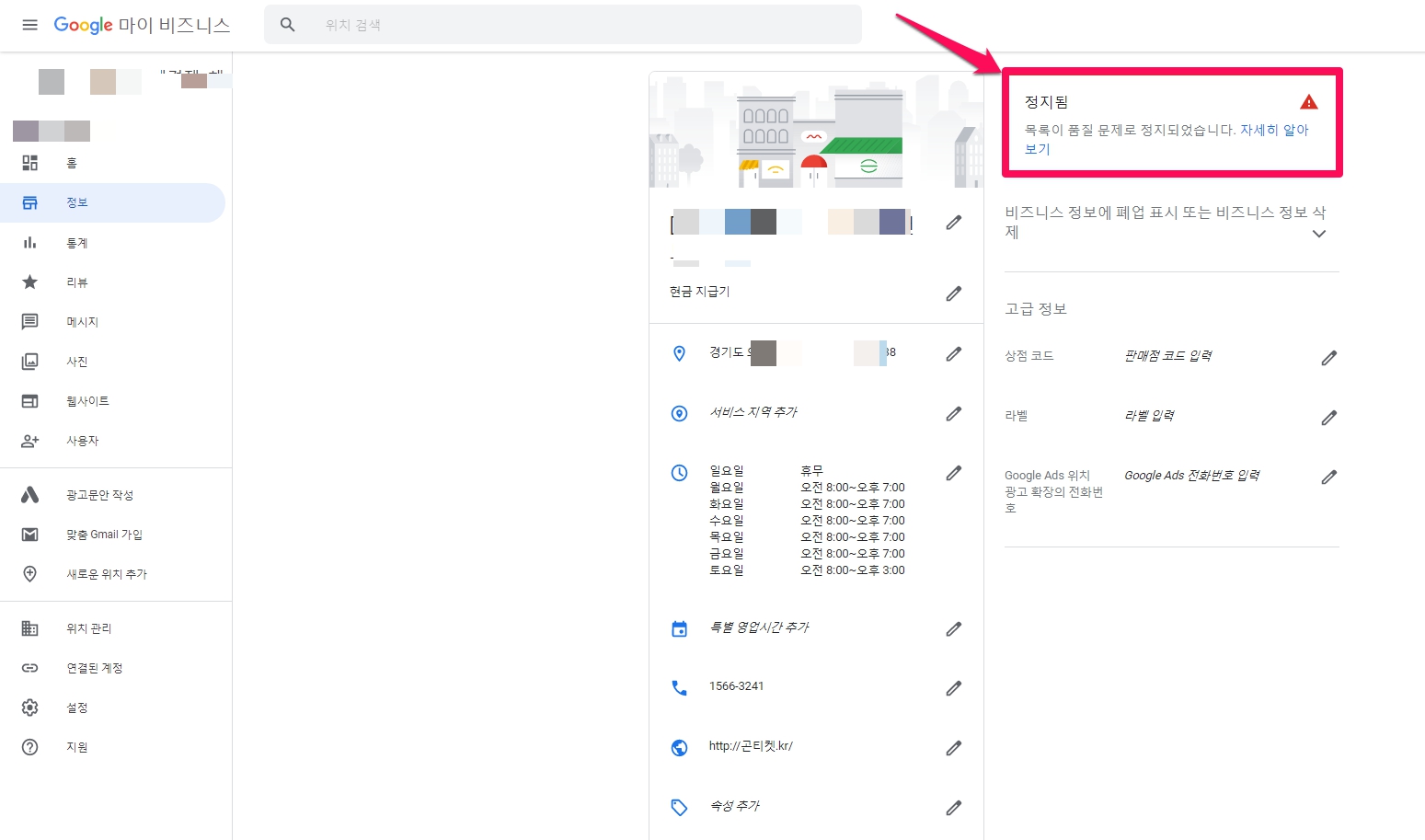
Profile suspended
Nothing is more problematic than seeing this alert on your GMB dashboard.
It appears in the process of registering information after completing authentication in Google My Business and appears even after registration. Usually it is stopped due to quality problems.
The image below is an email from Google My Business. “***’s Google Business Profile has been flagged and suspended for suspicious activity.” Profile is suspended due to malicious reporting by a competitor.
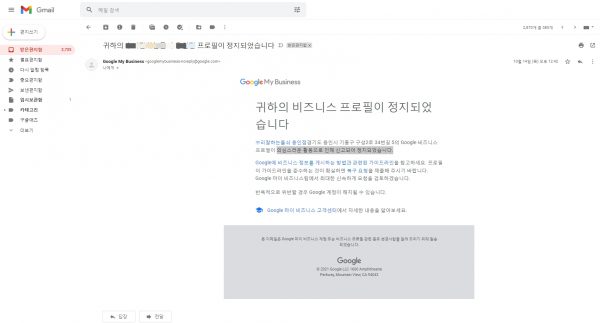
Basic solution: Contact us. Please refer to the causes and solutions for each case below first and use the basic solution, Contact Us.
Business Profile Reinstatement(1:09)
Attached is a video related to inquiry.
If you need to contact Google My Business support, your best bet is to use the contact us form.
Remember to be patient whenever you ask for help.
In these crazy times, your resources are limited and your work will take a little longer than usual.
As of 21.10.28, the inquiry form( https://support.google.com/business/gethelp ) has been updated.
Please log in with the gmail account that claimed ownership of Google My Business. (Or log in with an administrator account.)
[Step 1 ]
- What can we help with?
- After logging in with the gmail account that manages Google My Business, select the company (list).
- Tell us what we can help with : If it is suspended, you can put it as ‘My business was suspended’.
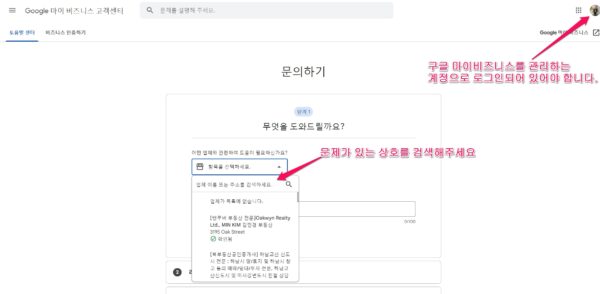
- Choose the best description of this issue.
Suspended business, Complaint about customer service, No more verification methods available, View more In this way, we select Suspended business.
[Step 2] Resources: Sources where the inquirer can solve the problem on their own are introduced, but it takes English and the problem of the inquirer is different for each case, so it is not helpful, so please pass it.
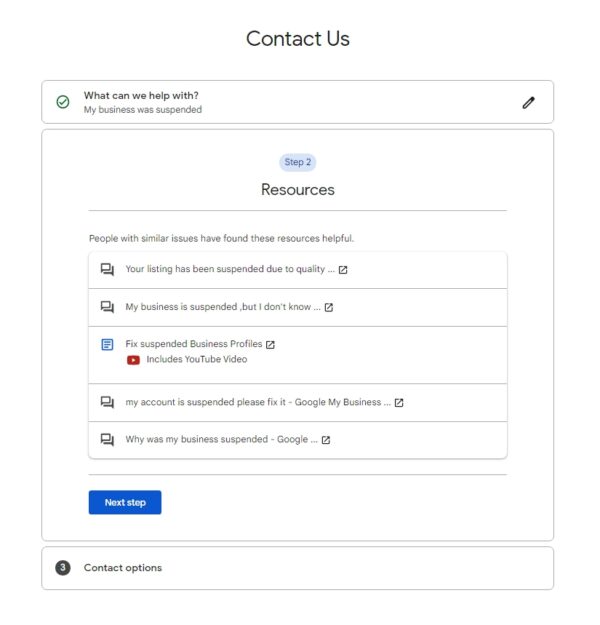
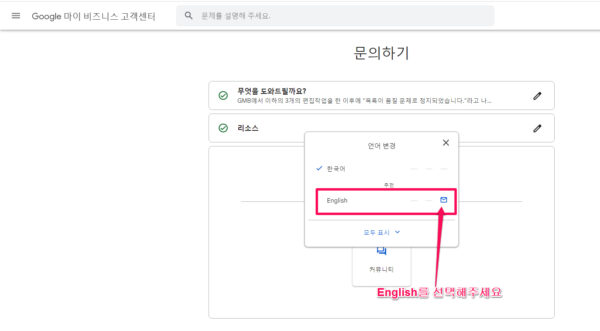
[Step 3] If the language is in Korean in the inquiry option, you cannot get e-mail inquiries and answers, and you can only view related content in English provided by the community.
For e-mail inquiries, please click the default language to change to English. (This is also because the head of GMB is located in Mountain View, California, USA.)
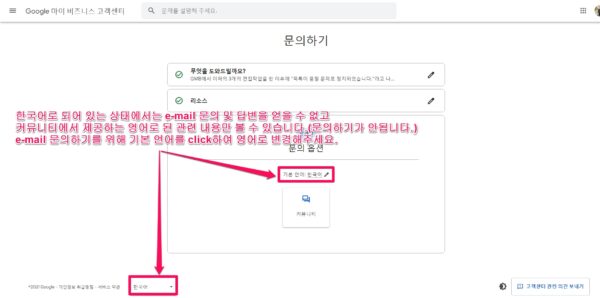
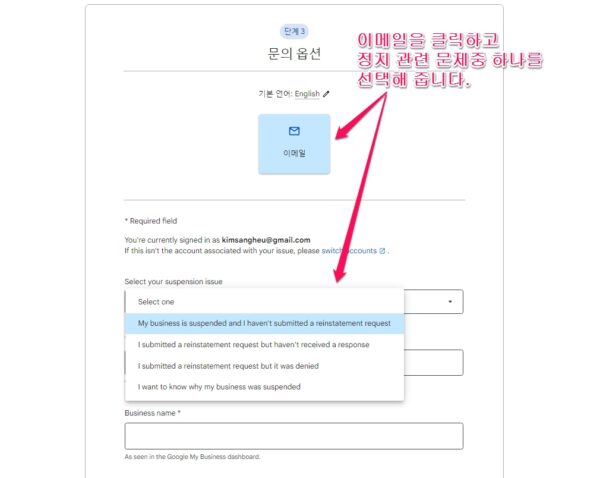
Click [E-mail] in the center to display the detailed form.
Select your suspension issue(Please select one of the suspension related issues. If you have asked before, you will choose 2 or 3, if this is your first time, you will choose 1 or 4.)
1. My business is suspended and i haven’t submitted a reinstatement request.
2. I submitted a reinstatement request but haven’t received a reasonse.
3. I submitted a reinstatement request but it was denied.
4. I want to know why my business was suspended.
Business name * : In my case, I wrote it as it is in GMB = Korean.
Business address * : In my case, I wrote it as it is in GMB = Korean.
What is the public URL for your business’s page? is the url that is displayed at the top by searching for the business in Google Maps, and is as follows.
https://www.google.com/maps/place/%EC%84%B1%EC%9D%B8%EC%9A%A9%ED%92%88+%EB%B0%94%EB%82%98%EB%82%98%EB%AA%B0+-+%EC%9D%98%EC%A0%95%EB%B6%80%EC%A0%90/@37.7375472,127.0429835,17z/data=!3m1!4b1!4m5!3m4!1s0x357ca5cc476357e3:0x28f82249a5771c34!8m2!3d37.7375472!4d127.0451722
If your profile has been suspended= it has been completely removed from Google Maps and you cannot enter addresses beginning with https://www.google.com/maps/place/https://business.google.com/dashboard/l/13771871295232677014 Enter the GMB dashboard address as ?hl=ko .
Does your business have a storefront where your customers can visit your business? *(Does your business have stores where customers can visit your business? *) : Yes if yes, No if not.
Picture of storefront which clearly shows permanent signage *(Required)
Picture of storefront which clearly shows address adjacent storefronts and respective signage(A photo of the store clearly showing the address adjacent to the store and its signage)
Picture of storefront taken from across the street which clearly shows address markers (e.g. street name signs and address numbers)
Describe your issue. * : Please write your request in English.
Case ID
If you are re-inquiring about previously inquired information, enter the Case ID.
This is from the last step, so make a note of it in case you ask again next time. ( your case ID is 2-0166000031826.)
The content is written in English.
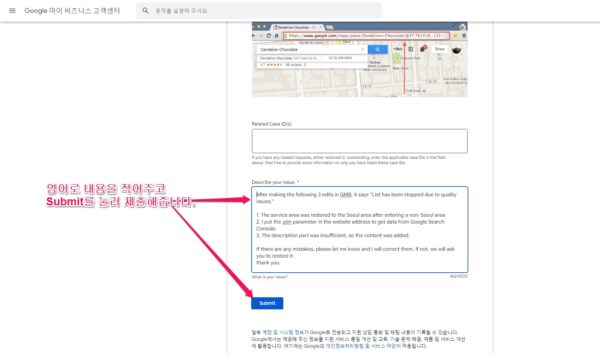
Please fill in the contents in English and click Submit to submit.
** Precautions **
Case ID: This is from the last step, so make a note of it in case you ask again next time.( your case ID is 2-0166000031826.)
It is also given every time you send the form and changes each time. So take note of the last case ID. For your reference, your case ID is 7-9910000031861.

*** Points to note ***
You will receive an email like the one below within 30 minutes. If you see in the middle of this email, please fill out the recovery (restore, recovery) request form in the ‘Please fill out the recovery (restore, recovery) request form.( If you have met the guidelines, please request the recovery again. )’ If you write , you will receive an email stating that you have requested a duplicate request as a reply. Don’t panic, and if you do not receive a reply after 3 business days, please write a reply to [email protected] from the orange e-mail below based on the case id to [email protected]
If you re-submit using the inquiry form described above ( https://support.google.com/business/gethelp ), select your suspension issue 3. Select I submitted a reinstatement request but it was denied and enter the Case ID.
The e-mail below is the content of the e-mail issued for guidance when making an inquiry.
Kim ****** <kimsan****@gmail.com>Your Google My Business support inquiry [2-0166000031826]
1 mail
[email protected] <[email protected]>
November 3, 2021 6:29 PM
To: [email protected]
Thank you for reaching out about your suspended Business Profile on Google. From the info you shared, here are your options and next steps: )
Ask for reinstatement
Confirm that your business meets our guidelines.
Learn how to represent your business on Google.
Fill out the reinstatement request form.
.
.
Learn how to represent your business on Google. (Click here to go to our guidelines on how to post your business on Google.
Field
Businesses that can create Google My Business listings
Businesses that cannot create a Google My Business listing
Ownership
Business Description Guidelines
Name
Address
Website and phone number
Opening hours
Category
Menu
Chain and brand
Department within another business, university or institution
Professional
Illegal activity
Marketing, Promotion or Other Contests
The difference between the guidelines above is that they are very detailed and have a lot of content added. I will add the newly discovered point as a new case study. )Please fill out the recovery (restore, recovery)request form.
Hear back about reinstatement
We review, investigate, and resolve most requests within 3 business days.
If it’s been more than 3 business days, reply to this email. We’ll look into your status.
If you have a storefront, attach a photo to your reply.
.
..
.
.
.
Reply to a denial
If we mistakenly denied your request, reply to this email. We’ll look into your eligibility.
In your reply, include an eligibility justification and summarize how your business operates.
If you have a storefront, attach a photo to your reply.
. .
.
.
.
Fix issues after reinstatement
For the security of Business Profiles, we can’t share specific reasons why any profile is suspended.
If you have issues with your reinstated profile, reply to this email with that info. We’ll investigate.
For details, learn how to fix suspended Business Profiles.
For general help with Google My Business, we recommend our YouTube channel, Help Center, and Help Community. If you need more help than those resources give, reply to this email. (For reinstatement issues, if you have a storefront, attach a photo of it.) We’ll be glad to assist.
Thanks,
The Google My Business Support team.
.
.
.
. .
. . , . . . .
. . .
.
.
business.google.com
Help Center
Ask Experts
Google LLC, 1600 Amphitheatre Parkway, Mountain View, CA 94043, USA
Google Ireland Ltd, Gordon House, Barrow Street, Dublin 4, Ireland
This email may be confidential or privileged. If you received this communication by mistake, please don’t forward it to anyone else, please erase all copies and attachments, and please let me know that it went to the wrong person. Thanks. The above terms reflect a potential business arrangement, are provided solely as a basis for further discussion, and are not intended to be and do not constitute a legally binding obligation. No legally binding obligations will be created, implied, or inferred until an agreement in final form is executed in writing by all parties involved.


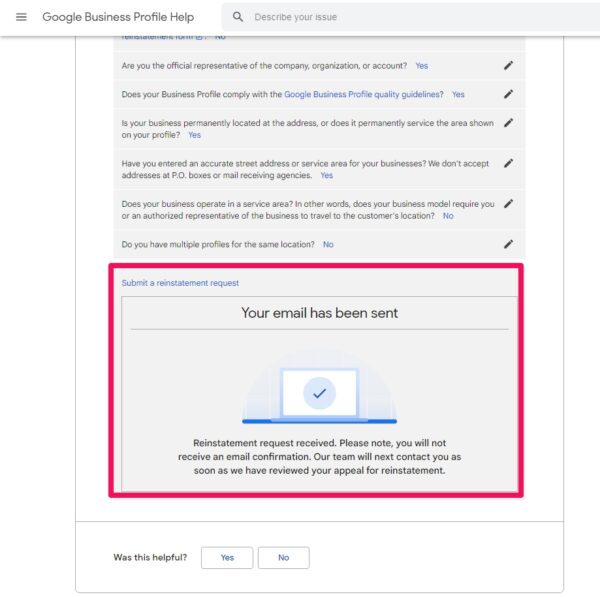
Recovery (Restore, Recovery) Request Form Submit
Did you already submit a reinstatement request for this Business Profile? Learn how to use the reinstatement form. When asked, select No.
Are you the official representative of the company, organization, or account?
If you select No because you are an administrator, you will no longer be able to submit. Yes please.
To file an appeal your page must comply with both the Google My Business quality guidelines and the content and conduct policy.
Does your Business Profile comply with the Google Business Profile quality guidelines? Yes
Is your business permanently located at the address, or does it permanently service the area shown on your profile? Yes please.
Have you entered an accurate street address or service area for your businesses? We don’t accept addresses at P.O. boxes or mail receiving agencies. Yes please.
Does your business operate in a service area? In other words, does your business model require you or an authorized representative of the business to travel to the customer’s location? No
Do you have multiple profiles for the same location? No please.
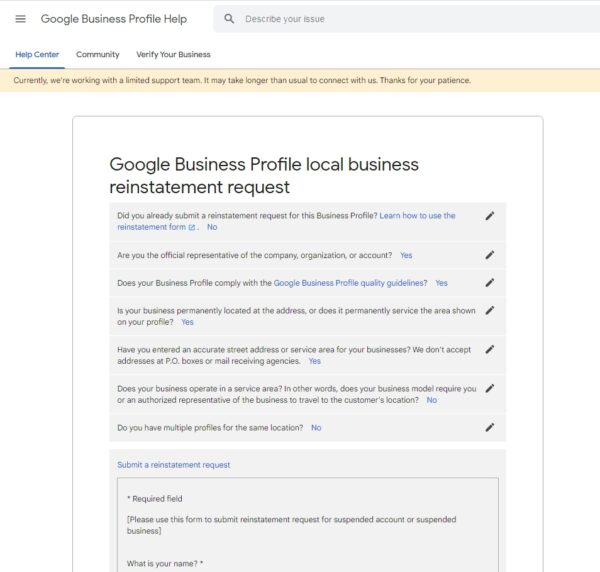
Now the recovery request form will appear..
Submit a reinstatement request
- Required field
[Please use this form to submit reinstatement request for suspended account or suspended business]
What is your name? *
What is your email address? *
What is the official email address used to manage your Google Business Profile?: I don’t know yet if I can put an email as an administrator.
Where do you manage your Business Profile? *
- I manage by going to business.google.com(A)
- I manage my Business Profile directly on Search or Maps(B)
If you choose A, What is the URL for your business’s listing on Google Business Profile? It says *(What is the URL of the business listing in your Google Business Profile?).
In method B, the profile ID could not be found due to lack of Google explanation. In particular, the profile ID cannot be found because it is not displayed on Google Maps when the profile is suspended.
Click the business information (info) of the business in GMB and go to ‘https://business.google.com/u/0/edit/l/13771871295232‘Copy the url like Click Home to go to ‘https://business.google.com/u/0/dashboard/l/13771871295232‘You can also copy and paste the same url. ‘13771871295232‘This is to inform location identifiers such as
Please provide a phone number we can call to reach you. *
Additional information (please be specific)
Attach any relevant proof (optional): It is optional but please attach a picture of the storefront here.
No file chosen
요청을 완룐하면 아래와 같은 화면이 나옵니다. 요청 메일을 잘 받았다고 확인 이메일을 보내주지는 않습니다. 오히려 정책 위반등으로 복구 요청을 수락해주지 않을 경우에만 즉시 복구 요청을 수락해줄 수 없다고 10분안에 답장 메일이옵니다. 정상접수된 경우, 영업일 기준 3일 이내에 대부분의 요청을 검토, 조사 및 해결합니다.영업일 기준 3일이 지난 경우 다시 요청해 주세요.
Cause Solution by Case
1. When keywords are included in the business name
As the quality guide for 2021-04-05, the regulations regarding the company name have been strengthened, so if you insert keywords into the company name, this phenomenon will occur. At least during the first authentication, please do not include keywords in the business name.
solution
When I sent an email to the support team because my profile was suspended, I got the following reply. As the quality guide for 2021-04-05, the regulations regarding the company name have been strengthened, so if you insert keywords into the company name, this phenomenon will occur. At least during the first authentication, please do not include keywords in the business name. The Contact Us URL link where you can request a location restore is https://support.google.com/business/gethelp?visit_id=637531971567211448-1109911991&rd=2.
.

.
.
.

.

. .
.

.

.
Hello, Thank you for contacting Google My Business team about your issue. Before further troubleshooting your case, we will need to resolve violations within your account to make it compliant with our data quality guidelines. Please carefully review our guidelines for representing your business on Google to make sure all of your business details are accurate and within our guidelines. Please find the non-exhaustive list of quality violations found in your account: Business Name. Name of your listing does not seem to reflect the real-world name of your business and contains additional information which is not allowed per Google My Business quality guidelines. If you have any further questions please consult the Google My Business Help Center. Thanks, Google My Business Support.
2. If the service area is set incorrectly
solution
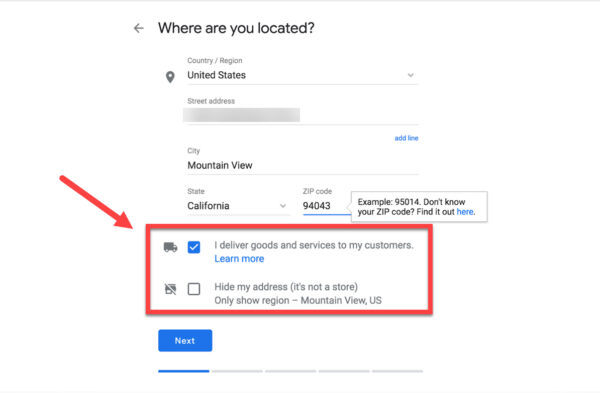
Whether a business is eligible for a service area is determined by its primary category. In some cases, the default category is an industry that cannot add service area, but adding service area is a reason for suspended (profile suspension). If you do not have a drop-off or delivery service to a location outside of your business, we do not recommend adding a service area. In addition, Google guidelines warn not to add as a service area if it takes more than 2 hours by car.
Service Area
To use our service area, you must be one of the following business types: (Source: Service Area and Hybrid Business)
- Door-to-door service provider: A business that provides door-to-door or delivery services to its customers but not at their business address.
Businesses like cleaning services or plumbers.
A door-to-door service provider can only create one profile for the metropolitan areas it serves. - Hybrid business: A business that not only serves customers from their business address, but also provides door-to-door or delivery services. Businesses without permanent on-site signage do not qualify as brick-and-mortar stores and must be registered as a door-to-door service provider.
An example would be a restaurant that offers in-store dining and also offers food delivery.
A hybrid business can display a brick-and-mortar store address, set the business hours for which employees reside at the address, and specify a service area. - If services are not provided at your business address, do not enter your address in the ‘About’ tab of Google My Business after verification of ownership. Leave the ‘Business Location’ field blank.
- Please note the following:
You can add up to 20 service areas.
The perimeter of the entire area should not take more than approximately two hours by car to the area where the business is located.
If you are changing your business type from a brick-and-mortar store to a door-to-door service provider or hybrid business, keep the following in mind:
If service is provided at your business address and also has a service area: Enter both the address and service area.
If service is not provided at your business address: Clear the address field and enter only the service area.
- Spam Service Area Businesses (SAB) Category: The following industries tend to be paused because Service Area Businesses has a lot of spam related to the nature of its business and listing of service area businesses.
The following are sectors that fall under the spammy SAB category and may experience pauses (source: How to Fix Common Service Area Business Issues in Google My Business )
- Garage Door Companies
- Plumbers
- Locksmiths
- Pest Control
- HVAC
- Tree Pruning
- Roofing
- Water Damage Restoration
- Flooring Contractors
- Foundation Repair
- Tree Service
When submitting a restoration request, please attach the following:
- Photo of your business vehicle if you have a Service Area Business (SAB).
- Photocopy of business registration certificate
For reference, this problem does not occur if you uncheck the box in the sense of not doing it when asking if you are providing a delivery service at the company registration stage.
3. When residence or virtual office/shared office is set as business address
According to Google guidelines, you cannot display your residential address on your Google My Business profile. (Source: Common Google My Business Problems & How to Resolve Them)
If you have a virtual office/shared office as your address, you must prove to Google that:
- You are renting a dedicated executive office.
- Your employees will be in the office during the stated business hours.
- I have a photo of a permanent sign with the company name.
- There is a photo or video of the entrance to the office showing signage, etc.
How do I take back ownership of my Google My Business listings?
Business owners often forget their GMB login information. Alternatively, someone other than the business owner may claim ownership of the business’s GMB listing.
So, how do you regain ownership of your business listing if it was claimed by someone else?
solution
If the business (list) has already been claimed, follow the process of registering as new, and in the final step, part of the current owner’s email account will be displayed.
It will be memorable if the email you used to request your business’s GMB profile is yours.
You can then log in to GMB using that email address and start managing your Google My Business listings.

( 이미지 출처 : 5 Common Google My Business Problems & How to Resolve Them )
If the email is not yours, check to see if someone else in your company may have claimed ownership of the company listing.
It could be a former employee, a digital marketing agency you hired, or even a stranger.
Most importantly, the listing of companies must be owned by the appropriate and rightful person.
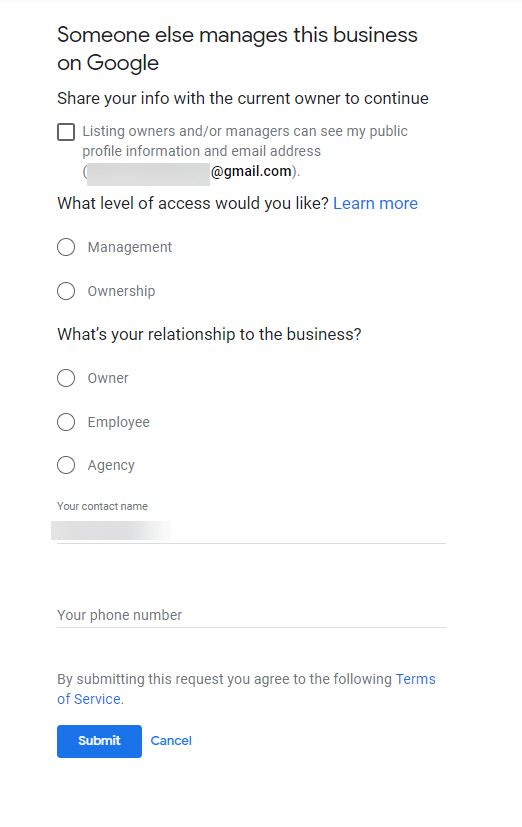
Click Request Access and you’ll be asked to answer a few questions about who you are, what your relationship to the business is, and the type of access you want (management or ownership).
( 이미지 출처 : 5 Common Google My Business Problems & How to Resolve Them )
If you own a business, click Owner , if you are an employee, choose Employee, and if you are a marketing agency, choose Agency.
When you click the submitbutton, an email is sent to the person who currently has ownership of the GMB list.
That person must respond to any title or management request within 7 days.
You will receive an email related to this request. Be sure to save that email.
If the owner does not respond, you can enter that list and claim it.
You will receive a notification email when your ownership request is approved, and you can manage your list from your GMB dashboard.
If your request is denied, you should be given the option to appeal or confirm your affiliation with the listing.
Open the original email you received when requesting accessto the GMB list and click View Request or open the Reject email and click OK.
One of these emails will start the process of proving ownership of the list.
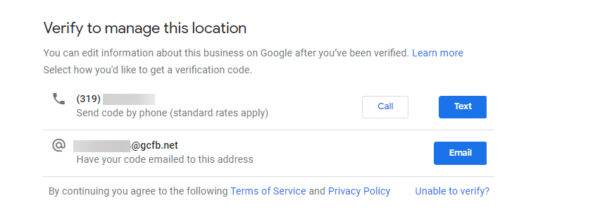
In some cases, you may be prompted to “Confirm to administer this location”.
If you are a digital marketing agency and see this option, contact the business owner (confirm by phone or email) before clicking on any of these options.
Inform the owner that Google will provide the PIN number by phone or email.
They will have to record the number and give it to you so they can access your account.
( 이미지 출처 : 5 Common Google My Business Problems & How to Resolve Them )
If you are the owner of a business, you will want to claim ownership.
If you are an employee or digital marketing agency that supports your business with digital marketing, you can request admin access.
Note: If you are trying to access a Service Area Business (SAB) GMB List (a business that does not have a physical address list in its GMB profile), the process is slightly different.
Enter your business name, information, and essentially check the GMB business listing again.
You will receive a postcard with your PIN in the mail within about 7-14 days.
Log in to the GMB dashboard, enter your PIN and view the list.
Now that we havetwo listingsfor businesses with the same name, Google must mark the listings as ‘owner conflicts’ or ‘duplicate listings’.
Inside the dashboard there should be a button called Request access .
When you click Request Access, an email will be sent to the person who claimed the original listing and will continue with the claim request process.
When you request access, the current person who has been identified on the list can respond to your request by granting or denying access within 7 days.
(You can check the status of your request by logging into your Google My Business dashboard or by clicking the link in the ownership email you receive from Google.)
When the current owner approves your request, you will receive an email and you can start managing your profile.
If your request is denied, you will receive an email informing you that:
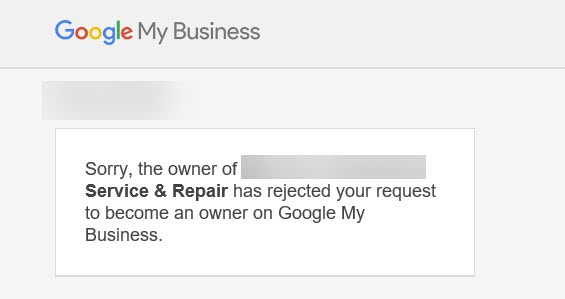
( 이미지 출처 : 5 Common Google My Business Problems & How to Resolve Them )
Don’t worry if you get rejected!
You can still propose to edit your profile and challenge the denial.
Open the original email you received when requesting access and click View Request or clickOK in the Deny Email.
Either of these two emails will take you to the next step in proving your affiliation with your business listing.
If you don’t receive a response, you can sign up for your profile directly by logging into your Google My Business dashboard.
Log in and find the Claim or Confirmbutton on your dashboard
What if a former employee writes a negative review about your business?
No one likes to get bad reviews.
Even worse, ex-employees write bad reviews about the company.
This is in violation of the conflicts of interest guidelines in Google’s User Provided Content Policy.
.
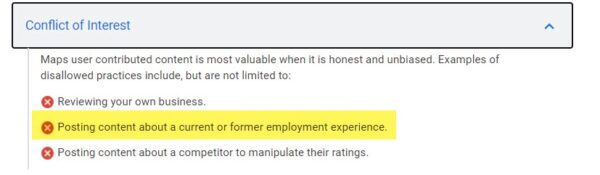
( 이미지 출처 : 5 Common Google My Business Problems & How to Resolve Them )
solution
You will see an option to mark the review as inappropriate.
If your review has not been removed, you can contact Google My Business support.
As a business owner, you must prove that that person has worked for you.
However, Google does not accept your personal information, such as HR documents, work records, copies of ID badges, etc.
You must be able to provide Google with public, social proof that that person has ever worked for you.
Occasionally, if a Google My Business Post post receives a negative review from an employee, you can log into the GMB dashboard to display the review, click on the review and click the three dots to the right.

( 이미지 출처 : 5 Common Google My Business Problems & How to Resolve Them )
When contacting GMB support, provide a link to the GMB dashboard and the reviewer’s name.
Explain that they have ever worked for you and provide public proof screenshots of this.
You can use LinkedIn profile screenshots that show you worked for the company, or social media posts that mention hiring or firing.
Here’s a list of spam and fake competitors dominating your search results. What should I do?
For search engine optimization (SEO) practitioners, the word “spam” has a negative connotation. And GMB spam is no different.
Whether it’s a complete bogus business listing or a keyword-filled business name, this type of rule breaker can harm a lot of people, both searchers and other local businesses.
solution
However, there are ways to combat GMB spam.
Sometimes it’s as easy as suggesting a fix.
For example, if you see a business with keywords filling in the business name, you can remove additional keywords by clicking the Suggest an editlink and editing the business name.
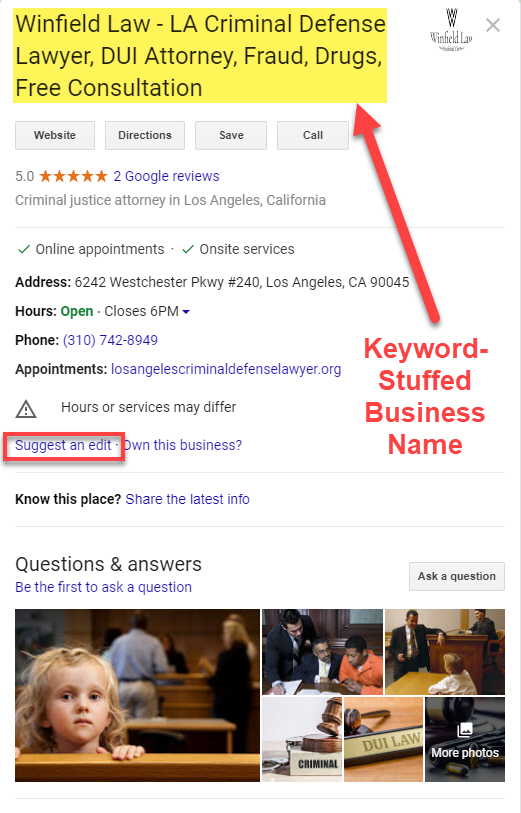
( 이미지 출처 : 5 Common Google My Business Problems & How to Resolve Them )
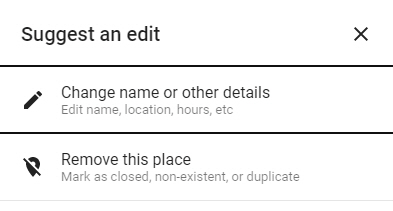
( 이미지 출처 : 5 Common Google My Business Problems & How to Resolve Them )
If you make a suggested correction to the name, address, time, or other section of the GMB listing, we will review your suggestion.
In some cases, changes take effect almost immediately, but it may take some time.
And, unfortunately, sometimes even legally proposed changes may not be made by Google at all.
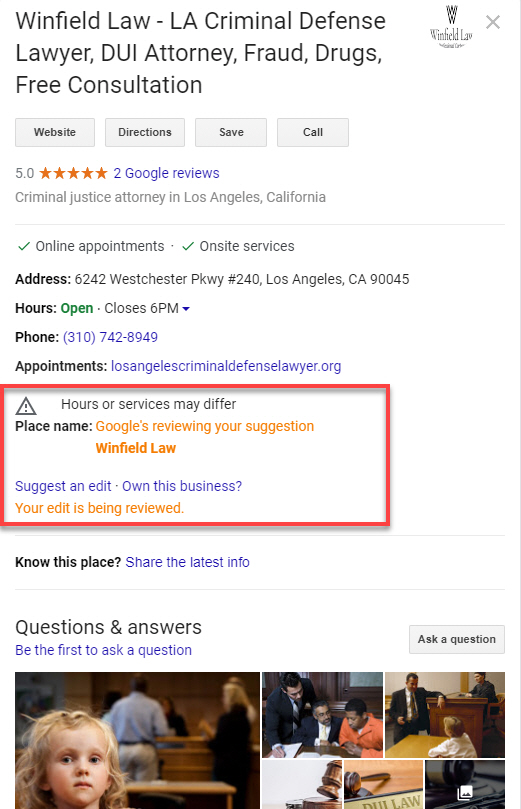
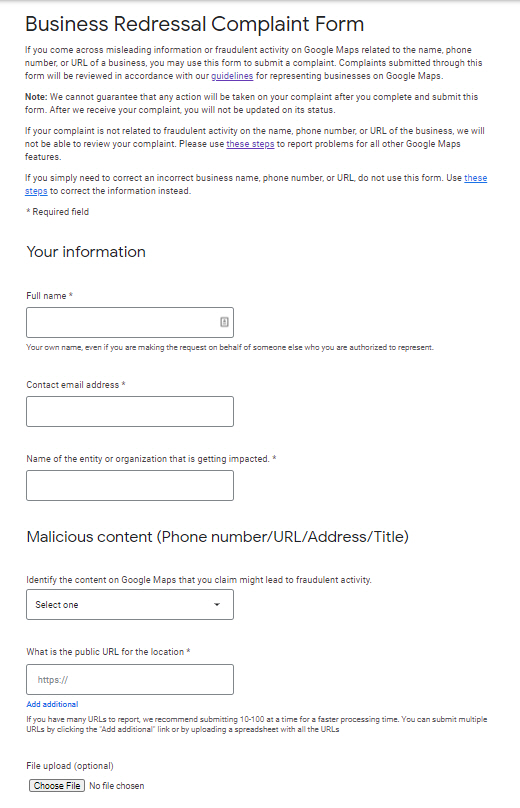
If the proposed changes did not take effect, or if your business is blatantly in violation of the rules, you must fill out a correction form.
Examples of blatant rule violations are if you display your home address on your GMB profile, or if you are an unnecessary lead-generating company or an online-only business.
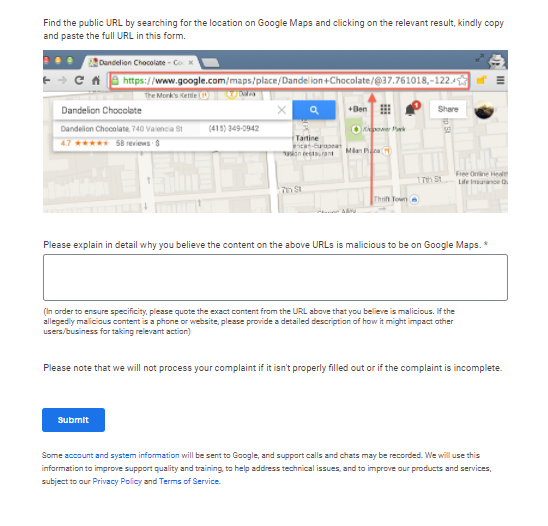
The amendment form is a much more formal “Complaint” form and requires additional information about the violation and the business affected.
When you fill out the Redressal form, you can also upload files and images to help you get a backup and explain why in the attachments below.
- screenshot.
- Photos
- Private investigator reports
- Audio files
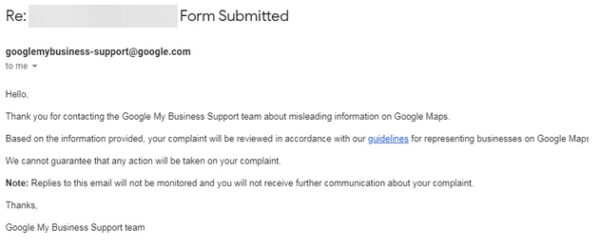
After submitting the edit form, you will receive an email stating that Google has received the form.
Each remediation form has a unique case number.
It is a good idea to keep track of the case number for your records and record which business you have reported in that case number.
It usually takes about 2 weeks for Google to act on a redaction form/spam.
Your Google My Business post has been rejected. is there any solution
Occasionally, Google My Business Posts will be rejected.
When a post is rejected, a red “Rejected” notification is displayed.
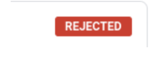
( 이미지 출처 : 5 Common Google My Business Problems & How to Resolve Them )
solution
In general, posts will be rejected because of the content or photos/images being used, or if your business falls into a “sensitive” subject area.
Words within a post can sometimes cause a post to be rejected.
A word may look harmless, but it may be on Google’s list of “aggressive” words.
If your post is rejected, please change the wording to more general body text and change or remove sensitive words or images.
It is also permitted to include a phone number or website URL in the body of a post. Google currently rejects many posts with phone numbers or URLs. So if your post is rejected, remove that element.
I can’t write a post because there is no post box in the left menu in Google My Business. is there any solution
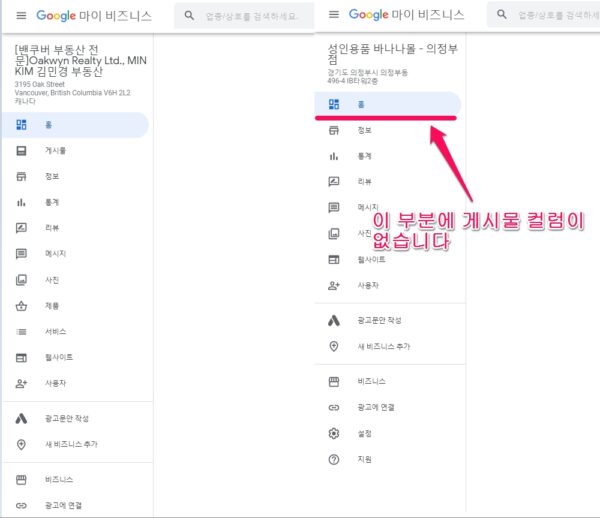
solution
Try changing the default category.
Sometimes, the website (homepage or shopping mall) in the information section is in violation of the policy and the post column is blocked. In this case, please change the website or enter the address of the signage website provided by GMB.
Where can I find GMB-related questions and solutions that are not addressed in the FAQ here?
solution
If you have questions about Google My Business, one of the best places to go is the Google My Business help forum ( https://support.google.com/business/community?hl=en ). Korean is not supported. You have to search in English.
Hosted by volunteers, this forum is a great place to get answers to your GMB questions for people with years of experience working with Google My Business.
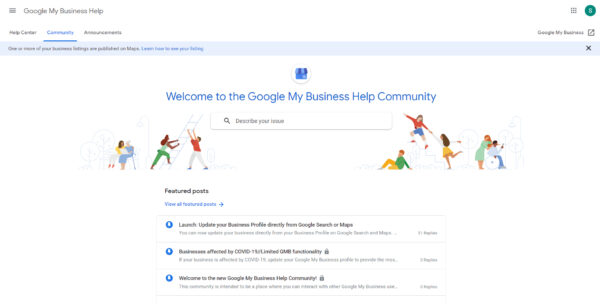
How to solve when Google’s automatic location setting doesn’t know local search results in a specific area?
solution
Enter the name of the region along with the search term.
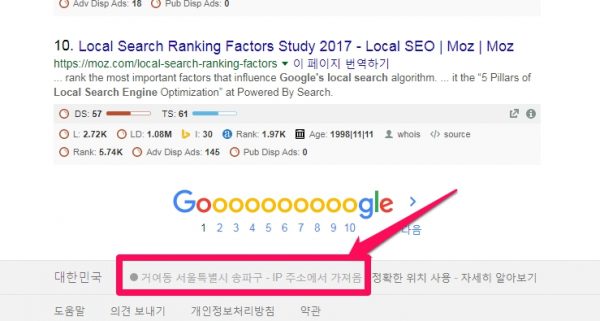

Automatically reflects the searcher’s location when performing a Google Local Search. If you look at the bottom part of the search bar, you can see that the location is displayed as shown in the image. By the way, if you want to see Google Local Search results in Hanam, not Geoyeo-dong, Songpa-gu, Seoul, enter “search term + location (administrative district name)” in the search box.
If I can’t comment on a customer’s review, how can I fix it?
solution
If you’re transferring ownership or claiming someone else’s ownership, you won’t be able to comment on reviews. If you are transferring ownership, ask the recipient to accept the invitation. A certain amount of time has to pass when another person claims the ownership, and we do not know that certain amount of time at this time.
I want to delete or change inappropriate photos. How can I solve this?
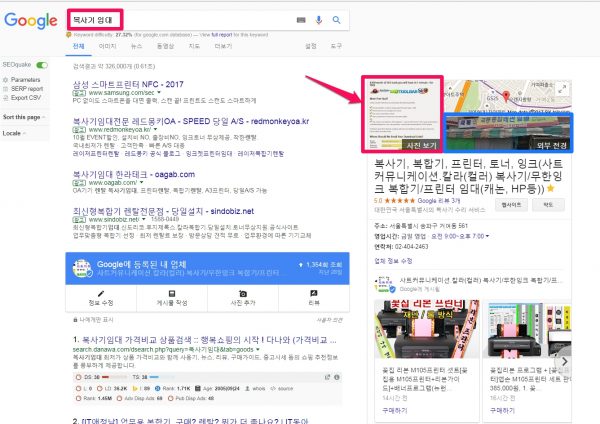
It is really satisfying to see the business under management (as a Google knowledge card) appear in the upper right corner on the Google Local Searches result page, and the image in the photo view (pink arrow and square) shows the industry and There may be cases where irrelevant photos appear, which greatly reduces the effectiveness of advertisements.
solution
This problem was previously corrected on the Google Plus page, but as of 21.10.28, it can be easily corrected. In Google My Business, select [Photo] -> [ID]from the menu on the left, and insert your company logo, external photo, or a photo you want to include as a representative photo. Here, ID means identification, that is, the cover image.
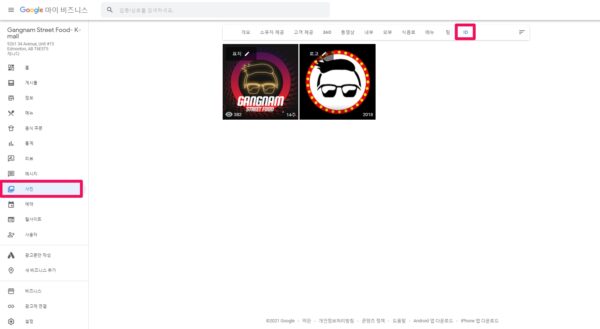
6. SEO tip (Advice on search engine optimization)
A. It is important to take the lead.
If there is no competitor within 8km, be sure to get first. A lookup on your smartphone will show you the distance from your current location to a local information provider, so watch this indicator to see how competitive you are and be sure to dominate.
1) Sorting criteria for local information
The sort criteria are relevance and distance, and the default is relevance. All locations within the distance are within 805m, within 1.6km, within 8km, and within 32.2km, but within 8km is the default. If it is not within 805m, it searches within 1.6km. If the business hours are all, currently open, but all of them are not business hours by default, they are displayed as non-business hours.
2) If the location of the business, such as a large commercial building or building, is good, search engine optimization (SEO, top impression) is more effective than web site optimization (top exposure).
The sample below is A company that has moved into Kolon Science Valley ( Kolon Science Valley 2nd, 55 Digital-ro 34-gil , Guro-gu, Seoul ), a building with apartment-type factories and shopping malls Google Local Searches results Data confirmed by Google My Business (GMB) statistics. It has 1,790 views per month. In my personal opinion, it’s a very meaningful SEO tool. For example, if you are a certified brokerage business, there is no such thing as an online marketing tool. Of course, this is a meaningful result for other loacal shops as well. 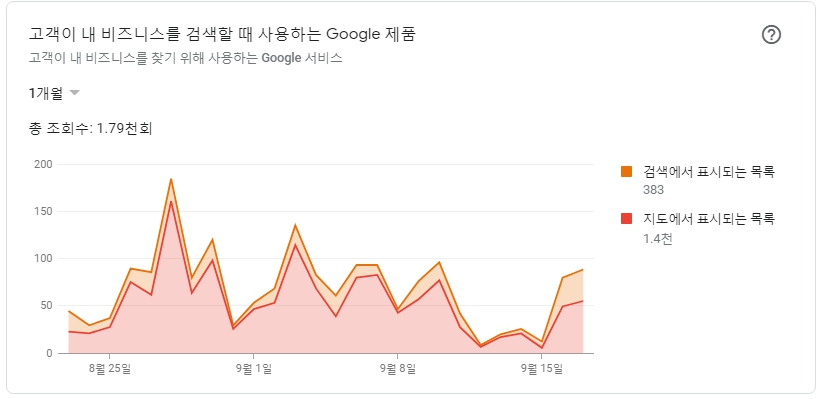
B. It should be in the top three.
As I heard above, in early August 2015, the Google Local Search display format What was typically showing 7 local results (“Pack of 7”) based on location and search query Only 3 local results were shown. way (“3 pack” or ” Snack Pack ”), so searchers have the option to click to get more results, but this extra step could negatively impact local businesses ranked 4-7. So it should be in the top three. As many businesses have already been registered in Google local search results, there is a way to advertise paid ads for industries that are difficult to be exposed in the top 3 with free registration. However, regional targeting of paid advertisements is based on ‘city’. In the five major cities such as Seoul Metropolitan City, the area is too large and the cost of paid advertising is high, so consider the cost-effectiveness of paid advertising in the five major cities.
구글 애드워즈 익스프레스(Google AdWords Express)
C. Use Software Solutions for Local Rank Checking
[Conclusion of Local SEO tool becoming a Korean service]Even though it’s a great post, t he tool that provides Korean and Korean service seems to be about LocalFalcon. I’m not on the list for this post The conclusion is that you will be able to get the Korean GMB SEO Report from Nightwatch.io and from LocalFalcon. |
59 Experts Reveal Best Local SEO Tools for 2020 (With Leaderboard)
The pros and cons of each solution are very well laid out.
Just keep in mind that the solution chosen by 59 experts has a search console and schema. Search Console is a great rank tracker. very important.
Nightwatch.io : It can also be tracked on YouTube, so it is suitable for sat communication.
Pricing starts at $39 per month (monthly) or $24 per month (yearly). Excellent for accurate local tracking, including listings on GMB maps. https://marketingarsenal.io/serp-tracking-tools/
Accurately track the rankings of regions and map packs around the world. https://nightwatch.io/ahrefs-rank-tracker-alternative
Track your rankings on Google, Bing, DuckDuckGo and YouTube.
The service provided as well as the price is pretty good
Starter
For freelancers, SMBs and marketers with limited budget.
$24
month billed
annually
500 Daily Keywords Tracked
50 Websites Tracked
5,000 Site Audit Pages
Google Analytics Integration
Track Google, YouTube and Bing
Best Local SEO Tools (Final Leaderboard)
BrightLocal wins overall among our pros, with SEMrush and Ahrefs tied for second place.
Here is a list of the best local SEO tools (by votes):
#1. BrightLocal (24 votes) [ 14-day free trial ] : Good, but no Korean service. pass.
# 2. SEMrush [ 30-day free trial] and Ahrefs (12 votes) :
# 2-1 SEMrush(Pro) : Paid solution $119.95 per month ~. There is also a Korean site ( https://en.semrush.com/ ), but the locals are only the US, Austria, Germany, France and UK. pass.
#2-2 Ahrefs : Paid solution. From $99/month. Korean website tracking is good, and tracking is sophisticated down to the postal code level, but it is crucially Ahrefsis not particularly a local search engine optimization tool.
- Track Google “3 Pack” Ranking cannot be tracked.( https://ahrefs.canny.io/rank-tracker/p/track-google-3-pack-ranking )
- Patrick Cookman May 9, 2021
I can’t believe they haven’t added this feature yet. We also want the local pack to be recognized as a SERP feature in other areas of Ahrefs, such as filters in Organic Keywords 2.0. - Jeremy Ashburn April 2, 2021
We need this feature ASAP!
# 3. Whitespark (9 votes) : Korea is not. pass. US, Canada, UK, Australia, Brazil, New Zealand, Germany, France, Italy, Netherlands and Spain only.
# 4. GatherUp(8 votes): I inquired through messenger whether the service was available in Korea. Probably not.
# 5. Yext (7 votes): Not an SEO tool. The level of managing local listings to ensure that NAP details, citations, reviews, and feedback are accurate wherever they are counted.
# 6. Moz Local and Search Console (6 votes)
# 6-1 MOZ (https://moz.com/products/local/pricing#pricing-table LITE $129/year ~ Moz Local currently supports purchasing management for US, UK and Canadian business listings. Korea is not supported.) etc. seem good, but Moz does not provide Korean service, so pass.
#6-2 Google Search Console is the only answer in a situation where you cannot find a service for the Korean region.
You can use Google Search Console to.
- See which local queries are generating traffic.
- Find new potential local queries to target.
- Find out which keyword combinations and local modifiers work.
- Make sure local search keywords like service + location work.Find out which keyword combinations and local modifiers work.
- Review average rank position and CTR data to see which local pages can be optimized.
Kyle Douglas said: . . “In local SEO, the keywords customers want to rank are often the services they provide and the positions they perform. 항상 트래픽의 80 %를 유도하는 이러한 키워드의 변형이 있습니다. Search Console을 사용하면 어떤 유사 콘텐츠가 가장 효과적인지 확인하고 해당 키워드의 순위를 높이는 데 ‘두 배 감소’할 수 있습니다. “
# 7. LocalFalcon (5 votes): Local Falcon works in any language, anywhere in the world! To introduce… This guy seems to be serving Korea.
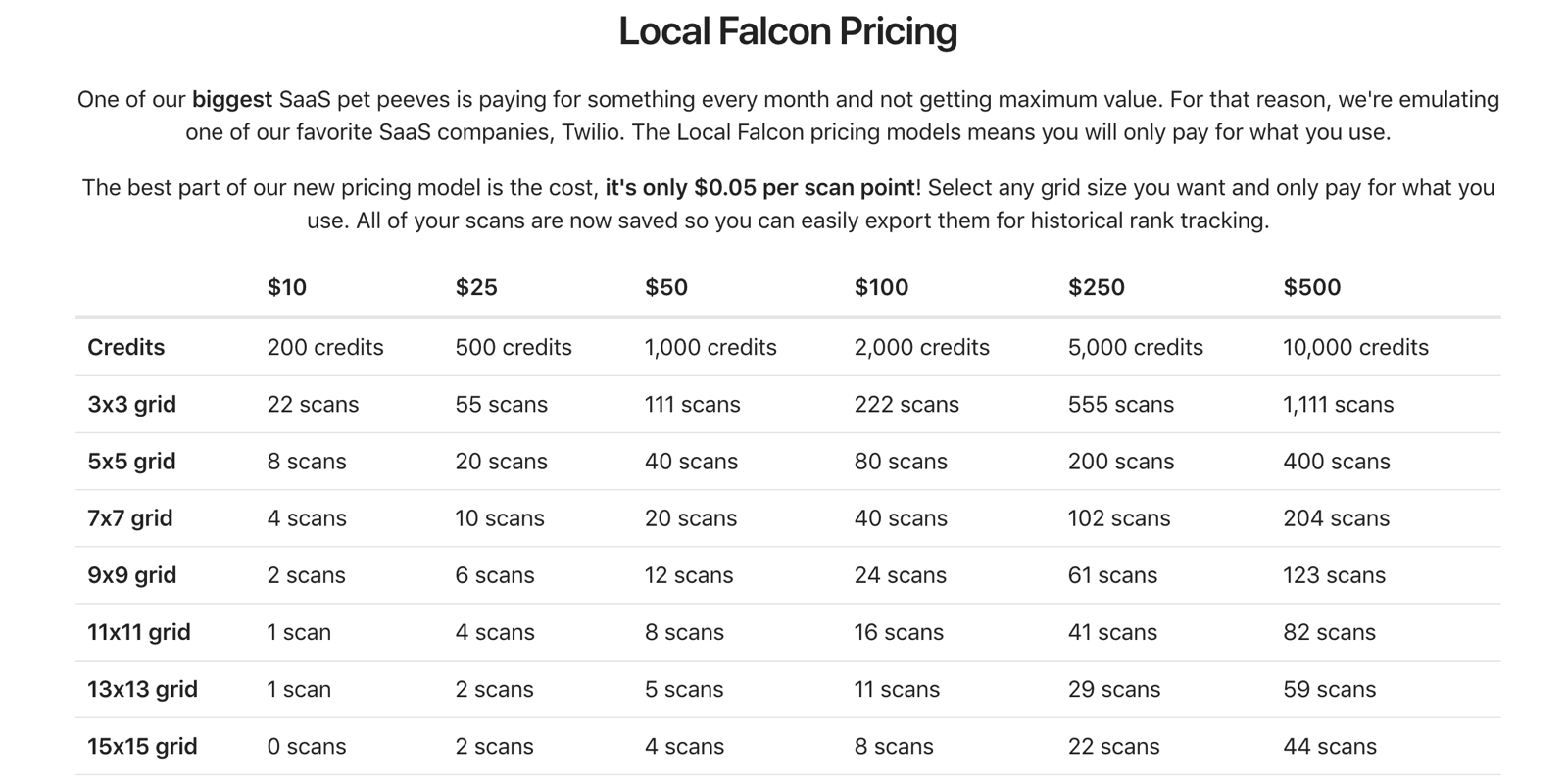
Local Falcon has different types of plans, so you only pay for what you use. For example, $10 buys 200 credits, which can be used for 22 scans of a 3×3 grid or 8 scans of a 5×5 grid, etc.
- Multi-point, accurate grid scanning
- Competitor reports to gain a competitive edge
- Trend report to review ranking data over time
- SoLV or Share of Local Voice, showing % of data point rank in 3-pack
- Auto Scan – Multiple scans can be scheduled with the click of a button.
- White Label Scan Report
# 8. JSON Schema Generator (4 votes): It is very noteworthy that the schema was voted the solution.
# 9. GeoImgr , SEO Powersuite and BrightEdge (3 votes): From this point on, even that post does not explain how to help local SEO. I don’t think we need to know more below.
# 10. PlacesScout , Mangools and Sitebulb (2 votes)
1) Google’s Ad Preview Tool( Google’s Ad Preview Tool ) : suggestion
What do Google search results pages look like for people living in London? By default, Google shows different search results depending on the user’s geographic location, language, etc. Therefore, the Google SERP that I see is different from the Google SERP that target customers overseas see. It’s unrealistic, but if you’re curious about what your target audience will see on Google, the surest way is to actually go to that country and do a search in that country’s language. The Google AdWords Ads Preview and Diagnostic Toolis a great way to view search results in another country without the hassle of moving to another country ( excerpt : Search Engine Optimization Diagnosis in 5 Minutes) Google AdWords Ad Preview and Diagnostic Tool( Google AdWords Preview ) Literally provides an ad preview feature, which allows you to filter by location, language, and device, so even those who don’t advertise can see how Google’s local search rankings are performing in a given area.
- Please set the location (search area) and language first.
- Enter a search term and press Enter and you’re done.
- Please use the device as an option.
- Audience: If you’re gathering audience parameters in advance, you can choose, but it doesn’t seem to have anything to do with Google Maps.
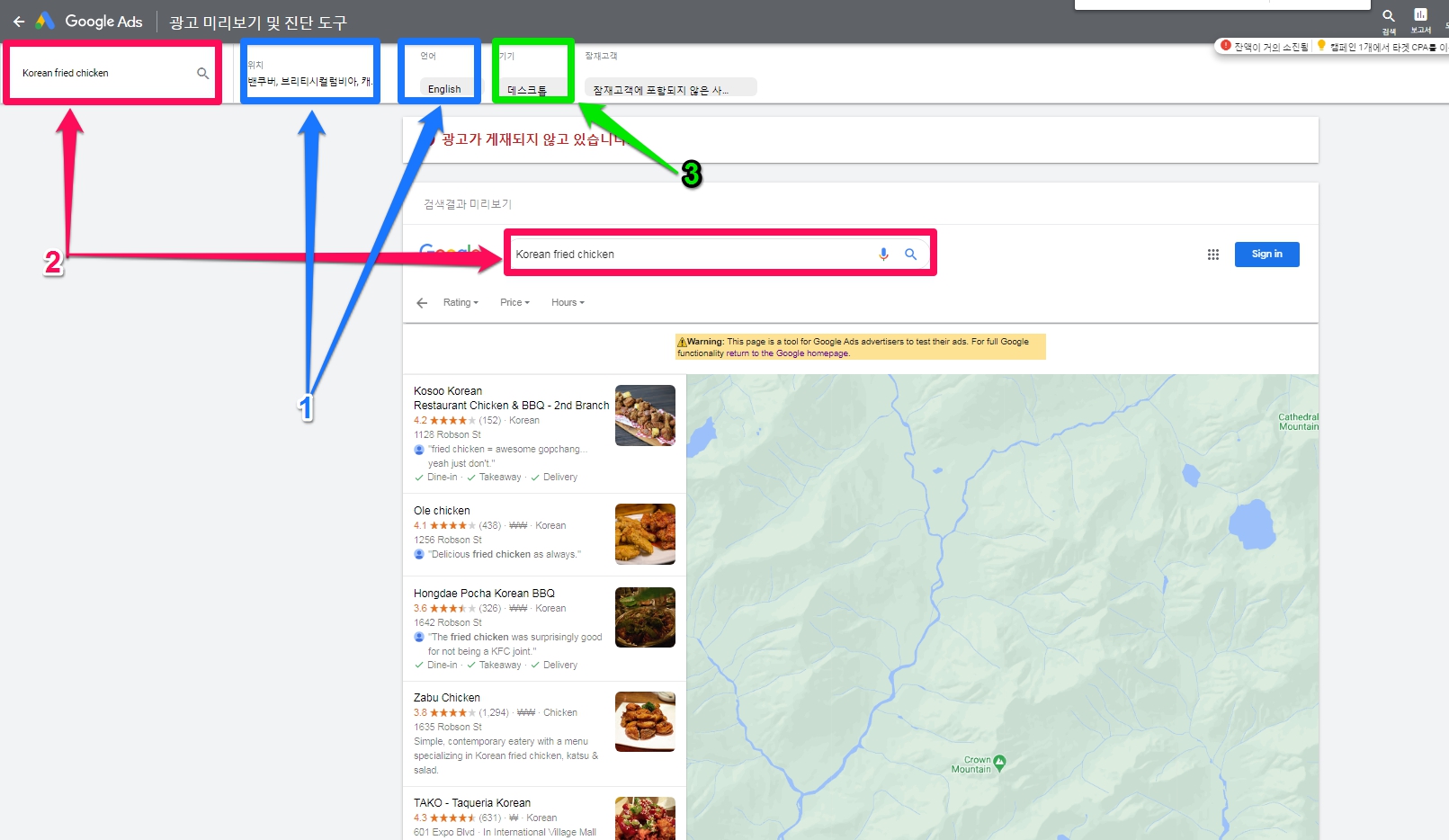 In the case of manually checking the search ranking at a specific point in time, which cannot be tracked to the history of search ranking changes in Google Maps for a specific keyword, it is easy and simple, and it is worth using.
2) BrightLocal( BrightLocal , suggestion)
The following Local Viking and prices fluctuate up and down, but in terms of features such as ranking tracking, BrightLocal is much better. Also, the report is very visual at different urls, so it’s intuitive, there is a download function, and it has been used to automatically submit reports to customers by e-mail. Very easy. BrightLocal can test the performance enough for 15 days, but Local Viking requires payment to see it.
The fatal weakness is that the service is not available in Korea.
Each service and the countries it serves
The contents received by e-mail inquiry are as follows. There are no plans for services to other countries as of 2021-06-21.
All Tools
All BrightLocal tools are available in the USA, the UK, Canada, and Australia.
Citation Builder
Citation Builder (our manual citation submission service) is available in the US, the UK, Canada, Australia, New Zealand, Singapore, the Netherlands (Holland), Germany, Ireland, and South Africa.
Citation Tracker
Citation Tracker currently covers the US, the UK, Canada, Australia, New Zealand, Ireland, Philippines, Macau, Taiwan, and Hong Kong.
Rank Checker & Local Search Grid
USA, UK, Canada, Australia, Ireland, and New Zealand.
price
For up to 6 listings, it is a minimum of 10,000 won to a maximum of 30,000 won per listing, and after 7, it is a minimum of 0.1 million won to a maximum of 160,000 won. 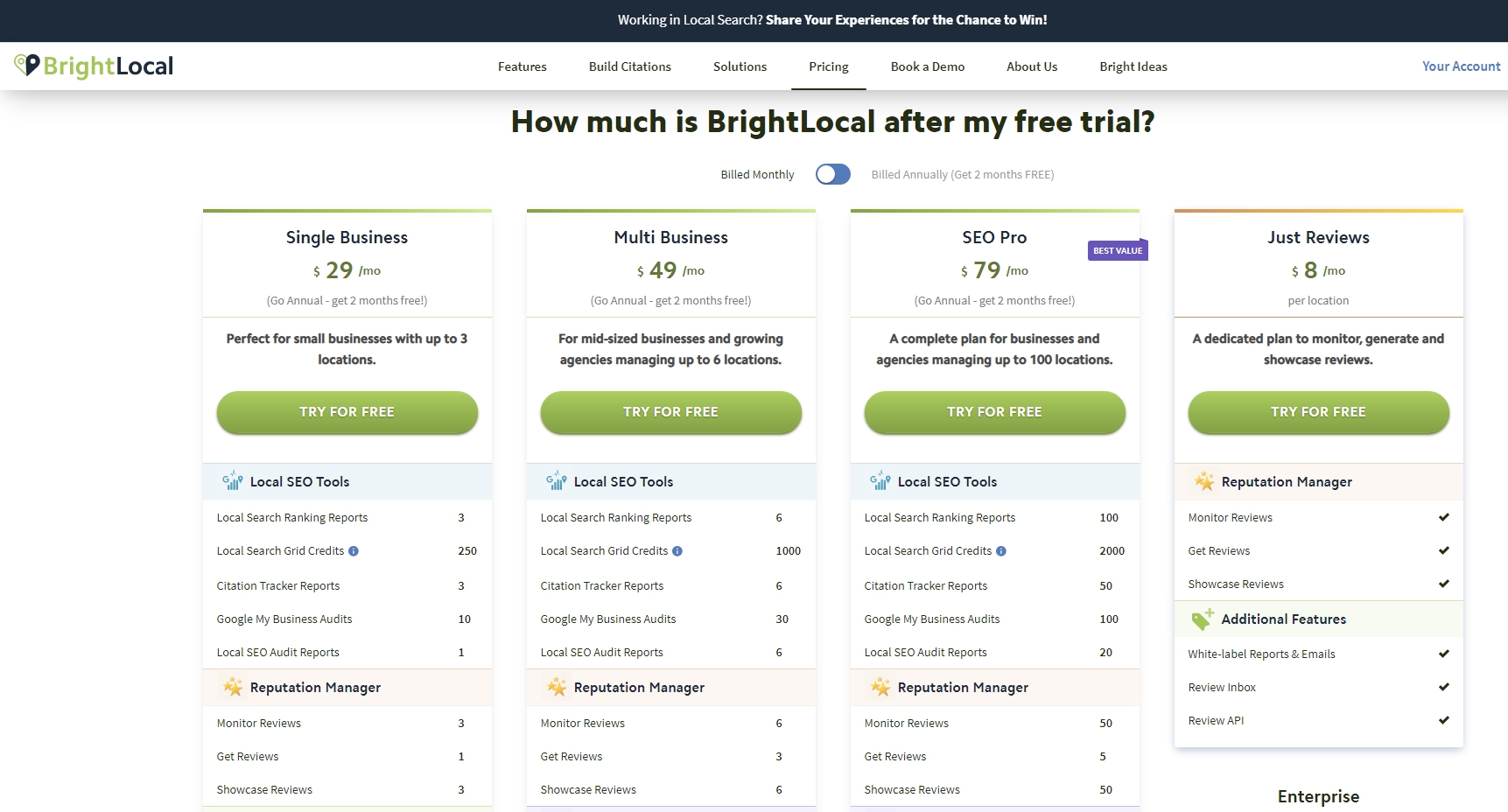
How to use (Help Center)
It got too long, so I’ve summarized it in the post below.
brightLocal(1)(개요, 서비스 가능국가, Getting Started 등) : 59명의 local 전문가가 뽑은 최고의 tool. 한국은 서비스 안됩니다.
3) Local Viking Rank Tracking( https://localviking.com/)
This solution was given to us by a representative who is collaborating with us in Canada, but if you do not pay, you cannot view the contents, so I did not investigate further. The ability to look up rankings is intuitive and excellent, so consider it next to brightLocal.
price 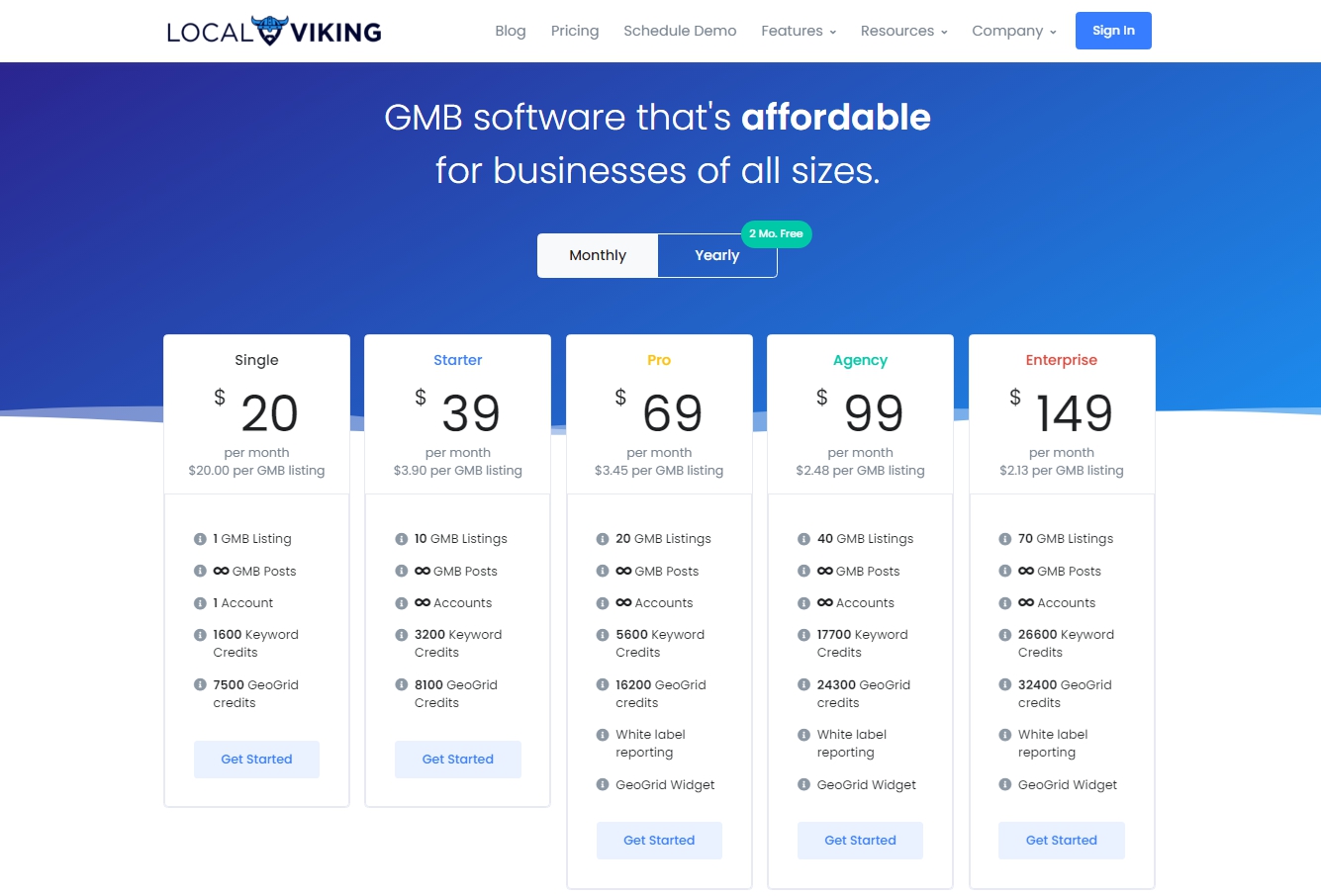
4) Rank Tracker Tool( Rank Tracker , pay)
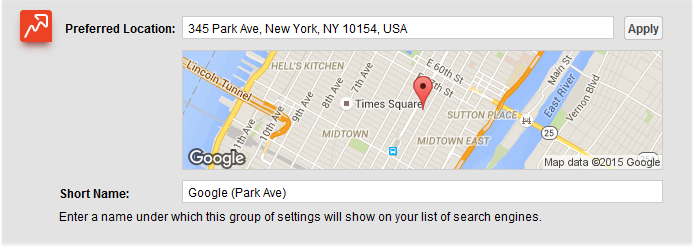 We’ve outlined it in detail in another post below. You can check the ranking by adding Google Maps to the search engine you want to search for ranking.
http://www.seenbuy.kr/seo-powersuite/
Google’s Ad Preview Tool( Google’s ad preview tool ) allows you to enter keywords and search them right away, but Rank Tracker adds keywords to the keyword list and updates the tool to view them.
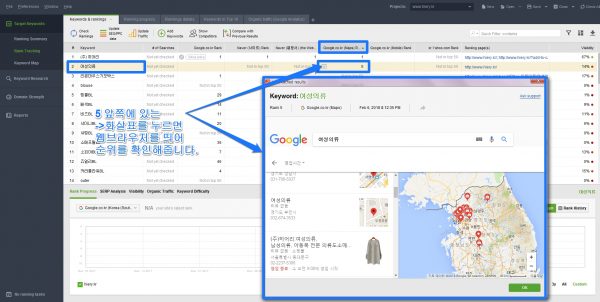
5) Advanced Web Ranking(Advanced web ranking, this is not a solution, but an advanced search method provided by Google. This is the search method suggested in trouble shooting above.)
According to Google Web Search Help Center as of May 13, 2021 To show results near other locations on Google, simply add the location to your search terms. Just like in Jongno-gu, if you combine a location (region name) and a search term, the search results from that location are displayed. 
6) Search Google by Location Bookmarklet
 Chris Desrochers has created a bookmarklet ( bookmarklet ) was created. It’s easy to install and works well even in Google Chrome’s incognito mode (where search results don’t show up with your personal search settings). http://marklets.com/Search%20Google%20By%20Location.aspx If you move to , drag the pink part and paste it to an appropriate place among the bookmarks, the installation is complete. If you click this bookmark, you will enter the search term and then enter the area to see the search results. 5) Use Advanced Web Ranking when searching domestically, and it would be good to use this solution when searching abroad.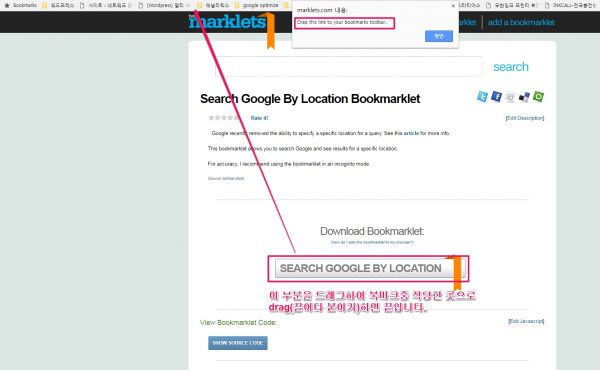
5) WhiteSpark’s Local Rank Tracker(pay)
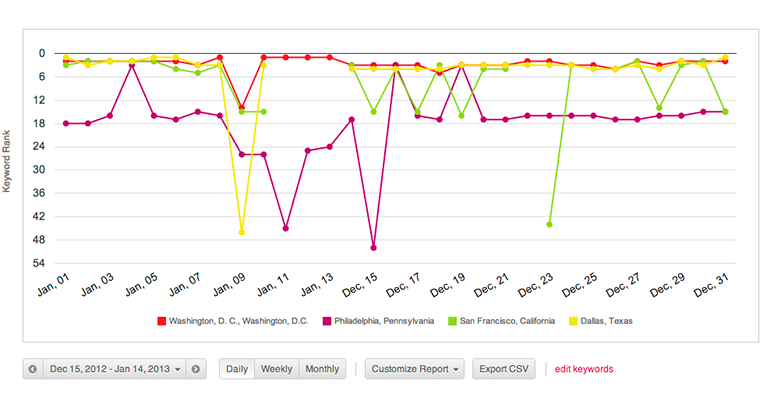 Even after Google removed the filter WhiteSpark ‘s tools reflect the searcher’s desired location. Because they position the search to the target city and fall back to the near parameter when all else fails, they can provide great local data for a specific region. You can track local rankings at the link below and there is a fee. https://whitespark.ca/local-rank-tracker/
6) Moz Rank Tracker( Moz , pay)

( image source : 17 Ways to Get Localized Search Results After Google Killed its Location Setting )
Great solution, but only available during the free period. Just an introduction. Moz uses location targeting to report keyword rankings by location. According to their product manager, Moz’s ranking feature is after google update I’ve been through “temporary problem” The problem was then resolved.
8) I Search From
( image source : 17 Ways to Get Localized Search Results After Google Killed its Location Setting )
This is basically a browser-based version of the feature that Google has removed. I Search From Now the search tool is a record so you can see more examples of it. Like the other tools on this list, I Search From uses a “uule” parameter to provide fairly accurate local results.
9) SearchStation ( http://www.searchstation.net/ )
 SearchStation rightly points out that removing your location settings from Google may result in slightly different results when adding keywords in SearchStation. But Google’s update itself hasn’t changed anything for users, and once you set your location, SearchStation’s program is said to provide more accurate local search ranking reporting than ever before.
10) AccuRanker
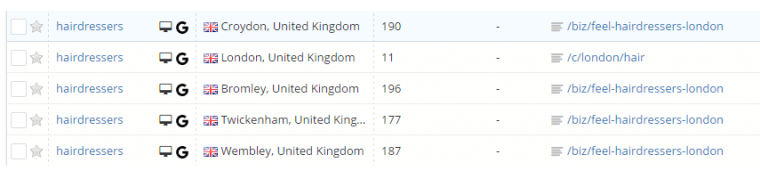 Designed for both Google and Bing, AccuRanker parameters ensure localized reporting in specific cities. AccuRanker says their geolocation results are not affected by Google Updates.
11) Places Scout
 The workaround for Places ScoutNow displays the desired location setting at the bottom of the SERP page. The software allows you to check the ranking of keywords with and without a geospatial tool, view ranking and lead reports, and change Google location settings.
12) Geolocator
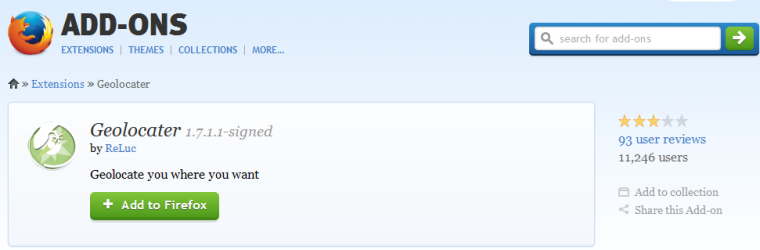 Add-on for Firefox Geolocator can edit default geolocation. However, reviews of this tool are mixed, and many users have said that even before the December update, this addon ( Geolocator ) is considered to be a serious problem. This tool is not recommended.
13) Location Guard
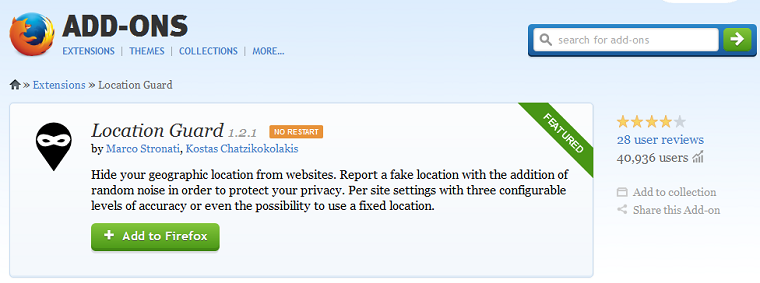 This Addon for Firefox ( Location Guard ) is strangely included, Geolocation feature included. This is actually a privacy tool designed for Firefox, but one of its features allows you to pick a pinned location on the map and use that location as a search location. References: 1. Google’s 200 Ranking Factors: The Complete List 2. Google My Business information 3. Get Your Business To 100% In Google My Business 4. The New Google Local Search Display 5. 17 Ways to Get Localized Search Results After Google Killed its Location Setting 6. Search Engine Optimization Diagnosis in 5 Minutes
References: 1. Service Areas and Hybrid Businesses
2. How to Fix Common Service Area Business Issues in Google My Business
3. 5 Common Google My Business Problems & How to Resolve Them