인터넷은 우리에게 자유를 주었습니다. 저희는 자유를 얻기 위해 지식을 통합하고 체계화하고 공유합니다. 랜선 위 정글에서 살아남기 위해 저희는 시키는 일만 하는 꿀벌 대신 고객을 위해 창조하고 혁신하는 게릴라가 되겠습니다. Seenbuy.kr is now Aiforu.kr.
[Recommended] Google My Business (Google My Business, GMB) ) performance measurement of search engine optimization (top impression): Measurement method through Google Analytics and Google Search Console (the reason why the franchise headquarters should use Google Maps)
Google MyBusiness listings are essential for many small local businesses. Not only will your listing be prominently displayed for business name or brand searches, but it will also appear in so-called “localpacks”, local search results (the three local listings at the top of page 1 in organic searches) and Google Maps. Especially on mobile devices, this local pack will have a very prominent position and further lower other organic search results.In a competitive niche, it’s easier to rank in local search results (MyBusiness listings) than in ‘normal’ general organic search (portal searches) results. (It takes a lot of effort to be exposed on page 1 of search results through organic search, but it is relatively easy to appear on page 1 of organic search by being in the top 3 of local searches. )
We are one of the few Google My Business registration agencies in Korea. Our strengths are the basics of registration agency and search engine optimization (higher exposure to search engines, SEO).
So, I researched a method of measuring performance before and after search engine optimization.
Summary
The performance measurement method is 1. How to do it in Google My Business (GMB Dashboard > Stats) 2. Tracking Google MyBusiness users in Google Analytics and Google Search Console: There are two ways to use the Google My Business referrer. We recommend ‘Checking MyBusiness Performance in Google Search Console’ at the bottom. Please take a look.
1. How to do it in Google My Business (GMB Dashboard > Statistics)
As always, Google seems easy and difficult, but once you know it, it is easy.
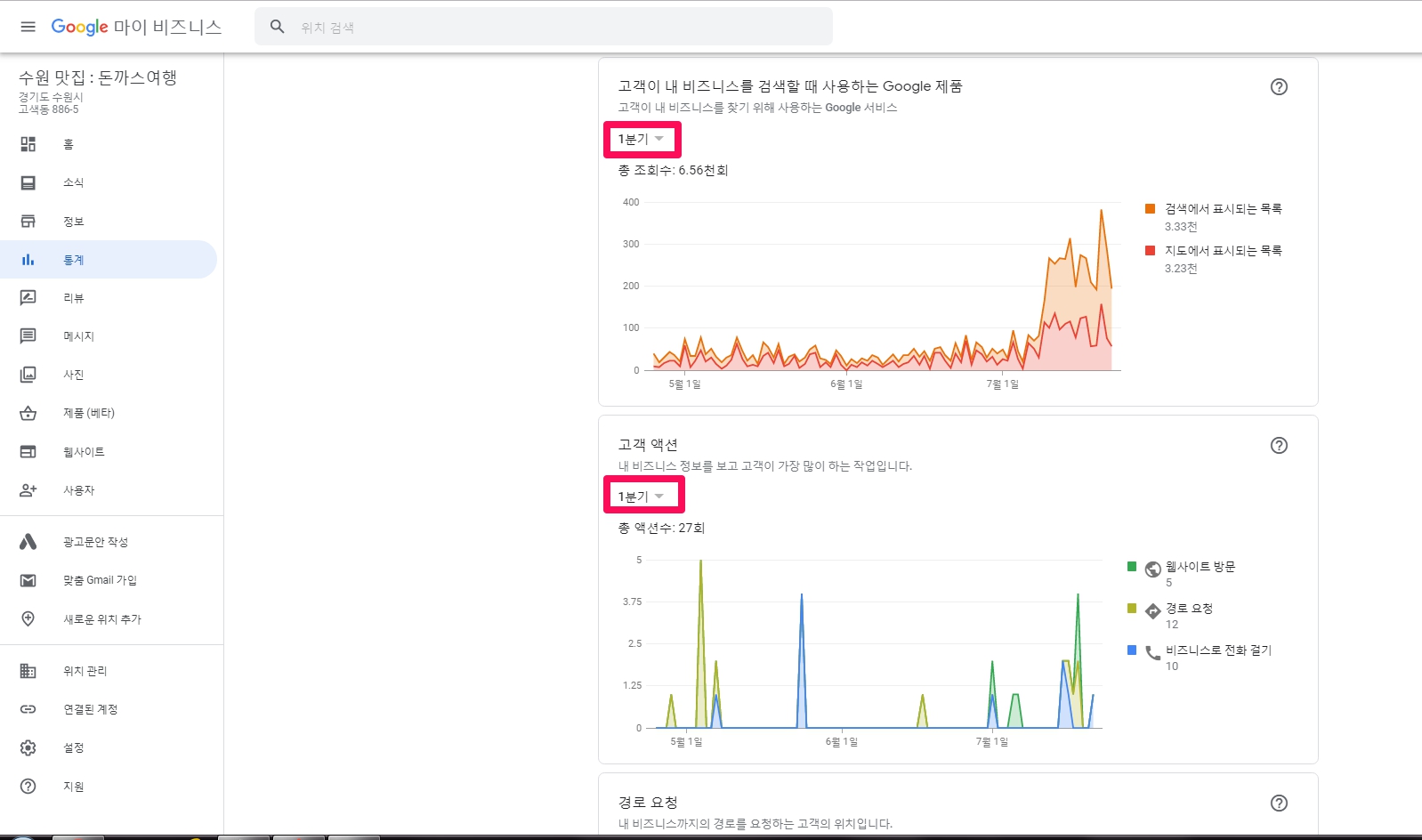
If you look at the dashboard of Google My Business (GMB), there is [Insight Statistics].
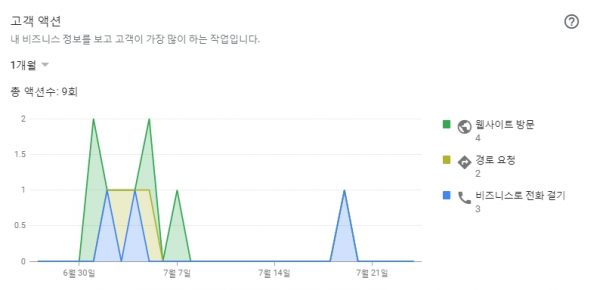
‘How customers search for your business, search terms used to find your business, Google products that customers use when searching for your business, customer actions, etc.’ You can set the search period by dividing it into 1 quarter. You can measure performance by changing this to 1 week/1 month/1 quarter and looking at it. In particular, ‘Google products and customer actions that customers use when searching for your business’ are displayed in a chart so you can understand them intuitively.
The downside is that you can’t see data prior to the most recent Q1.
2. Tracking Google MyBusiness users in Google Analytics and Google Search Console: How to use the Google My Business referrer
Using the UTM parameters below is a very good tracking method. But This analysis method is available only when you have your own website and select [Website (visit)] among the call to actions such as [Route Request], [Call], and [Website (Visit)] in Google My Business. You can track insights (analysis results) into your search experience. (Note: The statistics page provided by Google My Business = insight page cannot be directly tracked. There is no way to verify site ownership through an ownership verification code or tracking code, so tracking is not possible. )
Although the most important contact data, such as addresses, phone numbers or business hours, are already displayed directly on Google, most users click the ‘Website’ button to get more detailed information about their business and services on the website.
The Google MyBusiness dashboard (backend) has several reports showing impressions (how often your business information is displayed), phone number clicks, directions button or website button and other data.
On the other hand, in Google Analytics,users using Google My Business are classified as organic by default. How many users actually came to the website displayed in google my business through local search results (MyBusiness listing) and that website It’s impossible to figure out how to use (what pages were viewed, how many pages were viewed, what actions were taken…). However, you can easily solve the problem by adding a parameter to the URL.
UTM code generation
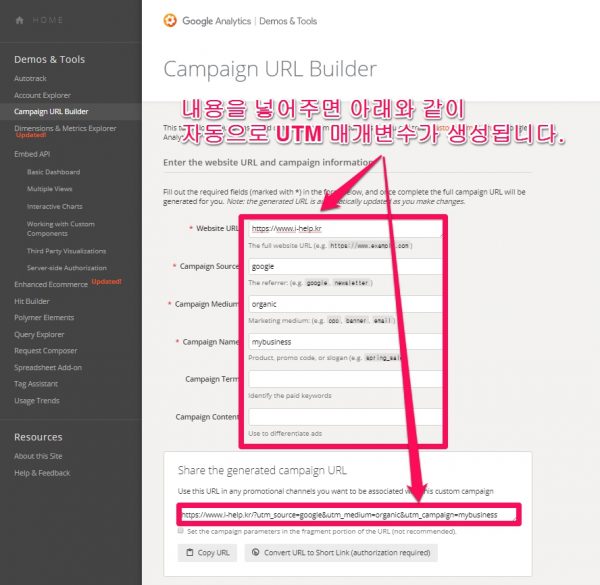
Generation of UTM codes (parameters) for Google My Business can be done through the following tools:
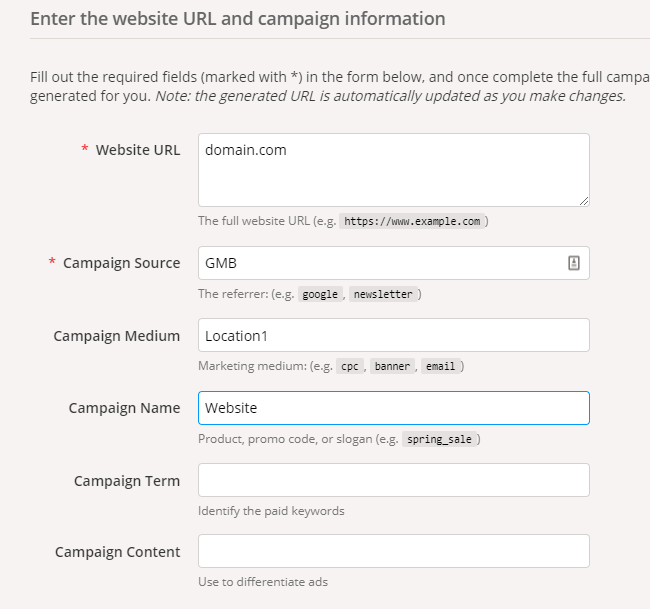
Campaign URL Builder, Google provides a very easy and simple tool. Add UTM parameters by entering the URL of your home page (or any other URL you want to add to your MyBusiness profile, such as a contact or service page) and entering additional information in the fields given.
utm_source : Shows which advertisers, sites, publications and more are sending traffic to your property (eg google, naver, daum, newsletter 4, billboard). Google MyBusiness (GMB, Google Local Information ) only comes from Google General (Organic) Search (Service Pack) and Map Search (Google Maps Search Finder), so you can set the source to “google”. However, if utm_source is google, it is displayed as organic and is indistinguishable from non-map organic search, so it is necessary to separate the inflow from Google organic search and GMB (service pack and Google Map Search Finder) It is recommended to mark it as utm_source=local or utm_source=gmb for (I personally display it as gmb.) (For reference, source and medium correspond to sources and media frequently seen in Google Analytics.)
utm_medium : Advertising medium or marketing medium (eg CPC, babber, e-mail, newletter, etc.). gmb comes from generic (natural organic), so we usually display it as organic. However, if you are operating multiple business sites and want to analyze each business separately, medium is used to distinguish each business place. In other words, if you enter utm_medium=seoul-branch for Seoul branch and utm_medium=busan-branch for Busan branch in each gmb website, you can differentiate and analyze them.
utm_campaign: You can enter your ad campaign name, slogan, promo code, etc. When not used for special purposes, please use “mybusiness” as this post is tracking Google my business (GMB). This can be useful when analyzing the website, reservation, and menu separately. (Also, according to Claire’s Guide to UTM Tagging, there is an opinion that you can track incoming calls by typing utm_campaign=gmb-phone , so try it out. )
Campaign Term : Identify the paid keywords
utm_content : Typically used to identify links within the same content or within the same ad. ( Use to differentiate ads ). utm_content can be useful if you have a list of many MyBusiness branches. In utm_medium mentioned above, you can do it here without setting branches like seoul-branch and busan-branch. Then you can get city or zip code analysis.
utm_term : Shows paid search keywords. If you are tagging yourself for paid keyword campaigns, you must specify keywords using utm_term. It is best to put it like “utm_term=”{query}”
Additional explanation: There are cases where utm_keyword is used instead of utm_term, but it is said that utm_term is better captured. And the reason I don’t use ‘utm_term={keyword}’ {keyword} only catches keywords used in advertisements, {query}whereas can track all the words even if a user searches for a word that I have not registered in the search ad. (How to clean up UTM using anger)utm_term={query}, utm_term={keyword} like {query}, {keyword}It seems that you can’t use the substituent itself like . {query}, {keyword}If you use a substitute like , “The link you entered is invalid.” Both Google Analytics and Google Search Console show search terms by themselves, so utm_term is a meaningless parameter in GMB performance analysis.
How to update URL with UTM parameters in Google My Business
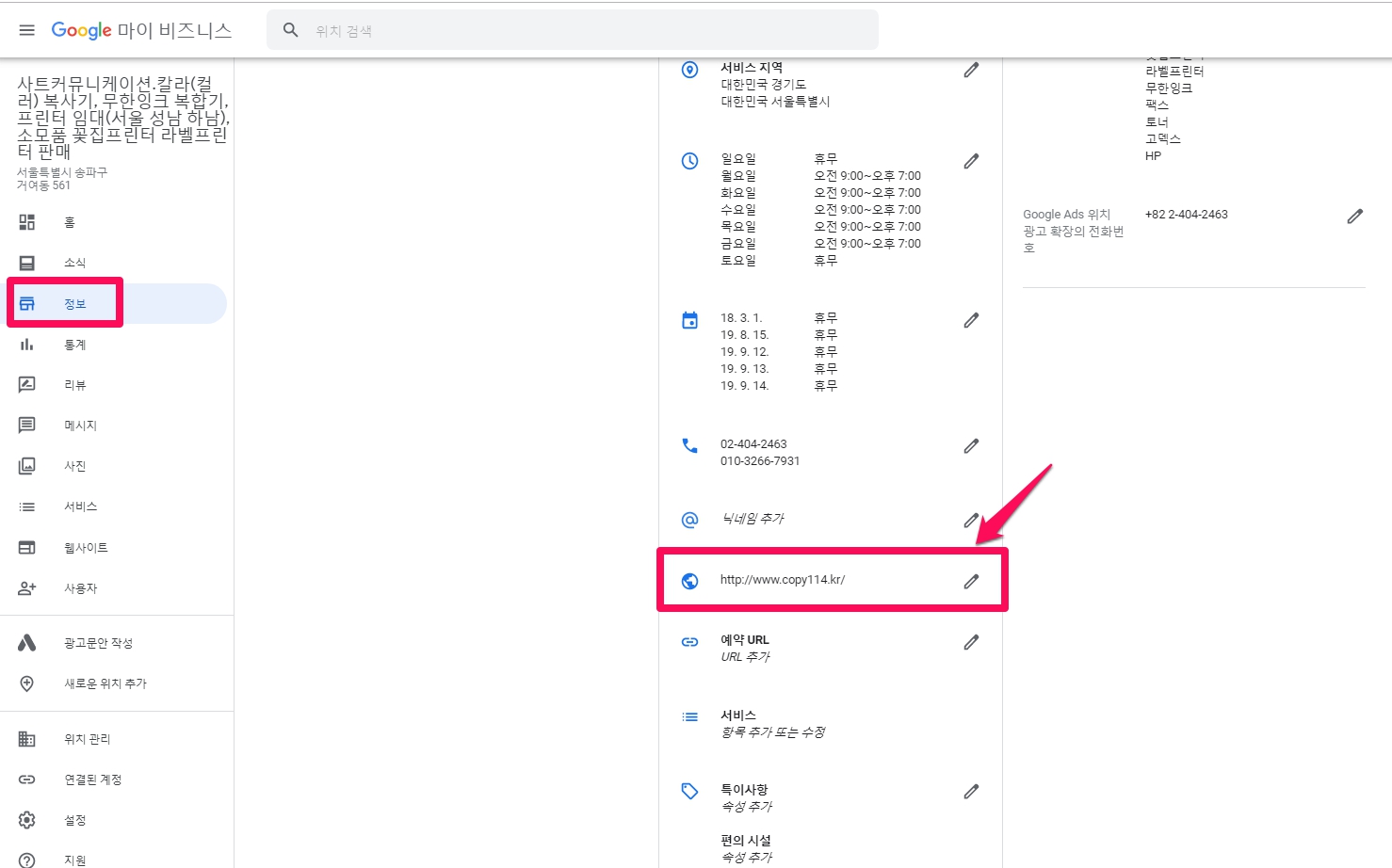
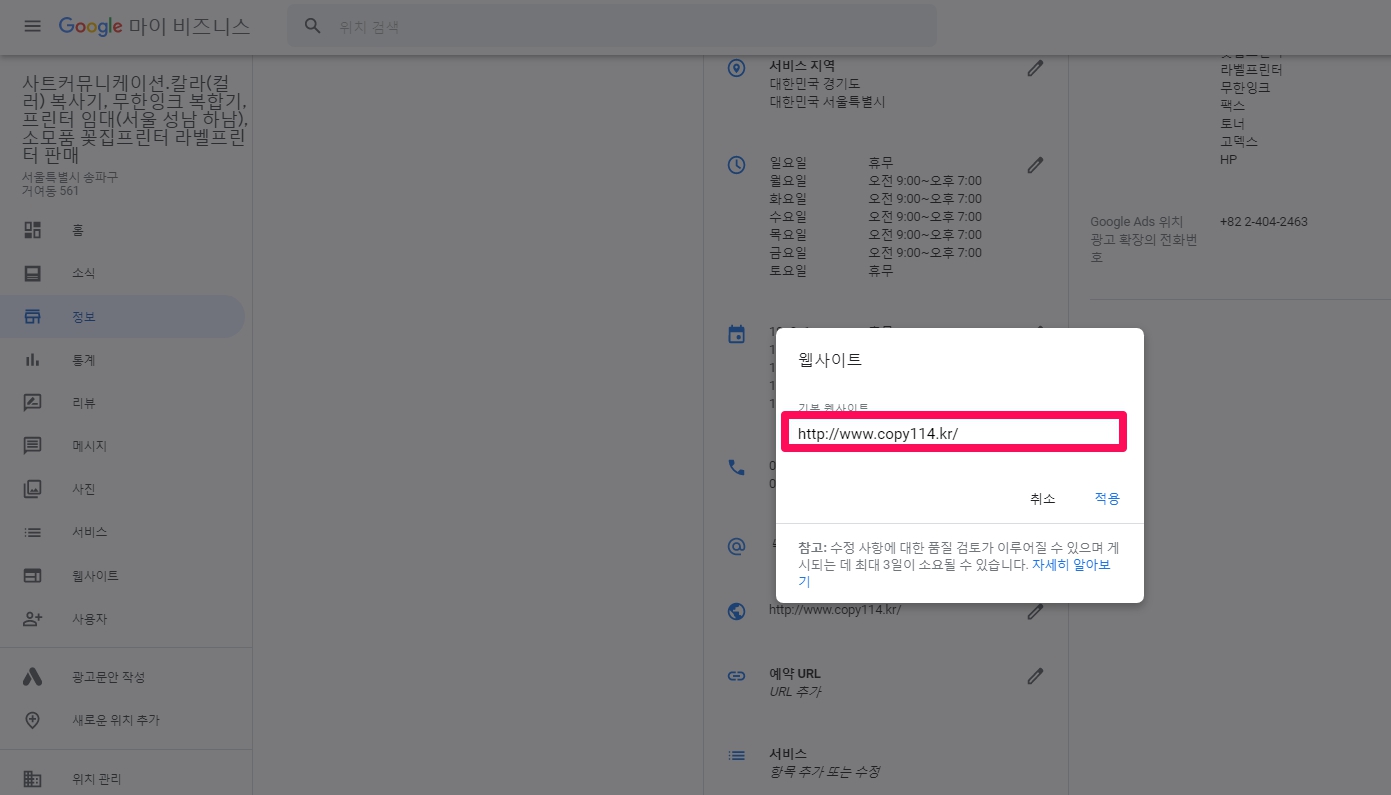
It’s time to add the new UTM string to the URL to add to the GMB list.
If you have added menu url, preview url, reservation url etc in addition to website url in GMB (middle url part of GMB > [About]), add this parameter to all your links!
How to test if Google Analytics is collecting traffic sources
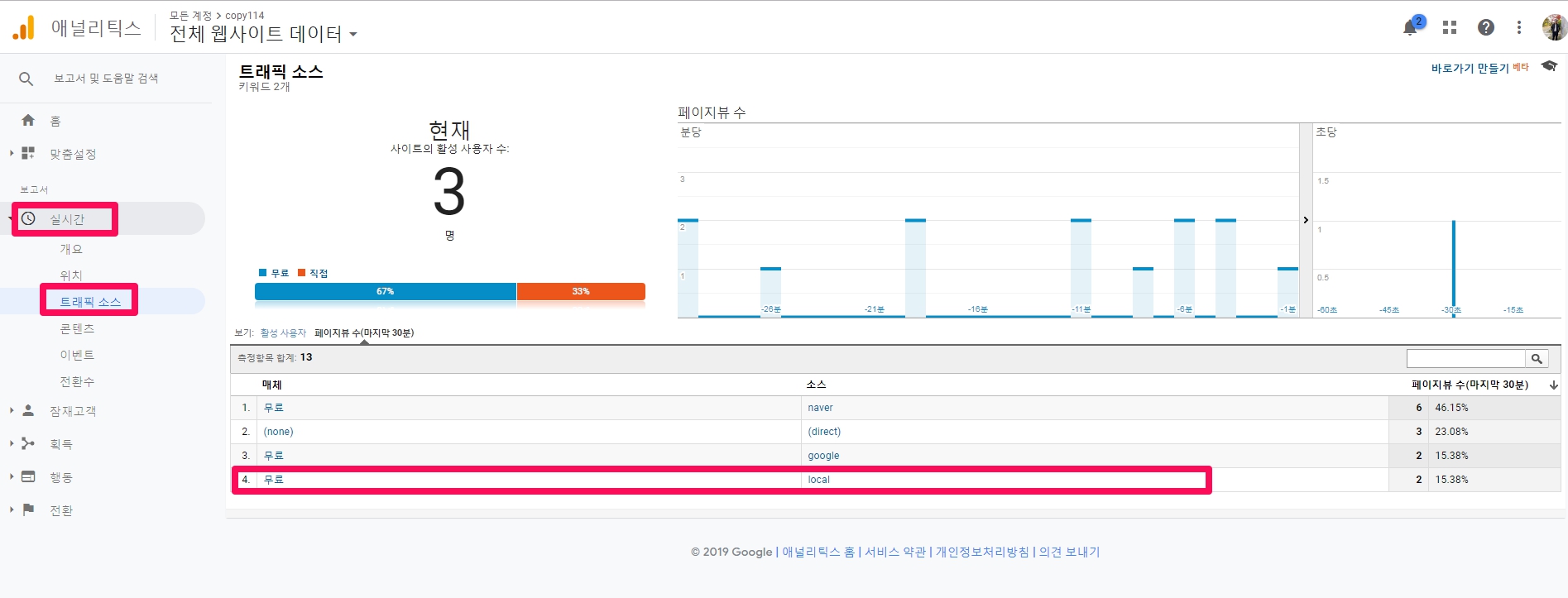
A live view is available in Google Analytics. This allows you to see the real-time traffic coming to your website.
You can check the traffic coming through Google Maps in Google Analytics [Real Time] -> [Traffic Source]. If utm_source is google, it is displayed as organic. When utm_source=local is set, it is displayed as local as shown in pink in the image above, and when it is displayed as utm_source=gmb, it is displayed as gmb. (It is displayed depending on what you set utm_source to. I personally display it as gmb.)
Creating UTM parameters and using Google Analytics makes it easier to work with. If you have a history of inflow (1 day has passed since you installed the UTM parameter), you can check the Analytics data in the path below.
Acquisition
Channel
source > local : in my case gmb
Campaign > GMB
It can also make things a lot easier.
You can go ahead and set up custom segments to compare this traffic channel to other channels.
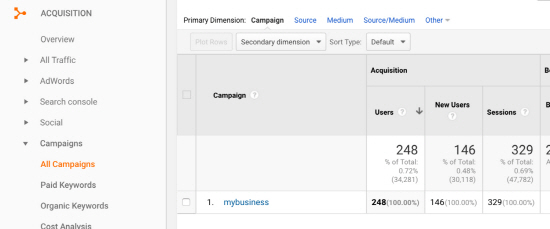
Reports can be viewed in Google Analytics under Acquisition / Campaigns / All Campaigns.
Of course, there are many more options. For example, you can use a MyBusiness campaign to create segments where you can compare MyBusiness users to users from different sources. Alternatively, you can use it to set up custom audiences in your remarketing campaigns.
.What is custom segmentation?
A segment is a subset of Analytics data. Segments allow you to isolate and analyze portions of your data, helping you identify and respond to trends in business elements.
Google Analytics can apply segments based on various criteria such as day of the week, device, region, user type, etc.
Segments are the most powerful feature of Google Analytics. This cannot be overemphasized enough.
Creating custom segments in Google Analytics is simple.
I’m trying to analyze the parameters of your UTM or custom URL in Google Analytics.
These are ? utm_source=local&utm_medium=organic&utm_campaign=gmb
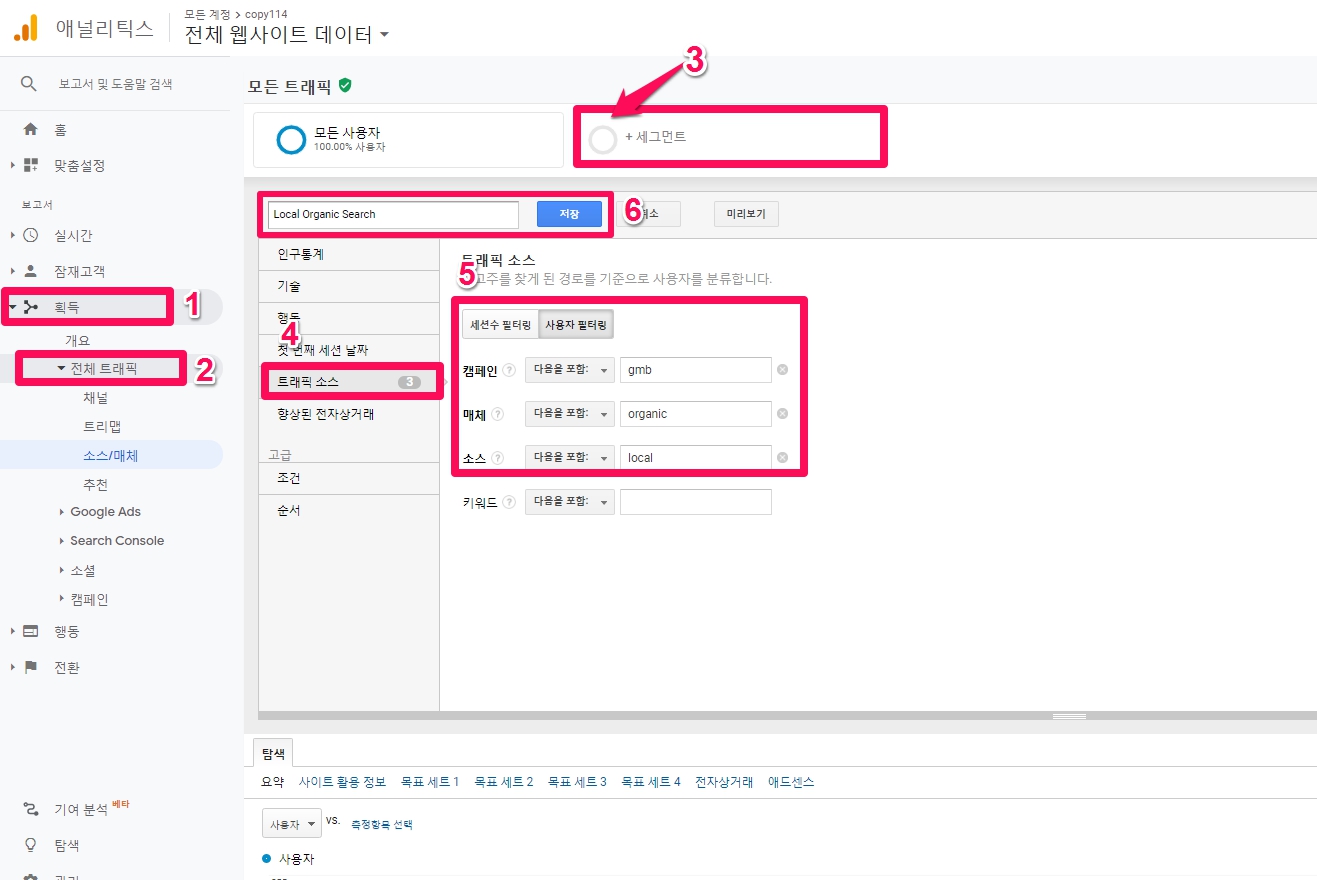
In Google Analytics, go to Aquisition > Add Segment > New Segment > Traffic Sources.
Name the segment Local Organic Search.
Create the following naming convention in your traffic sources:
Campaign: gmb
Medium: organic
source: local
Don’t forget to save the segment.
Keep the parameters all lowercase as they are case sensitive
[To ksh memo]
What it looks like when comparing channels As of 2021-05-19, I put utm in the GMB website address, and as of 2021-05-20, I set a custom segment in Google Analytics. This post is complete if you upload the analytics of www.copy114.kr to capture Local Organic Search (GMB utm tracking).
How it looks on its own As of 2021-05-19, I put utm in the GMB website address, and as of 2021-05-20, I set a custom segment in Google Analytics. This post is complete if you upload the analytics of www.copy114.kr to capture Local Organic Search (GMB utm tracking).
Checking MyBusiness Performance in Google Search Console: Top Recommendations
It’s interesting to see the performance of the MyBusiness column also appear in the Search Analytics reports in Google Search Console.
After adding the UTM parameter to GMB (middle URL part of GMB > [About]), filter the URL parameter in Search Console to get data about the performance of MyBusiness listings.
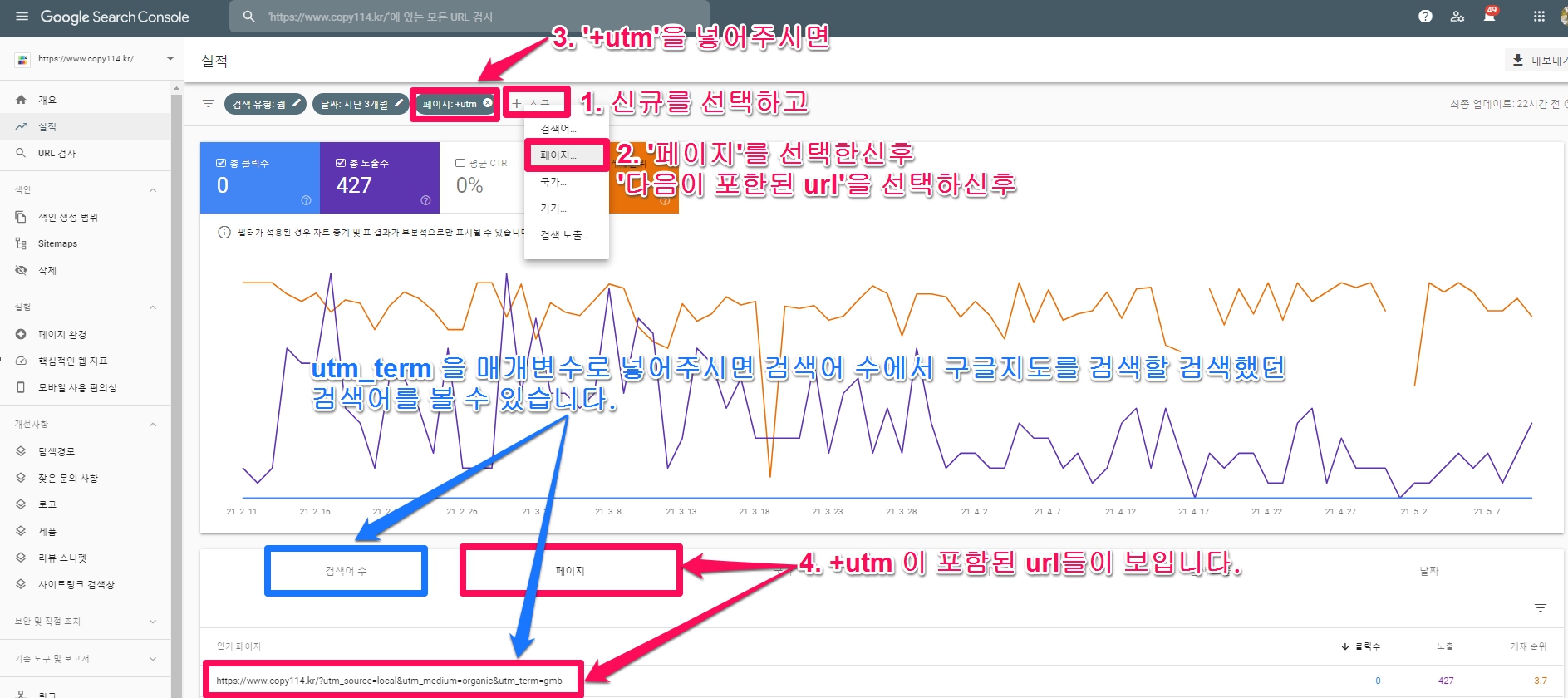
To filter parameters, select [Performance] from the left menu in the Google Search Console, and click the 1. After selecting [+New] 2. After selecting [Page], click ‘3. After selecting the ‘url containing the following’ 4. Just put ‘utm’ in the filter. Then you can check the following achievements (data). If you put ‘utm’ in the filter, only the results of Google Maps ( GMB ) are displayed. If you select the pink [Page], you can see the page with the ut parameter you put in the website address in Google My Business.
You can also get detailed information about search terms, pages, country, device, search impressions, date, and more.
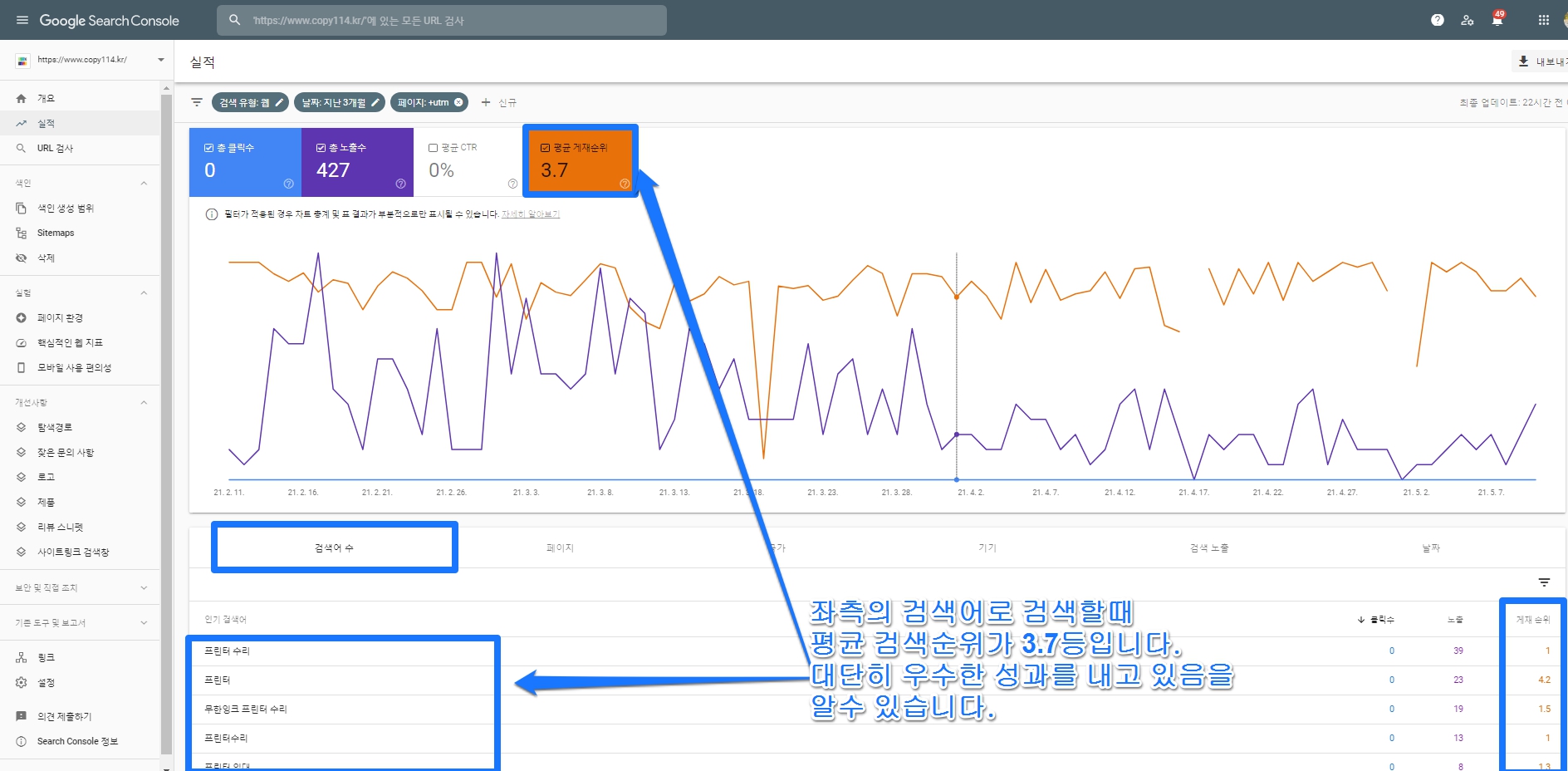
You can check the search terms used to search for the business in Google or Google Maps. If you search [Number of search terms] in the blue box in the image above, you can check the search term and the position (this is the company’s ranking on the map), impressions, and clicks when searched with that search term.
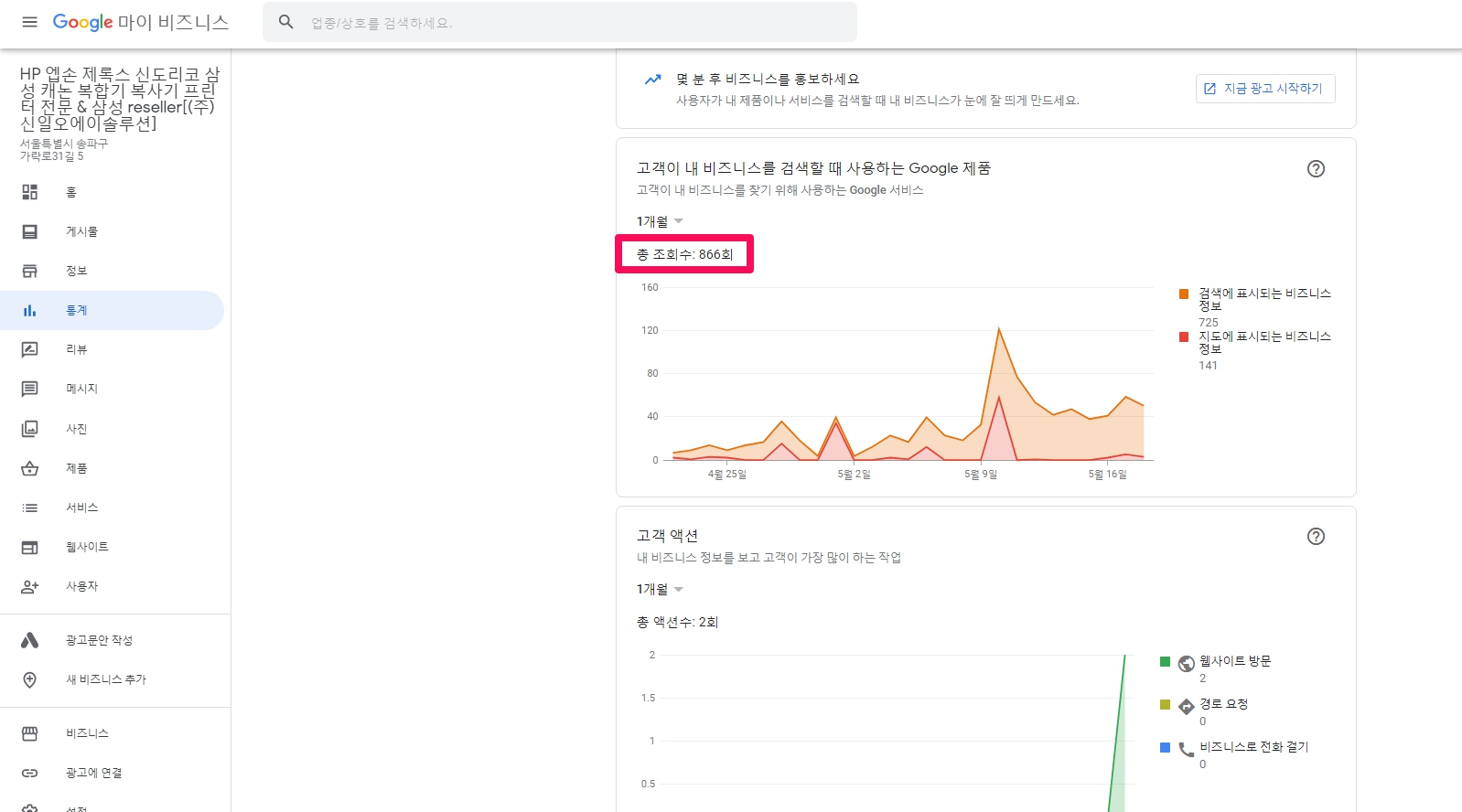
The image below is an image of statistics of Google My Business. The total number of views is 866. Here, the total number of views is the total number of impressions because the Korean translation is incorrect. This is the part that causes confusion for ordinary people when looking at the statistics of Google My Business.
Performance hits with the utm parameter in Google Search Console are excellent in that they show you the actual exact number of search hits (not impressions).
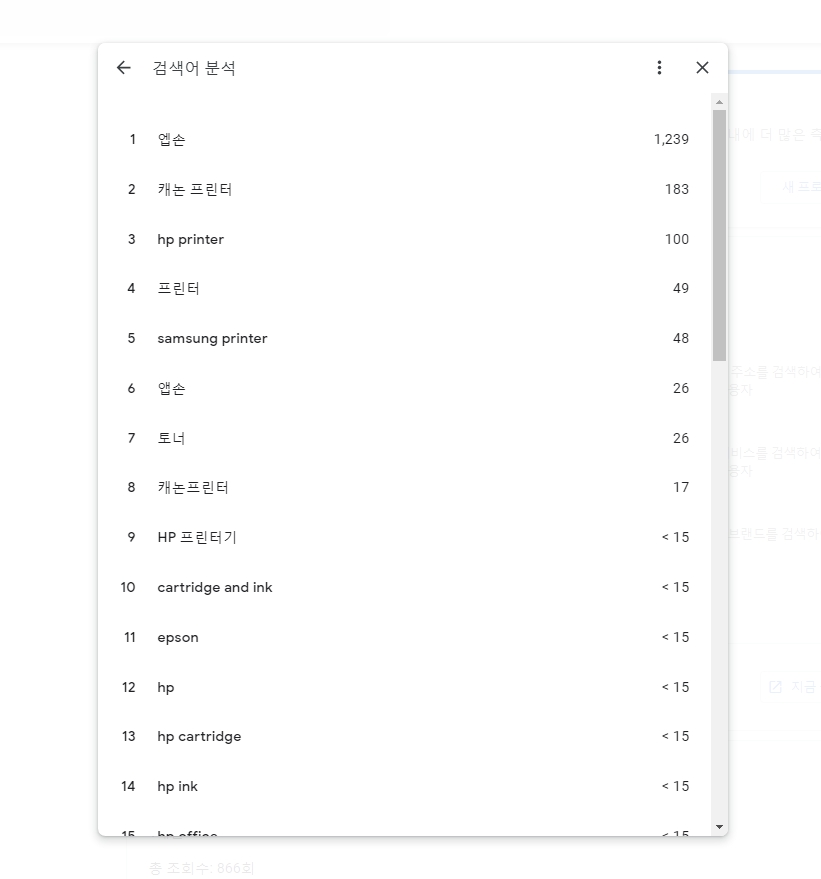
The image below is an analysis result of a search term searched on Google Maps, which is shown in the new profile performance among statistics of Google My Business. The numbers to the right of this image are displayed as views but are impressions. Google Search ConsoleIn utm parameter, the performance inquiry shows the actual number of impressions as well as the number of hits and shows the exact position of the position, so it accurately informs the SEO (Search Engine Optimization) ranking of GMB (Google My Business, Google Maps). There is no tool (report) that shows GMB performance in such a clear and clear way for each search term.(It is possible for services such as paid rank tracker, which costs about 100,000 won, but it is impossible unless you do not omit and enter all imaginable expected search terms.)
Case Study 1( http://www.shiniloa.com/ )
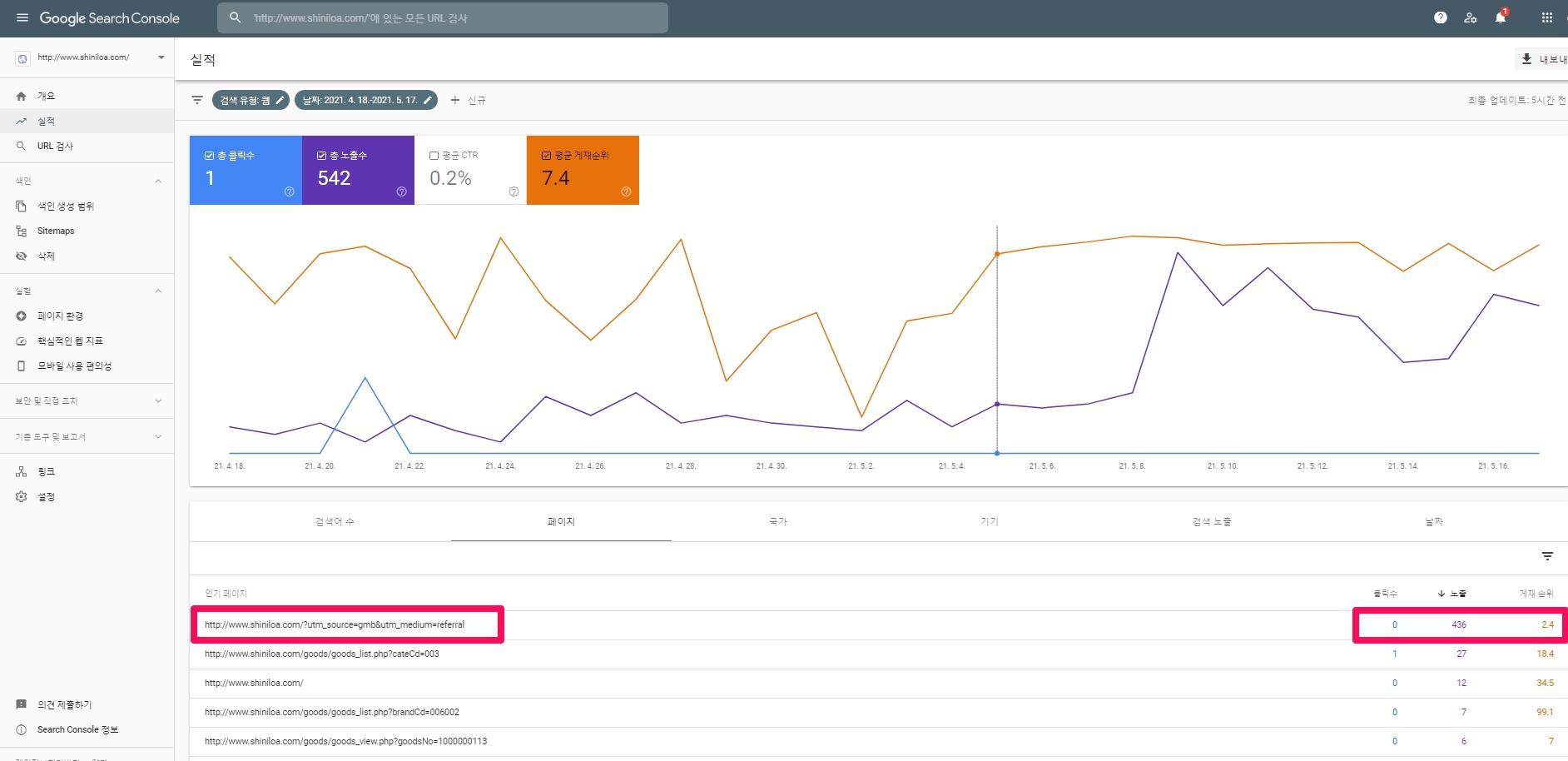
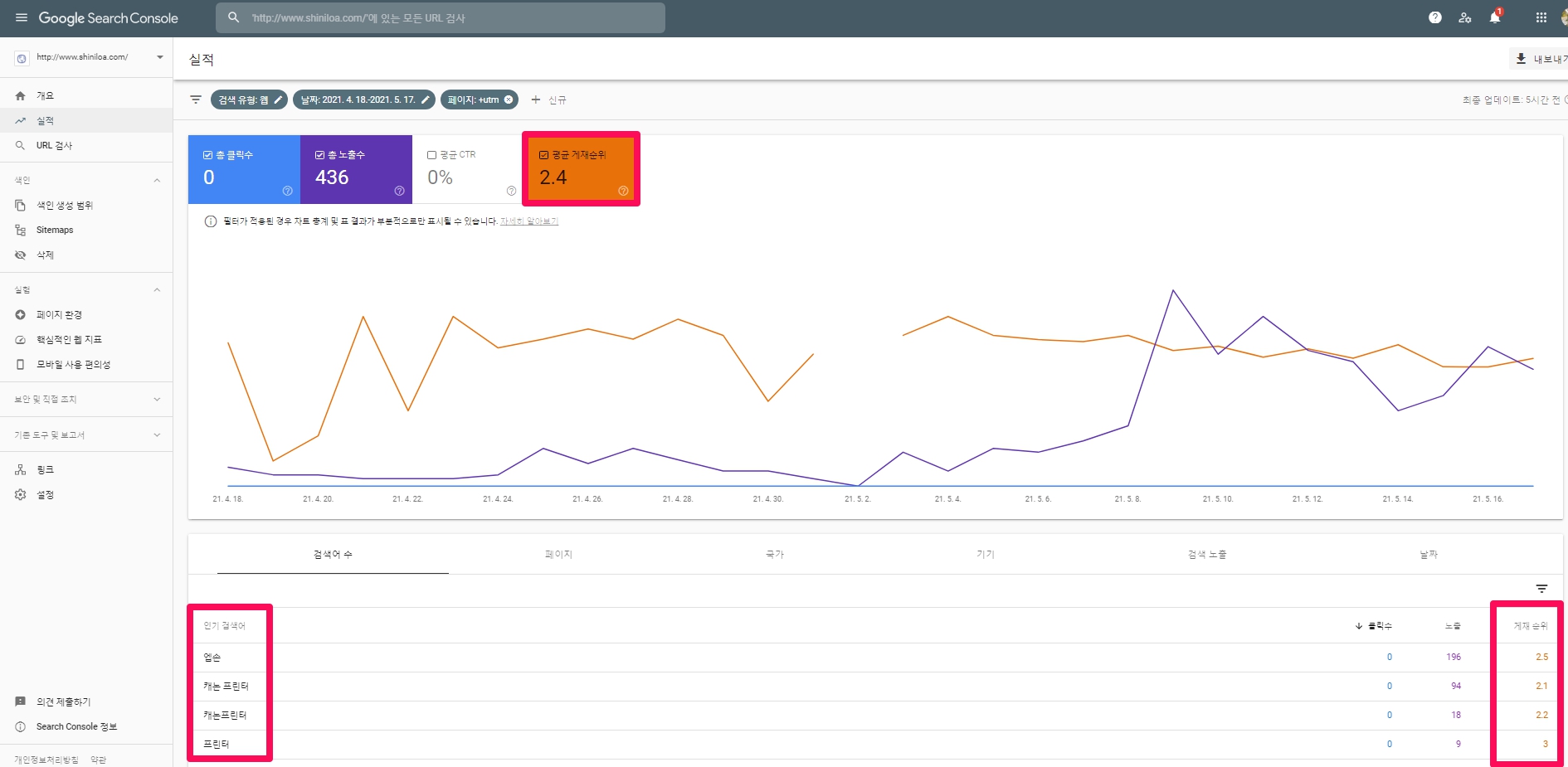
The image below is an example of Shinil Oe, a company that sells office equipment. Google Maps exposure ( http://www.shiniloa.com/?utm_source=gmb&utm_medium=referral ) was 436 out of 542 total exposures during 2021-04-18 ~ 2021-5-17. This is an astonishing record that 80.4% of total impressions were made with Google Maps.
This company (Shinil OA) is a local company and has 1 website (shopping mall) and 1 business site. The image below captures the results of only the page where the utm parameter is put (homepage address on Google Maps). More than 80% of search terms in pink are impressions, clicks, and positions on Google Maps. It was exposed for a total of 33 search terms, with an average position of 2.4. That’s a really great number. Local businesses must use GMB (Google Maps) for this reason. Unfortunately, there are no clicks. As of 2021-05-19, we have 11 cases of Google Maps optimization in Canada, and 1,000 customer actions (call, visit website, request route, place an order) are occurring per month. (If you want to check the data, please click https://datastudio.google.com/u/0/reporting/ed324cee-1fc8-4027-8aff-4e001c5efa5b/page/PCr4.) map) and I’m personally confident it won’t take 5 years.
Case Study 2
The screen below is the screen when the number of search terms is clicked. If you click ‘Average Position’, you can check the average position. In the case of this site (www.copy114.kr), it is showing very good performance with a score of 3.7. It can be judged that Google Maps (Google My Business optimization) was successful. The unfortunate thing is that the average CTR is 0% because domestic users only use Google Maps to search for restaurants and do not use it to find copiers or photocopiers. If there is no click like this, data is not collected in Google Analytics described above. 이처럼 Even if there are no clicks and cannot be tracked by Analytics, Google Search Console shows the total number of impressions and the number of impressions for each search term, so we recommend that you use Google Search Console to measure MyBusiness performance more accurately.
Case Study 3 : Why Franchise Headquarters Needs Google Maps
Why Franchise Headquarters Needs Google Maps
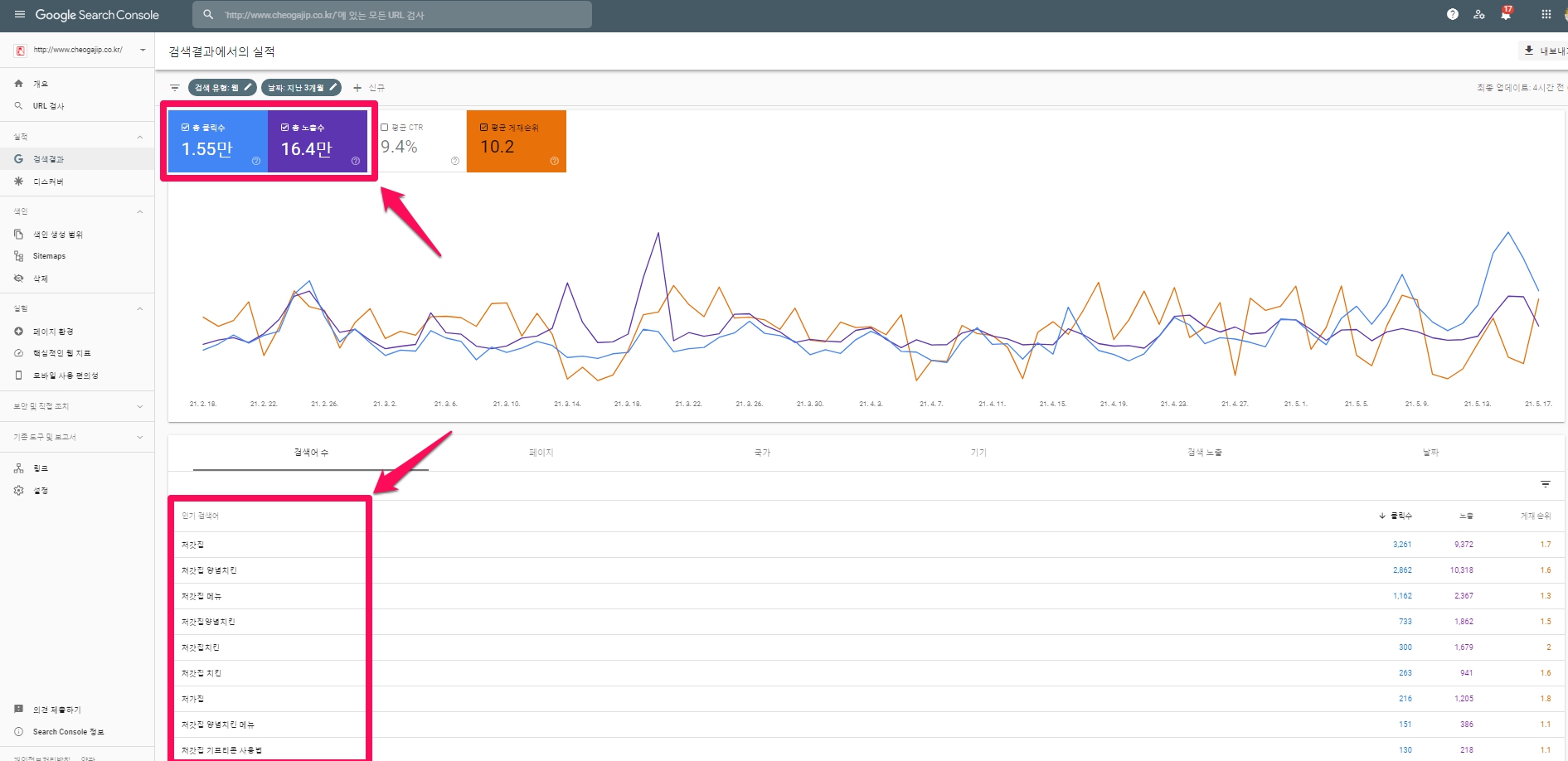
The total number of clicks was 1.55 million, and the search terms used by searchers, including consumers, when searching on Google were composed of Cheogajip + *** Taking into account the expected average estimated top bid of 871.5 won (the calculation criteria will be explained in the Google Keyword Planner below), the Cheogajip Chicken website saves advertising costs of 13,508,250 won (= 1.55 million * 871.5 won) per month and advertises. You can say you are doing it.
So, how economically effective can a chicken franchise be if it optimizes Google Maps?
The default distance that shows search results on Google Maps is 8km in radius and 16km in diameter. Seoul is about 30 km away. It is easy to assume that there is a franchise headquarters with two or more affiliated stores in a special city, and this affiliated store is exposed in the top 10 on Google Maps when a search term for chicken is searched. The effects of Google Maps optimization that the franchise headquarters can obtain are as follows.
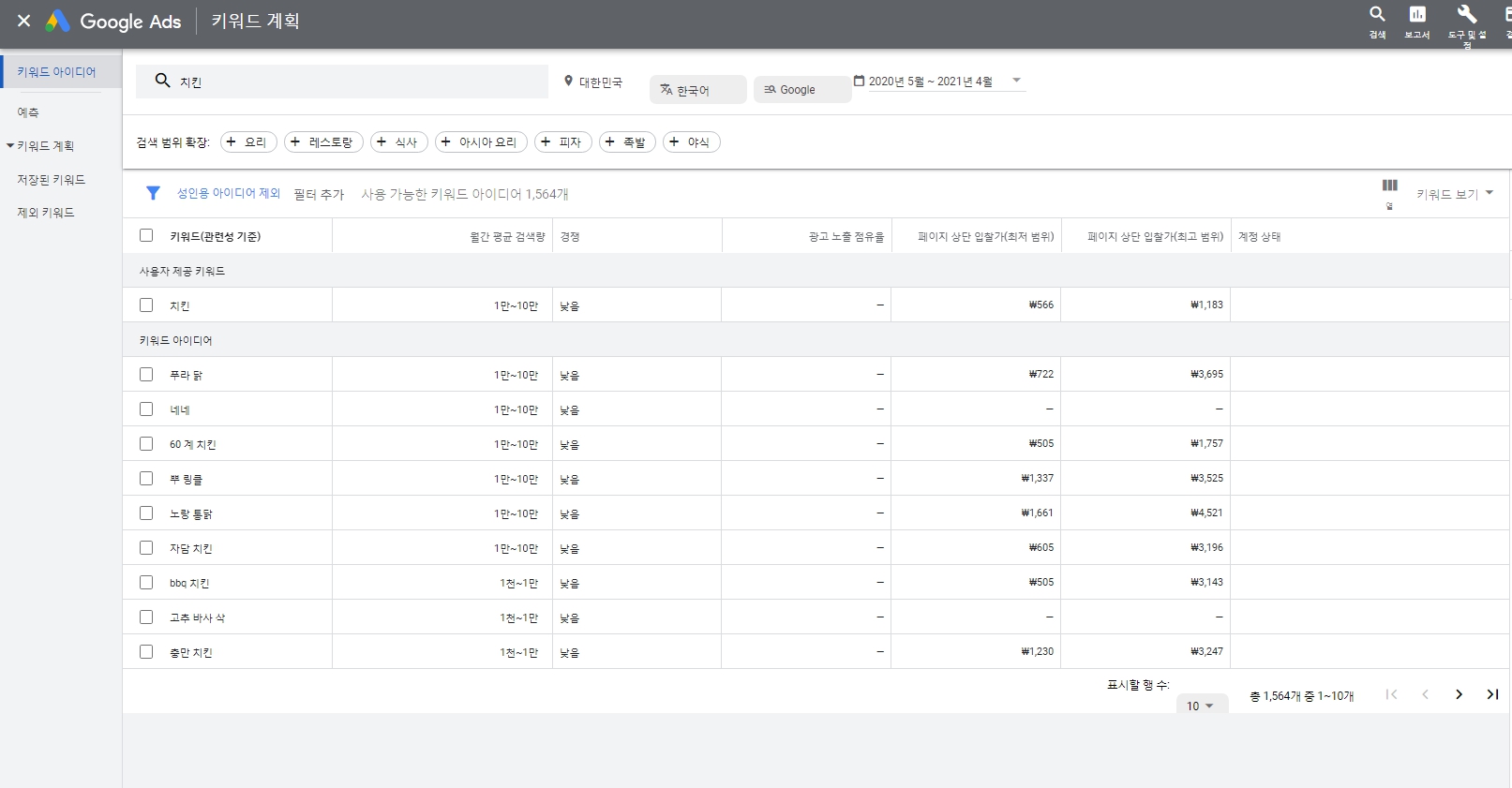
The image below is the number of statistics for ‘chicken’ in Google Keyword Planner ( ), which shows the number of search statistics on Google.
In the case of chicken search terms, assuming that the expected monthly hits is 55,000 (=(10,000 + 100,000)/2) and the upper bid is 871.5 won (=(564 + 1,179)/2), the monthly Google advertising cost is It is 47,932,500 won/month.
Therefore, the effect of Google Maps optimization that the chicken franchise headquarters can obtain is 47,932,500 won per month.
Please take a look at the chicken franchise headquarters.
This is domestic data. Among the Canadian companies that I act on behalf of, there is a BBQ chicken franchise.
As of 2021-05-19 at one store, the performance (total number of actions) in the last month was 1.76 thousand. (Website visits: 647, Route request: 802, Call business: 307, Send message: 2). I am confident that such achievements will come within 5 years in Korea as well.
My personal opinion is that the Google Maps optimization effect mentioned above will grow at least 10 times and at most 100 times after 5 years.
Case Study 4: Tracking and Analysis Methods for Multi-Location Businesses
utm_medium (medium) or above We briefly explained that multiple locations can be tracked using the utm_content ( campaign content ) parameter. Below, we will take a closer look at tracking and analyzing multi-locations using utm_medium (medium).
In the example above, the ‘Campaign’ value was omitted. (In the above example, we left out the ‘Campaign’ value. It is not really needed when you have only one location you are wanting to track.)
However, if you have multiple locations, you will need all three levels of tracking differentiation.
We would create a tracking URL by entering information like this:
All we have to do to distinguish different locations is to name them differently in the ‘Medium’ level. Now we are able to separately track more than one location, as well as the different links from each of those locations.
We just need to drill down the data appropriately in Google Analytics to find it all.
Case Study 5 : Identify, track and analyze links to websites, reservations, menus and orders
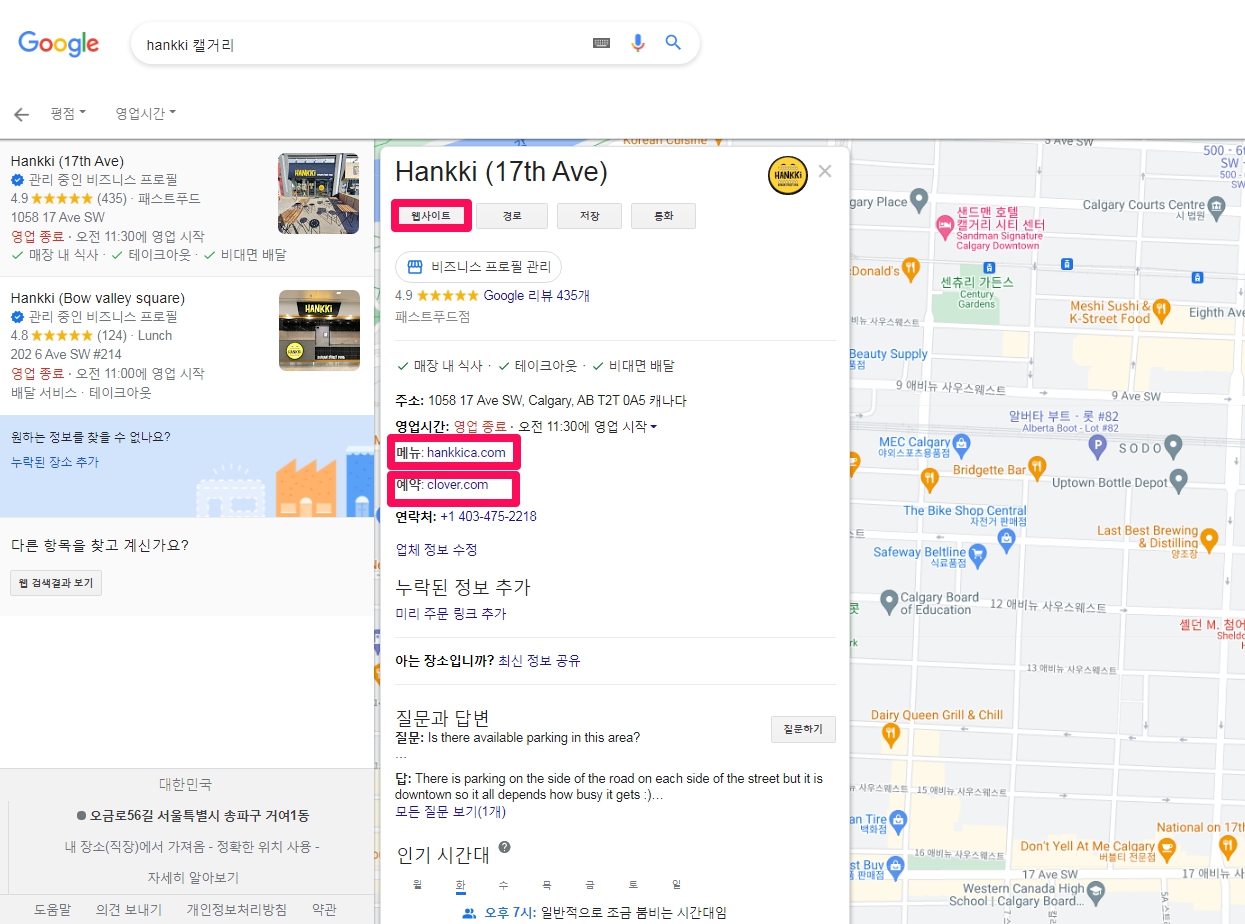
If you look at GMB (Google Local Information), you can see that the website, menu, appointment, and order are displayed as shown in the pink square in the image below. ( In the case of a restaurant, the menu is displayed. ) If you want to see the search terms, clicks, and posting rankings clicking on the website, menu, and appointment, you can track and analyze them by setting the following settings.
(Note: If you look at the local business link in the help of the Google My Business customer center, there is an explanation for this, but the explanation in Korean is very abstract, so it is much better to refer to our post.)
There are actually two links you can add to your Google My Business listings: Website Links and Appointment Links.
Although displayed differently on the mobile and desktop versions, here is an example of a knowledge panel that shows where the two links appear on the screen. If you hover your mouse over the website button or appointment URL on your desktop, you will see the full URL in the lower left corner of your screen.
.
. .
This way you can differentiate between the two links when a click occurs.
Correctly tracking two different GMB URLs
Going back to the input to the UTM builder, starting with ‘GMB’ as the source, you can add a ‘website’ or ‘appointment’ (or ‘menu’ if you have a list of restaurants) as a medium or campaign input. To create a completely different tracking URL:
domain.com?utm_source=GMB&utm_medium= Website
domain.com?utm_source=GMB&utm_medium= appointment
domain.com?utm_source=GMB&utm_medium= menu
[ The ‘Campaign’ input is not required. Doing so will provide an additional layer of data differentiation. Used in the multi-location business example below.]
If you look at Analytics, you can isolate the resulting data into the following form:
Now I’m tracking the website button and appointment url field separately.
That way, we will be able to differentiate between the two links when they receive a click.
Properly Tracking Two Different GMB URLS
Going back to our inputs for the UTM builder, if we start with ‘GMB’ as our Source, we can then add ‘Website’ or ‘Appointment’ (or ‘Menu’ if you have a restaurant listing) as the Medium or Campaign input to create completely different tracking URLS, for example like this:
.
.
.
.
.
.
Case Study 6 : Put utm parameters in your posts to analyze the performance of reactions, reservations, online orders, purchases, learn more, and signups for events
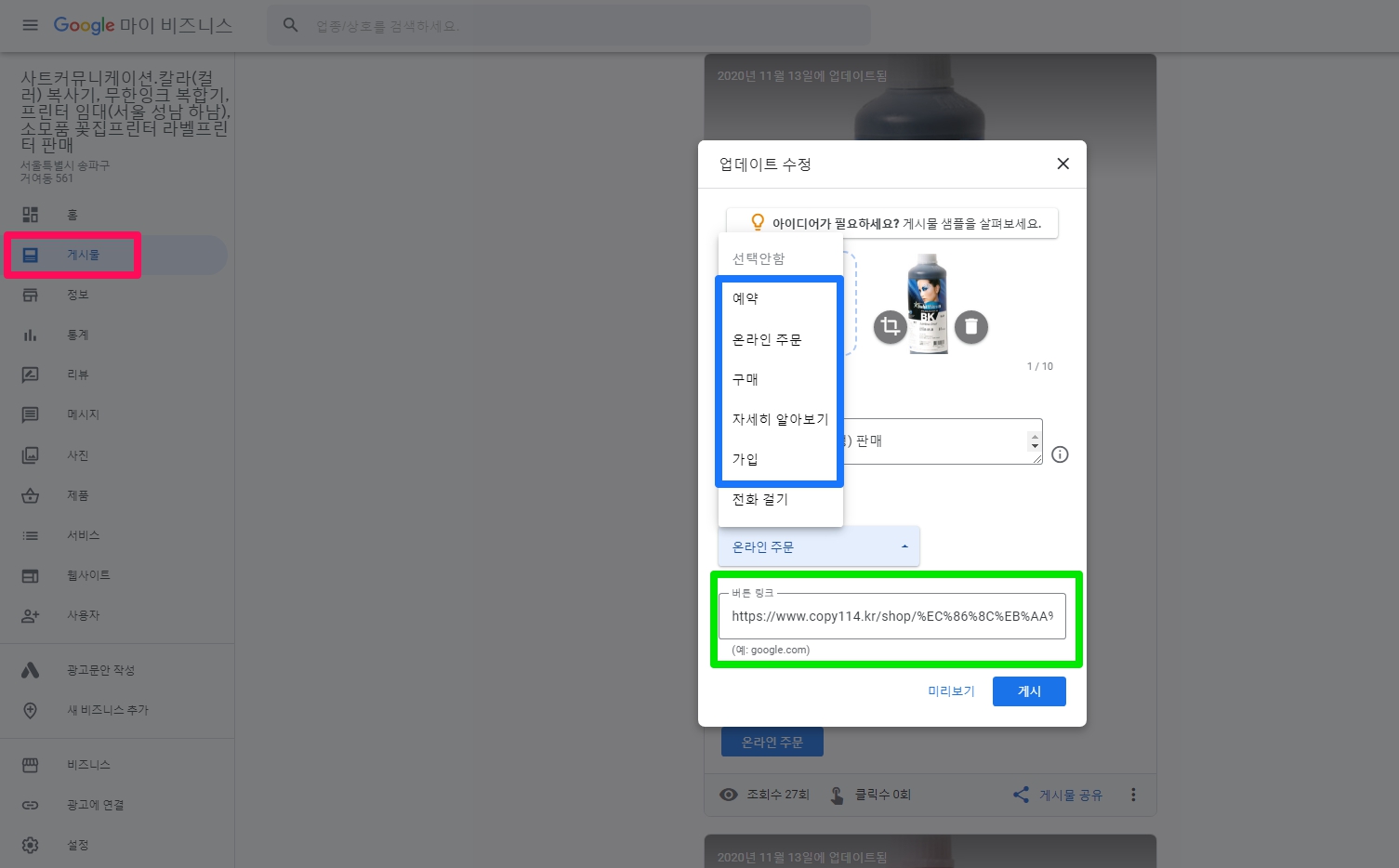
This is a great way to monitor the success of your posts. Posts on GMB have CTA buttons such as Reservation, Order Online, Buy, Learn More, Sign Up, and Call. Among these, you can put a link (url) for appointment, online order, purchase, learn more, and sign up, and you can analyze the performance by inserting the utm parameter here.
In addition to update posts, coupon posts, event posts, and product addition posts also have CTA buttons such as reservation, online order, purchase, learn more, and sign up. All of them can be tracked, so make sure to use them.
Case Study 7 : Tracking products posted to GMB
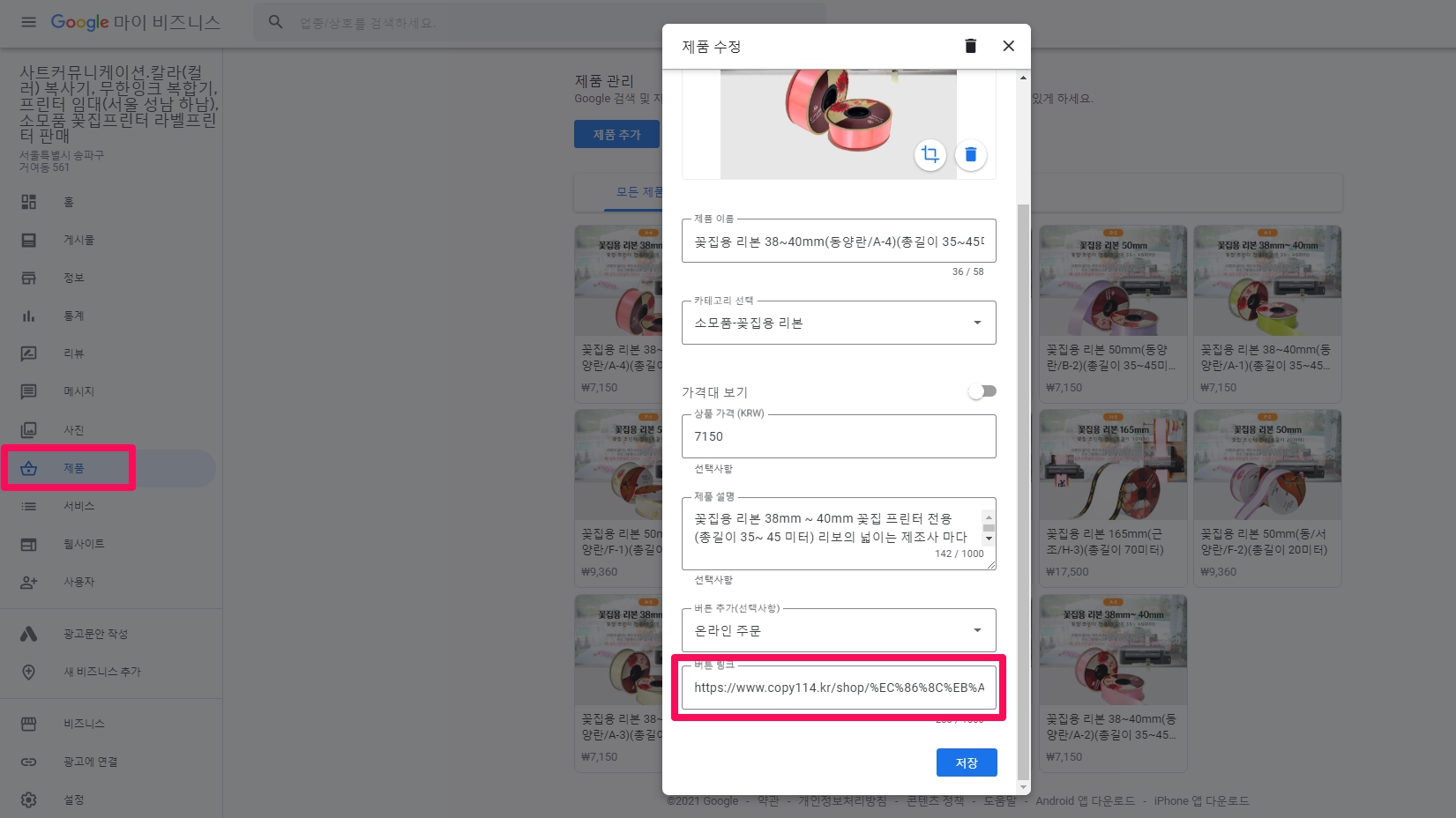
If your category is wholesale or retail, you can post your products on GMB. By inserting the utm parameter in the product link section, you can track how potential customers who viewed your product on Google Maps searched for keywords and visited your online store to purchase your product. utm_campaign=gmb-product for product links in pink squares Adding a utm parameter like .
Case Study 8 : Tracking calls made in your GMB profile
According to Claire’s Guide to UTM Tagging, some say you can track incoming calls by typing utm_campaign=gmb-phone , so try it out.
2. How to track Google My Business traffic using Google Analytics ( https://growtheory.co.za/track-gmb-traffic-in-google-analytics/ could not be connected.)
![[Recommended] Google My Business (Google My Business, GMB) ) performance measurement of search engine optimization (top impression): Measurement method through Google Analytics and Google Search Console (the reason why the franchise headquarters should use Google Maps)](https://aiforu.kr/wp-content/uploads/2022/02/logo-web-transparent-2.png)
![[Recommended] Google My Business (Google My Business, GMB) ) performance measurement of search engine optimization (top impression): Measurement method through Google Analytics and Google Search Console (the reason why the franchise headquarters should use Google Maps)](https://aiforu.kr/wp-content/uploads/2022/02/logo-web-transparent-3.png)