- 인터넷은 우리에게 자유를 주었습니다. 저희는 자유를 얻기 위해 지식을 통합하고 체계화하고 공유합니다. 랜선 위 정글에서 살아남기 위해 저희는 시키는 일만 하는 꿀벌 대신 고객을 위해 창조하고 혁신하는 게릴라가 되겠습니다. Seenbuy.kr is now Aiforu.kr.
- 024042463
- 01032667931
- [email protected]


Using Korean Fonts in WordPress : Rocket Font Plugin
Problem
When applying the Korean font to the theme, pretty fonts do not appear.
WordPress themes are mainly developed in English-speaking countries. Even if it is developed in a non-English speaking place, it is developed based on the use of English. So most of the demo sites are also in English. This is where the problem arises. It looks great when it’s in English, but when it’s in Korean, it often gets weird. I bought the theme because I fell in love with the cool design and typography, but the moment I started using Hangul, the expected results did not come out.
The way to solve this is to set the font to an appropriate Korean font. However, setting fonts is a cumbersome task that requires modifying the theme files, and it is also a difficult task for non-developers. (Referance : 2. WordPress Course / Plugin / Rocket Font / Plugin that allows you to set Korean fonts as web fonts )
Solution
Solved with plugins
‘WordPress course / Plug-in / Rocket Font / Plug-in that lets you set Korean fonts as web fonts’ introduces how to solve problems with plug-ins.
It’s a pity that the free fonts are a bit small after trying them out.
[Memo]
I know that there are free fonts on Google/Naver, etc., so it would be good to learn more about how to use these free fonts in WordPress.
There are ways to implement fonts in e-books that you have bought and haven’t seen before, so please reinforce them when you have time.
Anyway, before, the English font and the Korean font were different, so I felt something unbalanced, but it is good that there is no such thing. .
- Version:1.2.3
- Last updated:1 month ago
- Active installations:4,000+
- WordPress Version:3.5.1 or higher
- Tested up to:5.4.2
Types of Hangul fonts that can be used
It seems safe to use either Nanum Gothic or Nanum Myeingjo, which are used the most, and Nanum Gothic seems to be used in Naver now.
- Hanna
- Jeju Gothic
- Jeju Hallasan
- Jeju Myeongjo
- KoPub base
- Nanum Gothic
- Nanum right gothic
- Nanum calligraphy
- Nanum gothic coding
- Nanum Myeongjo
- Nanum pen writing
- NotoSansKR
- spoka han sans
- Nanum Square
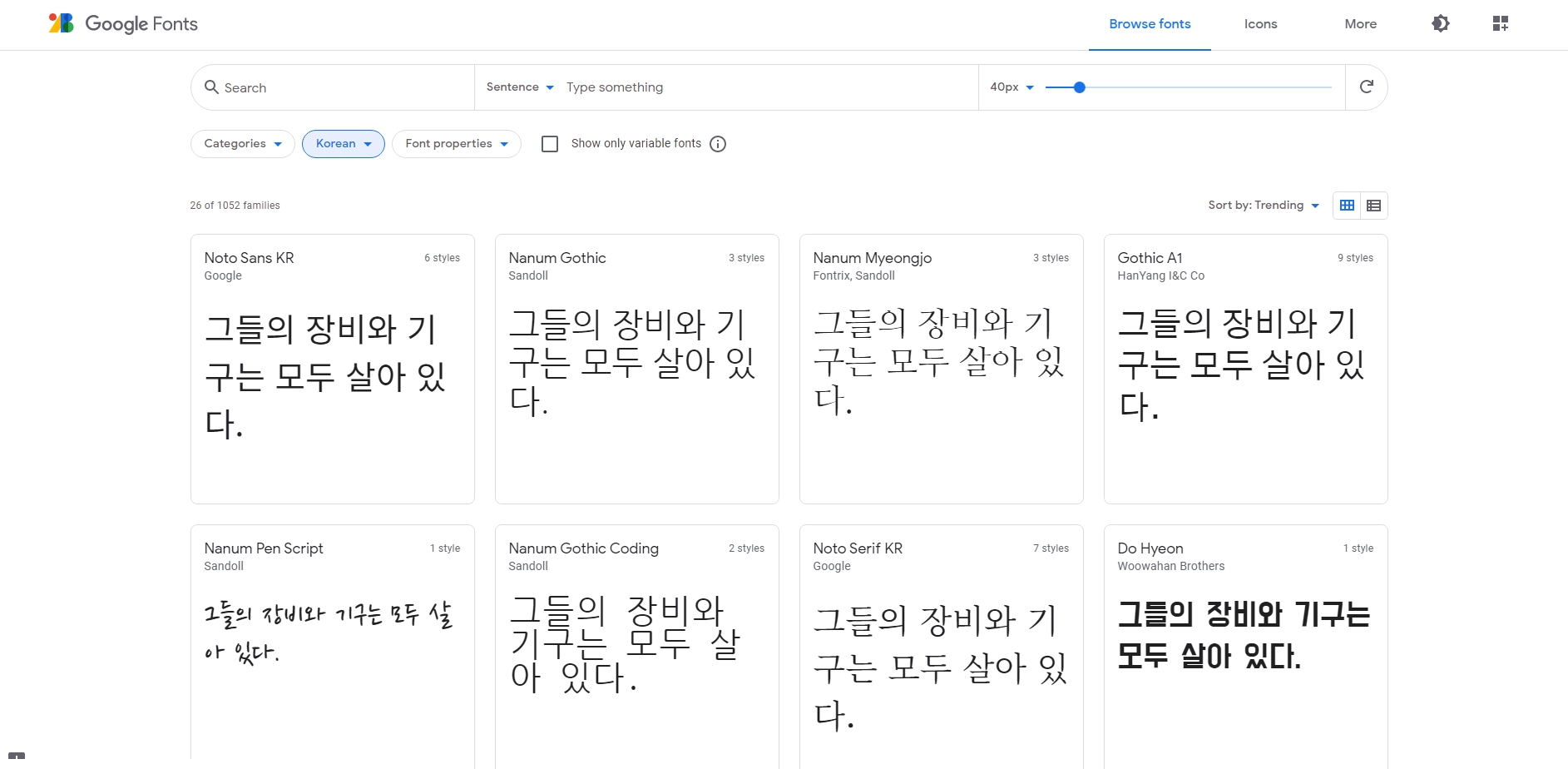
How to check the actual shape of available Hangul fonts
You can see how the fonts described above are displayed by setting the language to “Korean” in Google Fonts or by clicking https://fonts.google.com/?subset=korean.
Points to note
Note that when using elementor as the WordPress editor, the Korean font set in Rocket Font is not applied by default.
In this case, select [Style] on the [Text Editor Edit] screen of Elementor and select the font set as the default font in Rocket Font from the [Font] selection button.
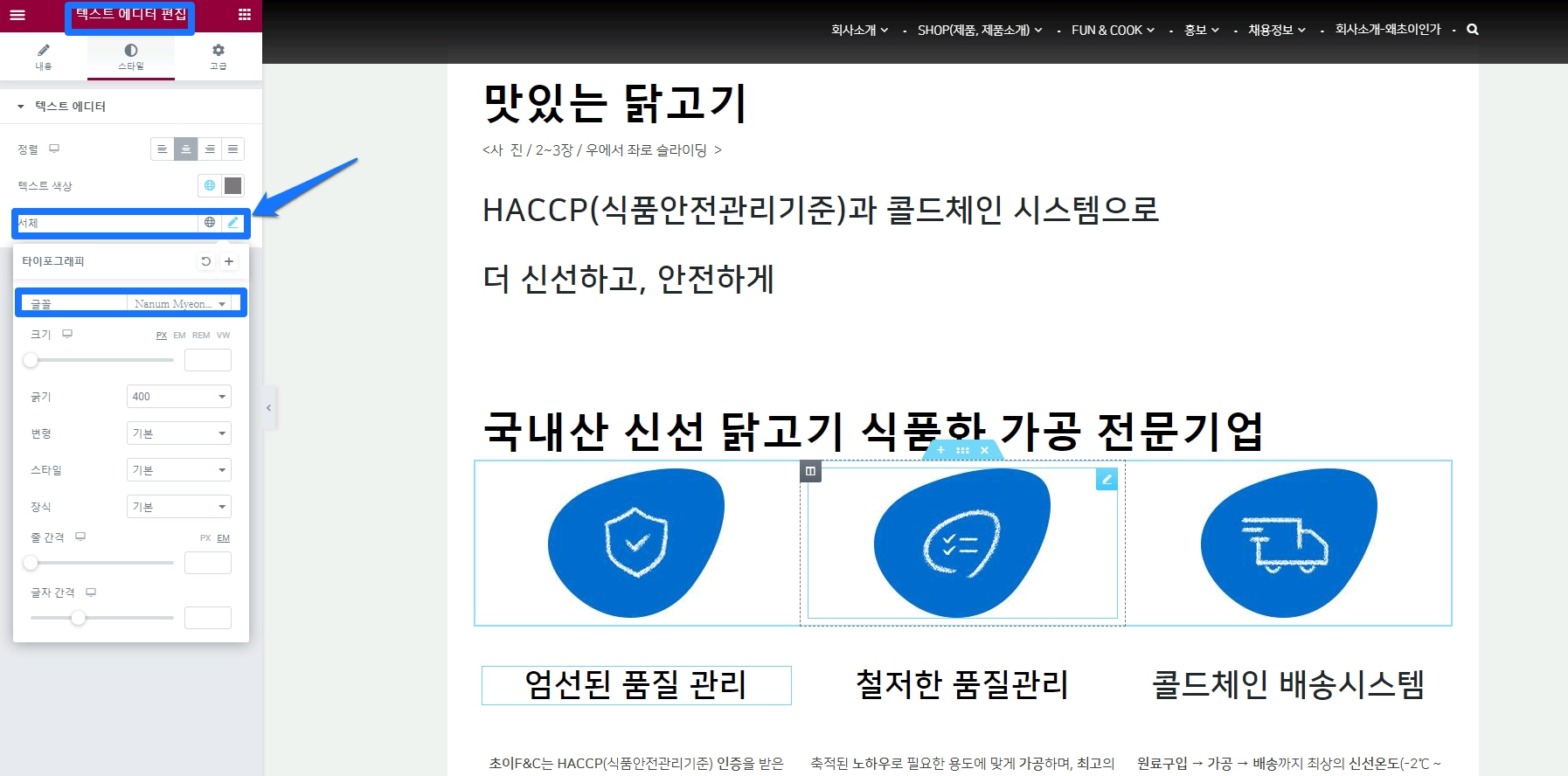
How to use
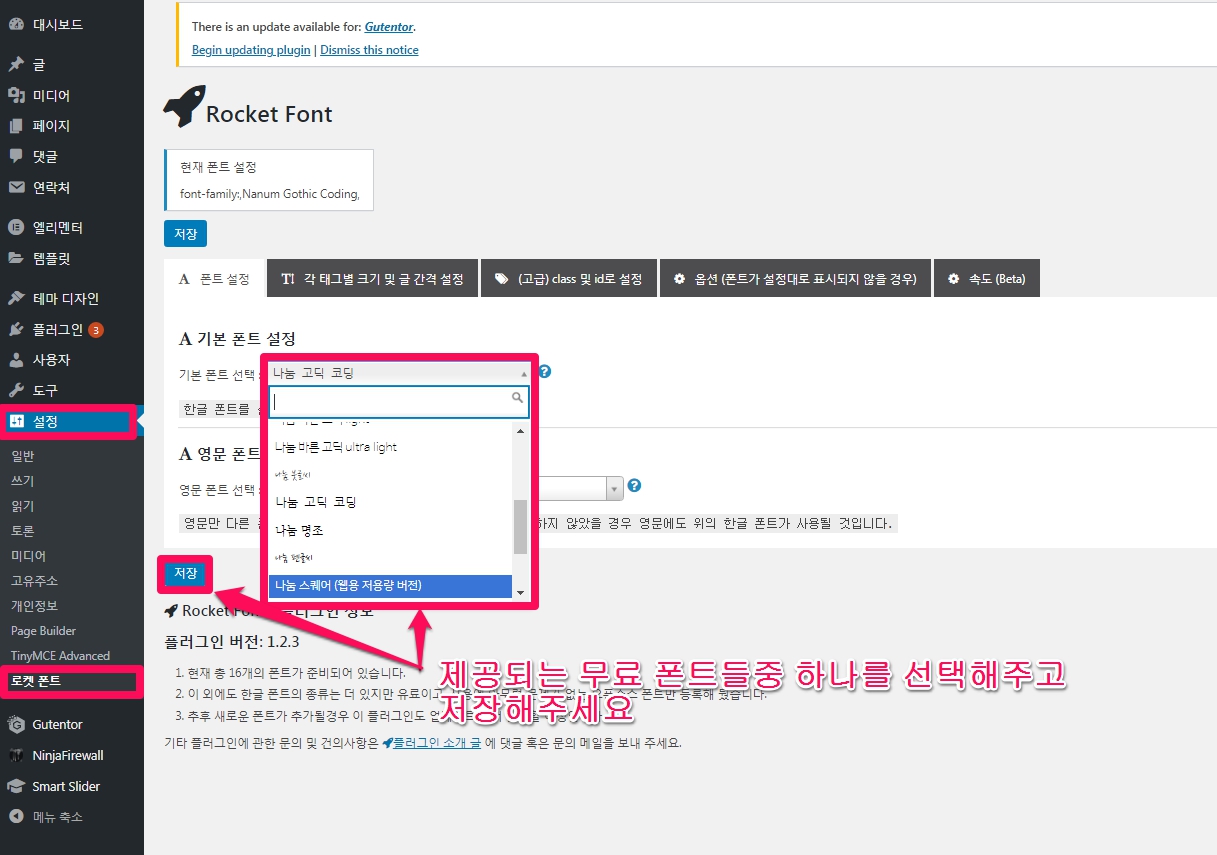
Default setting (body font setting)
Select the font you want to use in Admin > Settings > Rocket Font and save it.
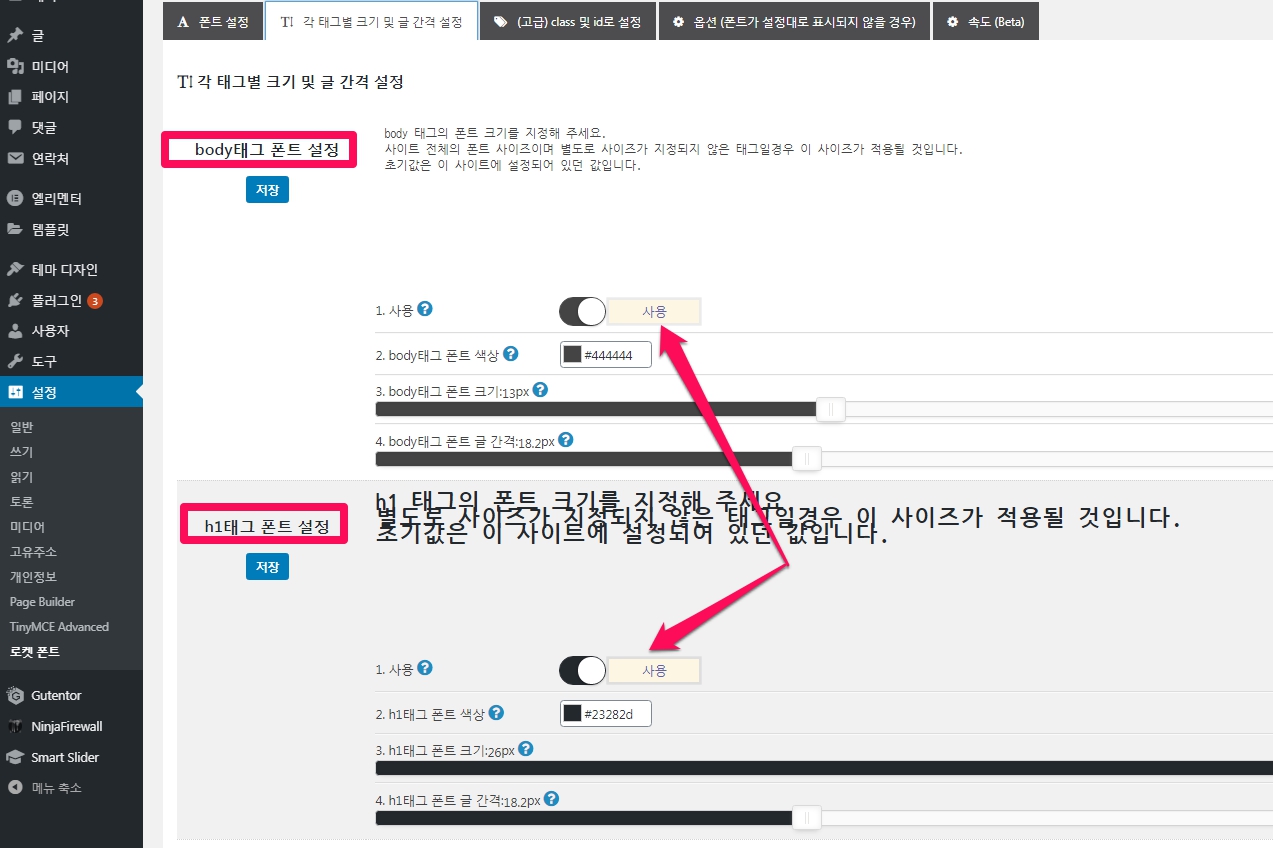
h1 ~ h6 (Title 1 ~ Title 6) Font setting
The h1 ~ h6 (Title 1 ~ Title 6) font can be set in Admin > Settings > Rocket Font > “Setting the size and spacing of each tag”.
The body can be set only by setting the font above, and you can use all fonts h1 ~ h6 (Title 1 ~ Title 6) and save it.
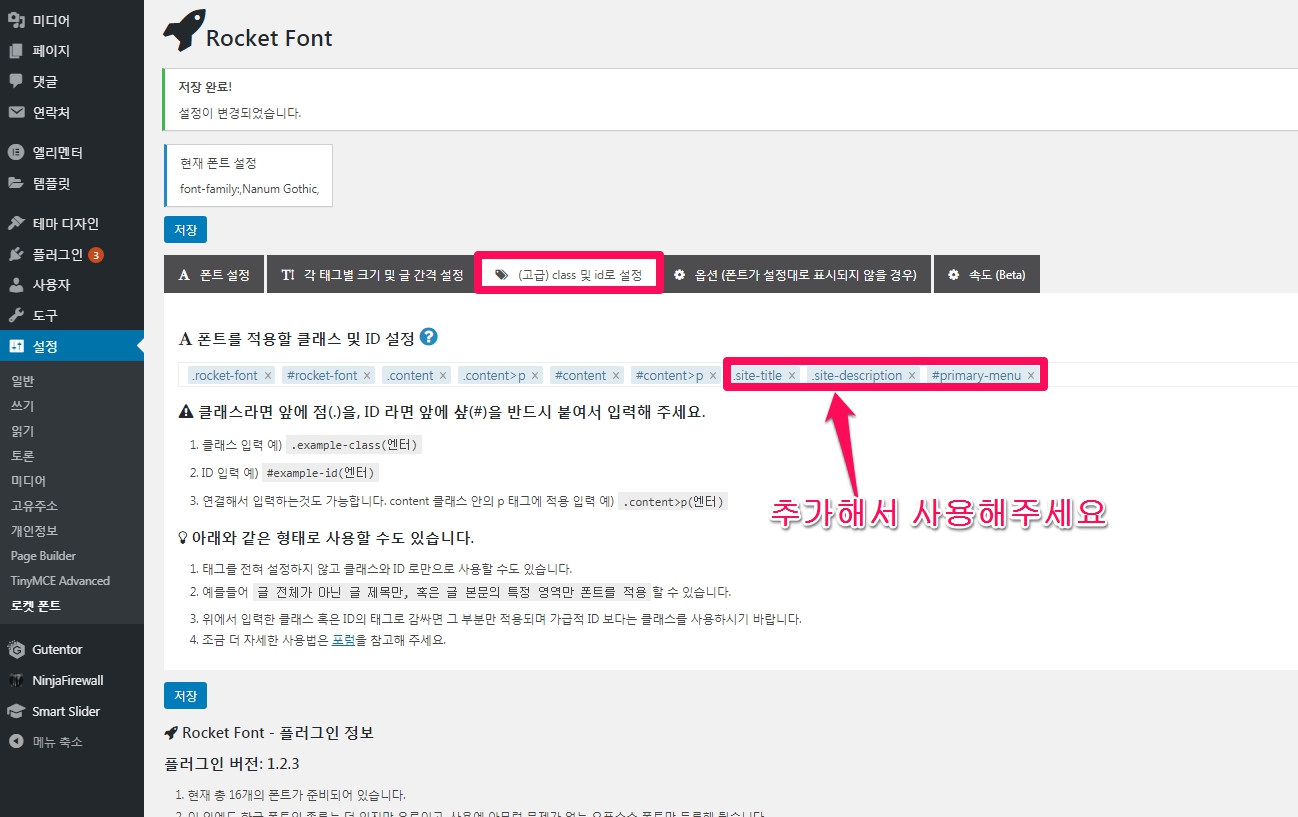
(Advanced) set by class and id
There are parts that do not apply depending on the theme, so please check. In Twenty Seventeen, it doesn’t apply to site titles and taglines.
The part to solve this is [Set as (advanced) class and id].
As indicated in ‘WordPress Course / Plugin / Rocket Font / Plugin that lets you set Korean fonts as web fonts’, the class of the site title is site-title, and the class of the tagline is site-description. Added “.site-title” and “.site-description”.
In my case, since the font of the main menu cannot be changed, I found that the id was primary-menu, so I added #primary-menu.
You can find the value of the element you want to change by using Chrome’s Element Inspection (F12), etc. After finding the value, add . if it is a class, or # if it is an ID.
If it is a class, be sure to put a dot (.) in front of it, and in the case of ID, be sure to put a shack (#) in front of it.
- class input example)
.example-class(엔터) - ID input example)
#example-id(엔터) - It is also possible to connect and input. Example of input applied to p tag in content class)
.content>p(엔터)
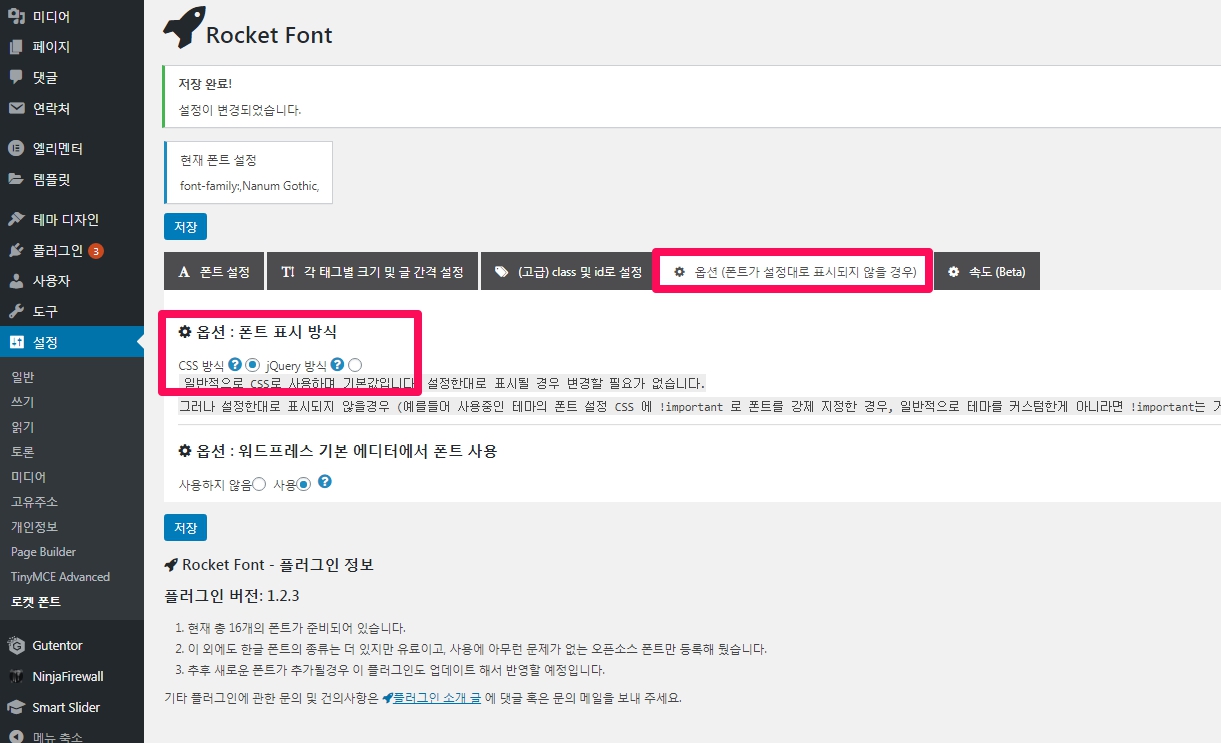
(Optional) When the font is not displayed properly
- If the set (optional) font is not displayed properly, try setting [Display method] in the options to jQuery method.
Solve with theme editor
Previously, it was possible to change in style.css, but as of 2020-09-10, you cannot enter the theme editor itself.
- Go to WordPress admin page > Appearance > Theme editor (style.css).
- Press ctrl + F to search for ‘font’.
- Among the searched ‘fonts’, move to the body area and change the font size.
FAQ
Q. I purchased a paid theme, but the Korean fonts are not pretty. Is there any easy way to solve it?
A. Try the Rocket Font plugin ( https://wordpress.org/plugins/rocket-font/ ).
Q. Where can I check the actual shape of the Hangul fonts that can be used?
You can see how the fonts described above are displayed by setting the language to “Korean” in Google Fonts or by clicking https://fonts.google.com/?subset=korean.
Q. I use elementor as the WordPress editor, but the Korean font set in Rocket Font is not applied by default. Is there a solution?
In this case, select [Style] on the [Text Editor Edit] screen of Elementor and select the font set as the default font in Rocket Font from the [Font] selection button.
Q. I installed and set the Rocket Font plug-in, but the font is not displayed properly. How can I fix it?
A. If the set (optional) font is not displayed properly, try setting [Display method] in the options to jQuery method.
References: 1. Change wordpress font, font size
2. WordPress Course / Plugin / Rocket Font / Plugin that allows you to set Korean fonts as web fonts
| 조작 용이성 |
|
|
SUMMARY
|
3.5
|