- 인터넷은 우리에게 자유를 주었습니다. 저희는 자유를 얻기 위해 지식을 통합하고 체계화하고 공유합니다. 랜선 위 정글에서 살아남기 위해 저희는 시키는 일만 하는 꿀벌 대신 고객을 위해 창조하고 혁신하는 게릴라가 되겠습니다. Seenbuy.kr is now Aiforu.kr.
- 024042463
- 01032667931
- [email protected]


YouTube: Add hyperlinks to descriptions & tags summary

Hyperlink
The video below explains how to add hyperlinks from 10:00 onwards.
It’s simple. Copy and paste “?sub_confirmation=1” at the end of your YouTube channel address and you are done.
This will automatically turn all other URLs, such as website addresses, blogs, and social network addresses, into hyperlinks.
What’s even more interesting is that the # (hashtag) also turns into a hyperlink.
YouTube upload settings
Of course, if you put it in the upload settings and use it, you don’t have to work every time you upload a video, so you can use it more conveniently.
In YouTube Studio, go to [Settings] -> [Upload Preferences] -> [Basic Information] and put it in the description section.

tag cleanup
description tag
Tags are a very important factor in determining whether YouTube will rank your video. Tags are signals that tell you what your video is about. If you use them correctly, they will help you climb higher.
If you watch other people’s videos, you must have seen that the next recommended video to watch is displayed at the end when the airing is over. At this time, your own video is exposed as a recommended video in other people’s videos. If you get a lot of exposure, you can get a relatively large number of clicks, which leads to watch time, which is a factor that makes you appear high in search results.
A way to measure performance can be validated by looking at how many videos are recommended in YouTube statistics.
One of the mistakes people make when creating video tags is that searchers forget to search for other keywords and only tag with keywords that they think are important.
How to discover descriptive tags
- Related search terms & keyword phrases
It is basically good to find related search terms. But there is a better way if you add it. It is to find keyword phrases. To get the tags most relevant to your video, go to Google and enter your main target keyword phrase.
After the search results appear, scroll down to the bottom of Mei. After you finish typing the keywords you think are keywords, you can get phrases made up of related search terms related to your keyword phrases.
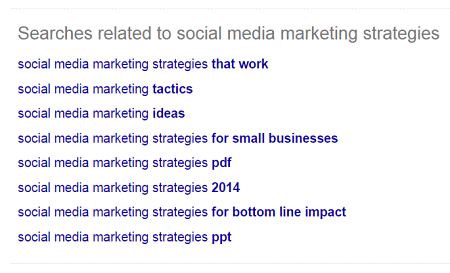
( image source http://selfmadesuccess.com/youtube-ranking-factors-2015-video-seo/ )
It gives you 8 of the most popular related search terms related to your phrase. Copy the one that makes the most sense to you, then paste it as a tag in your video. This is one of the best ways to get the best tags. It’s easy, fast, and the trusted source, Google, gives you the best results.
One of the other ways you can get quality video tags is to use Google Search in a different way. Google always helps users find what they’re looking for with suggestions (also known as related searches) when entering keywords based on other popular searches.
- Suggested search terms
As you enter keywords, look at another popular search that appears in the search bar before you finish typing. Here’s what they look like:
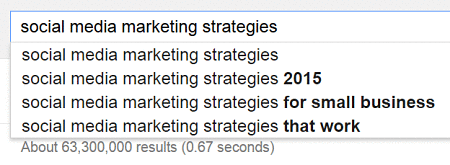
( image source http://selfmadesuccess.com/youtube-ranking-factors-2015-video-seo/ )
Note how Google suggests popular searches based on what you type in the box. Usually they will recommend about 4 searches to help you type what you are looking for.
Use the suggested search terms in the drop-down box as tags at the bottom of your video page. That way, Youtube always knows what your video is and where to show it.
- Competitor’s tag analysis and collection using chrome extension
Analyzing the tags being used on a competitor’s channel or video and tagging it as a tag is a great tagging policy.
With Google extensions like vidIQ, VidLog, Virool VideoSpy For YouTube, you can easily collect descriptive tags from competitors or competing videos.
For reference, the number of tags that can be added as a description tag is 500.
[Recommended]YouTube Analysis Tool(1) : Vidyard, VidIQ, NoxInfluencer etc
[Recommended] YouTube analysis tool (2): vidooly (Chrome extension name: vidlog)
hashtag
Hashtags are an easy way to find videos on popular topics.
There are two ways to find videos using hashtags.
– How to search for hashtags on YouTube and
– You can click the hashtag in the video title, above the video title, or in the video description.
Hashtags do not appear in Google’s general (organic) search results.


It will appear in YouTube search results.
It will also be displayed when playing that video.
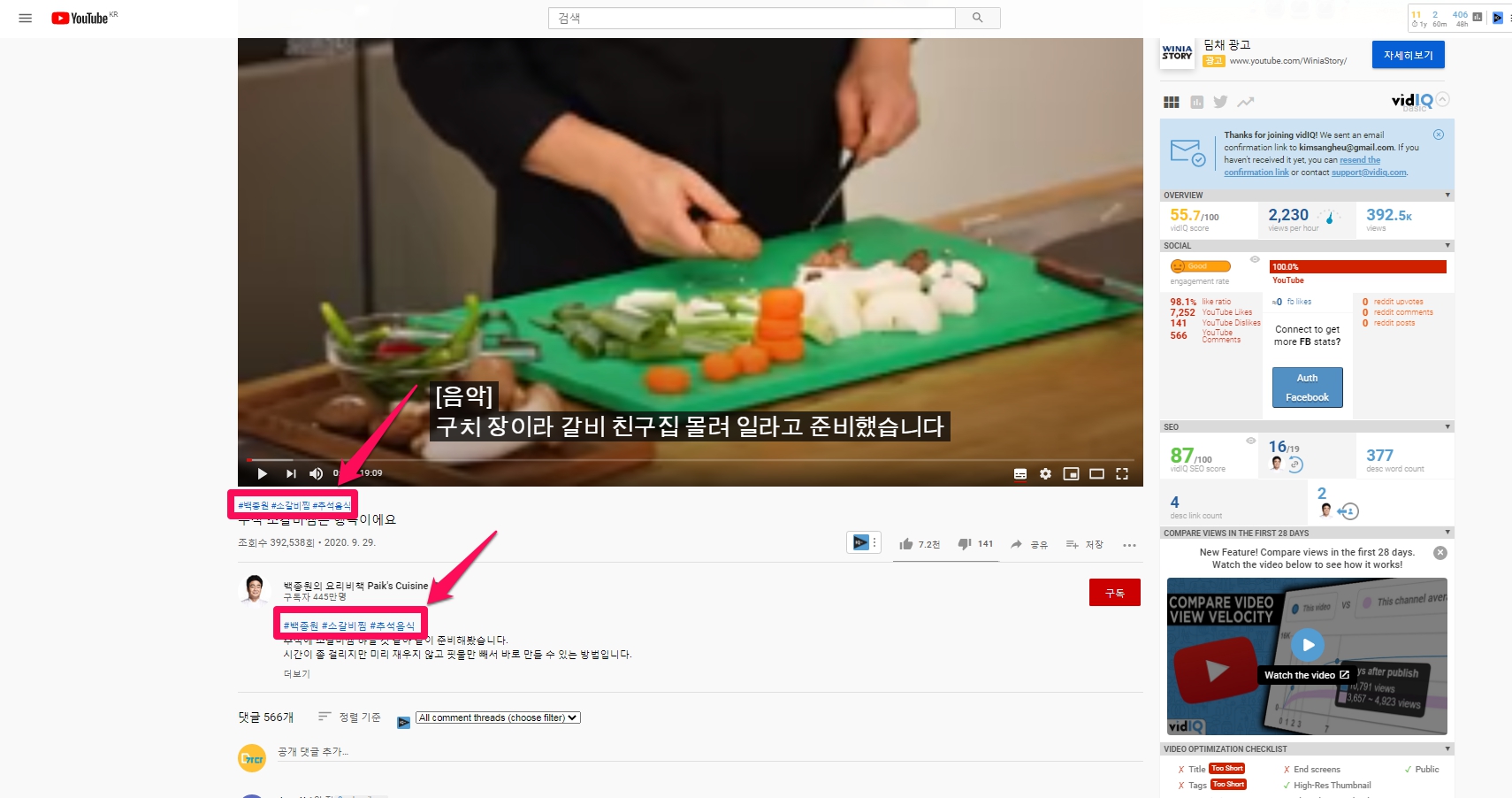
Add hashtags to your video
1. How to add a hashtag (eg #hashtag #example) to the title or description of your video in the video upload step
- In the video upload stage, put hashtags in the title and description.
- The #hash tag will be turned into a hyperlink only when you attach the hyperlink described above.
- When users click on a hashtag in the video title, above the video title, or in the description, they will be taken to the hashtag search results page to view related videos.
- How to add hashtags using YouTube upload settings
- You can use it conveniently by registering hashtags with keywords representing channels or videos in the basic information in the YouTube upload settings in advance. (Refer to the hyperlink and YouTube upload settings described above.
Too many hashtags
Is it important to use YouTube tags? #Bigfoot 9 According to Bigfoot 9, if you follow YouTube’s Community Guidelines to over-hash-tag YouTube videos, YouTube will ignore more than 15 hashtags, and over-tagging may result in your video being removed from uploads or search results. . Please use no more than 15 hashtags.
Bigfoot tag analysis
Bigfoot ( https://bigfoot9.com/youtube/today-channel) provides statistics about channels, including tags.
I can see the statistics for the channel, but I can’t find the statistics for the video tag.
It is said that it is possible to view the average number of views per tag per video, but it seems to be only available in paid services.
References: 1. Is it important to use YouTube tags? #Bigfoot 9
2. The 12 Youtube Ranking Factors In 2016 For Video SEO ( http://selfmadesuccess.com/youtube-ranking-factors-2015-video-seo/ )