- 인터넷은 우리에게 자유를 주었습니다. 저희는 자유를 얻기 위해 지식을 통합하고 체계화하고 공유합니다. 랜선 위 정글에서 살아남기 위해 저희는 시키는 일만 하는 꿀벌 대신 고객을 위해 창조하고 혁신하는 게릴라가 되겠습니다. Seenbuy.kr is now Aiforu.kr.
- 024042463
- 01032667931
- [email protected]


워드프레스 플러그인으로 리뷰 스키마 간단 적용하기 : Rate my Post – WP Rating System 플러그인

필요충분 조건
워드프레스에서 리뷰 스키마를 지원하는 플러그인들은 많습니다. 그러나 플러그인을 선택함에 있어 가장 중요한 요소는 설치후 과연 리뷰 스키마가 잘 적용되어 궁극적으로 구글 검색결과에 표시되느냐 일 것입니다.
이런점을 고려할때 Rate my Post – WP Rating System 플러그인을 추천함에 주저함이 없습니다.
단 Schema & Structured Data for WP & AMP 플러그인 : Product schema(제품 스키마)와 같이 사용하면 충돌이 나서 Schema & Structured Data for WP & AMP 플러그인 : Product schema(제품 스키마)가 작동하지 않으므로 같이 사용하지 말아주세요.
Rate my Post – WP Rating System 플러그인
By Blaz K.
개요
- Version:3.3.3
- Last updated:5 months ago
- Active installations:10,000+
- WordPress Version:4.7.0 or higher
- Tested up to:5.8.2
- PHP Version:5.3 or higher
- Languages:See all 10
이토록 쉽게 리뷰 스키마를 적용하시는 플러그인을 보지 못해 먼저 keep합니다.
이 플러그인은 post는 기본 페이지에도 간단하게 추가할 수 있는 것이 큰 장점입니다.
관리자도 클릭 한 번으로 리뷰 스키마를 적용할 수 있습니다. (리뷰를 부탁할 필요가 없습니다.)
Rate my Post – WordPress Post Rating Plugin(1:30)
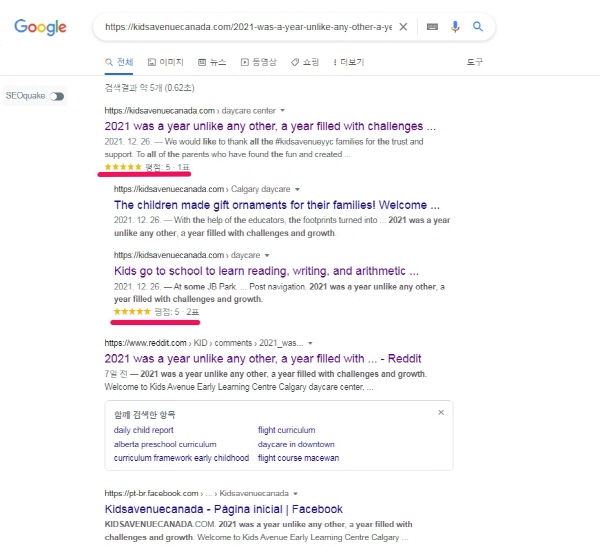
구글 검색결과 페이지의 반영된 결과
SEO를 대행했던 https://kidsavenuecanada.com/ 에 Rate my Post – WP Rating System 를 적용후 1 주일뒤 검색결과에 반영되는지 확인하였습니다. 탁월합니다.
Rate my Post Plugin Documentation ( https://blazzdev.com/documentation/rate-my-post-documentation/ )
위에 링크에서 개발자가 제공하는 Documentation(상세 사용법)을 살펴볼 수 있습니다. 이미지가 첨부되어 있어 구글 번역하시면 사용하시는데 모자람이 없을 것입니다.
- Installation
- Getting Started
- Options
- Filters
- Actions
- Global Functions/Methods
- Javascript Functions/Methods
- CSS Snippets
- Custom Templates
- Troubleshooting
- AMP Compatibility (BETA)
- Tutorials
사용법 상세
플러그인은 크게 [Settings], [Stats] [Analytics]으로 이루어집니다.
Settings
워드프레스 대쉬보드의 좌측 메뉴들 중 [Rate my Post] -> [Settings]에서 상세 설정할 수 있습니다. 이 플러그인은 post는 기본 페이지에도 간단하게 추가할 수 있는 것이 큰 장점입니다.
Settings은 [Settings], [Customize], [Security], [Tools], [About], [Pro Version]으로 이루어저 있습니다.
[Settings]
Add rating widget to all posts : 체크하시면 모든 포스트에 별점 입력 위젯이 표시됩니다.
Add rating widget to all pages : 체크하시면 모든 페이지에 별점 입력 위젯이 표시됩니다. 위젯이 영어권 스타일이라 이질감이 느껴지시면 아래의 [Customize] 에서 한글화하시면 많이 개선됩니다. 검색결과에 리뷰스키마가 적용되어 페이지에서 사용하시기를 권장하나 웹사이트와 너무 어울리지 않으시면 체크를 풀어주세요.
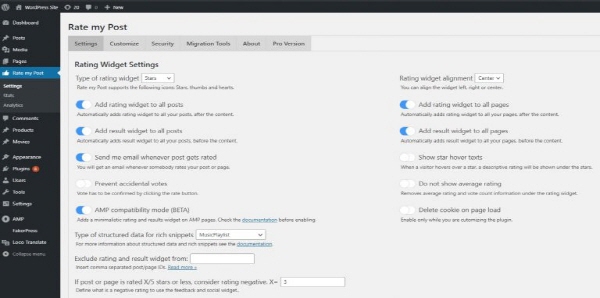
( 이미지 출처 : Rate my Post Plugin Documentation )
Rating Widget Settings
|
Rate my Post supports the following icons: Stars, thumbs and hearts. |
You can align the widget left, right or center. |
|
Automatically adds rating widget to all your posts, after the content. |
Automatically adds rating widget to all your pages, after the content. |
|
Automatically adds result widget to all your posts, before the content. |
Automatically adds result widget to all your pages, before the content. |
|
You will get an email whenever somebody rates your post or page. |
When a visitor hovers over a star, a descriptive rating will be shown under the stars. |
|
Vote has to be confirmed by clicking the rate button. |
Removes average rating and vote count information under the rating widget. |
|
Adds a minimalistic rating and results widget on AMP pages. See the documentation. |
Enable only while you are cutomizing the plugin. |
For more information about structured data and rich snippets see the documentation.
Insert comma separated post/page IDs. Read more »
Define what is a negative rating to use the feedback and social widget..
-> 게시물 또는 페이지의 별점이 설정된 값이하로 체크되면(예를들면 별 2개 이하로 체크되면) ‘부족한 점을 알려주세요’와 같이 팝업이 뜨게 하는 기능입니다. 팝업으로 표시되는 내용은 [Customize]의 Strings – Feedback Widget 부분에 있으며 이 부분을 한글화해주세요.
Feedback Widget Settings
|
Encourage users to help you improve your posts. Only you can see the feedback. The feedback widget will be shown in case of a negative rating. |
You will get an email whenever somebody leaves you private feedback. |
Social Widget Settings
|
Encourage users to follow you on social media. Insert links to your social media profiles below. The social widget will be shown in case of a positive rating. |
Enable this option if you want to show social share links instead of social follow links. Supported networks: Facebook, Pinterest, Twitter and Reddit. |
If you do not want an icon to be displayed, leave the field below empty!
Custom Post Types
Insert comma separated post types. Registered custom post types:
Insert comma separated post types. Registered custom post types: gd_place, mailpoet_page, saswp, template, portfolio, saswp_reviews, saswp-collections
Archive Pages
|
Ratings will be shown on archive pages (categories, tags, author pages etc.) next to the title. |
Advanced Settings
|
If your website is available in multiple languages enable this option. You will not be able to customize strings in the customize section. Instead customize strings through your plugin for translations. |
If you are utilizing page caching, enable this option. Not required if you use WP Super Cache, LiteSpeed Cache, WP Fastest Cache, WP Rocket or SG Optimizer. |
|
If enabled all plugin data (settings, customization, vote count, rating and feedback) will be deleted when you uninstall the plugin. |
[Customize]
게시글, 페이지 등에 보여지는 모습은 아래와 같은데, 분홍색 네모칸을 사용자 정의할 수 있는 부분이 [Customize]인데, 한글화하면 국내 사용자에게도 쉽게 다가갈 수 있어 더 좋습니다.

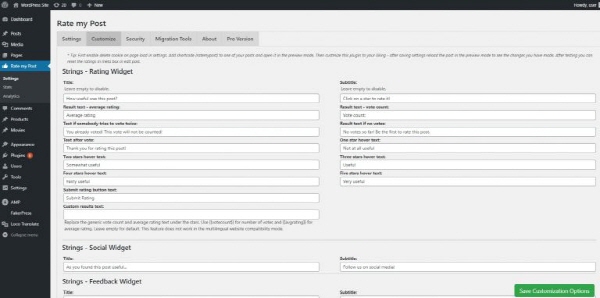
( 이미지 출처 : Rate my Post Plugin Documentation )
[Security]
Tracking 을 Yes으로 변경하면 [Analytics]에서 ip, user를 볼 수 있습니다.

[Tools]
[About]
[Pro Version]
[Stats]
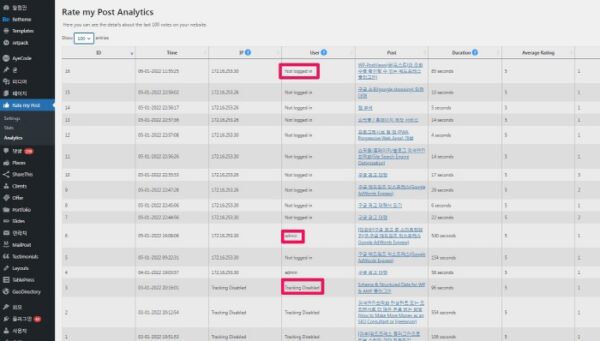
[Stats] 게시글별, 페이지별 집계를 보여주고 [Analytics]는 vote별로 분석자료를 보여주는데 ip, user를 추적할 수 있고 머문 시간(Duration)도 확인이 가능합니다.

[Analytics]
Settings 의 [Security] 에서 Tracking 을 Yes으로 변경하면 여기([Analytics])에서 ip, user를 볼 수 있습니다. user 항목에는 Not logged in(로그인하지 않은 상태에서 별점을 남김), admin(별점을 남긴 사람이 admin임), Tracking Disabled(Tracking 을 Yes으로 변경하기 이전에 별점을 남겨 추적을 하지 못한 경우입니다.)
워드프레스 편집창에서 직접 입력 가능
강제로 집어넣은 평점도 그대로 구글 검색 결과 페이지에 그대로 반영되는데, 시간이 조금 걸립니다. 웹마스터 도구에서 수동색인 요청을 해주셔야 빨리 반영이 됩니다.

다른 WP Rating 플러그인들
플러그인에서 WP post rating 으로 조회하면 꽤 많은 플러그인이 나옵니다.
참고자료 : 1. Rate my Post Plugin Documentation

1 Comment
Thanks.