인터넷은 우리에게 자유를 주었습니다. 저희는 자유를 얻기 위해 지식을 통합하고 체계화하고 공유합니다. 랜선 위 정글에서 살아남기 위해 저희는 시키는 일만 하는 꿀벌 대신 고객을 위해 창조하고 혁신하는 게릴라가 되겠습니다. Seenbuy.kr is now Aiforu.kr.
해정구역중 시를 벗어나지 못하는 문제를 해결하기 위해서는 더 많은 국가, 지역 또는 도시를 추가하려면 “위치 관리자”애드온을 설치해야합니다.
가격은 아래와 같습니다. 이 플러그인을 부족함 없이 사용할 수 있을 때까지 몇개의 addon이 추가되어야 할지 모르지만 구글 지도 API를 이 플러그인처럼 쉽게 연결할 수 있는 워드프레스 플러그인은 없습니다. 이 플러그인의 장점은 예로 들면, 사용자가 스마트폰에서 list를 조회하고 경로(탐색)요청이 가능합니다. 즉, 구글 지도 관련 API를 모두 이용할 수 있습니다. GEODirectory 의 다른 기능들을 검증해 보고 Unlimited로 구입하는 것을 고려중입니다. .
Single Site – $39.00
2 – 5 Sites – $49.00
Unlimited Sites – $89.00
특징들
글로벌 비즈니스 디렉토리
디렉토리 웹 사이트가 여러 도시를 포함하는 경우 위치 관리자 애드온이 필요합니다. WordPress.org에서 무료로 제공하는 핵심 플러그인은 1 개 위치 (도시, 마을 또는 마을) 내에서만 목록을 제출할 수 있습니다. 위치 관리자를 사용하면 디렉토리를 확장하고 글로벌화 할 수 있습니다!
무제한 위치. – GeoDirectory Locations Manager 애드온을 사용하면 목록에 대한 무제한 위치를 만들 수 있습니다.
위치를 미리 채울 필요가 없습니다. – 위치를 미리 채울 필요가 없으므로 시간을 절약 할 수 있습니다. 사용자가 목록을 추가하는 동안 위치가 채워집니다. Google API 또는 Open Street Maps가 정확한 세부 정보를 얻습니다.
특화된 지역별 디렉토리 생성에 문제가 없습니다. – 위치 관리자는 목록을 모든 위치들을 국가, 지역, 도시별로 제한할 수 있습니다. 3 개국, 5 개 지역, 12 개 도시? 문제 없어요.
SEO 친화적인 위치 페이지 생성 – 모든 위치 페이지에는 고유한 메타 정보, 텍스트 설명 및 추천 이미지가 있을 수 있습니다. 기본적으로 대체 변수 (%% location_name %%)를 사용하여 전세계 표준인 메타 정보를 채울 수 있습니다. 이것은 이 애드온에서 설정하는 것이 아니고 Yoast SEO 플로그인에서 설정해 주거나 [GEODitectory] 기본 플러그인의 [Settings] -> [General] -> Titles & Meta]에서 설정해주세요.
Yoast SEO 사이트 맵 지원. – Yoast SEO 플러그인을 사용하십니까? GeoDirectory는 자동으로 위치에 대한 사이트 맵을 생성합니다.
다중 위치 디렉토리의 핵심 부분은 위치를 전환할 수 있다는 점입니다. 스마트 위치 스위처는 이것을 쉽게 만듭니다.
위치에 따라 자동 위치 제안. – 위치 전환기를 열면 사용자의 위치를 기반으로 가장 가까운 도시 목록이 표시됩니다. 사용자는 항상 가장 관련성 높은 제안을 받습니다.
AJAX 기반 위치 제안. –보고자하는 위치를 입력하기 시작하면 AJAX가 데이터베이스에 저장된 위치를 검색합니다.( AJAX-based location suggestions. – Start typing the location you want to view, and we will AJAX search for any stored locations in the database. )
대체 근접 검색. – 검색이 사용자의 위치 데이터베이스에서 0 개의 결과를 반환하면 당사는 검색 텍스트를 자동으로 지오 코딩합니다. Google API 또는 OSM API에서 위치 제안 목록을 제공하십시오. 사용자가 해당 위치에 대한 근접 검색을 수행하도록합니다. 따라서 데이터베이스에 위치가 없더라도 사용자 검색에 가장 가까운 목록을 계속 표시 할 수 있습니다.
Fallback proximity search. – If a search returns zero results from your location database, we will; Automatically geocode the search text; Provide lists of location suggestions from the Google API or OSM API; Let the user do a proximity search for that location. So even if a location is not in your database, you can still show listings nearest to the users’ search.
저장된 검색 기록. – 위치 스위처를 다시 열면 빠른 액세스를위한 최근 검색 결과가 표시됩니다.( Saved search history. – Opening the location switcher again will show recent search results for quick access. )
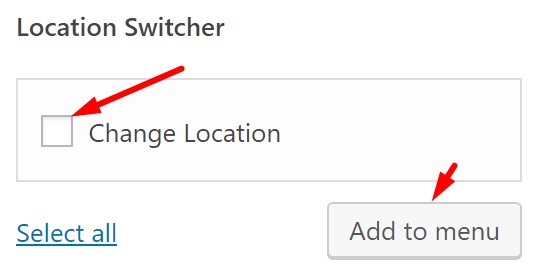
원하는 위치 스위처. – 스위처는 여러 가지 방법으로 액세스 할 수 있으며 가장 쉬운 방법은 메뉴 항목입니다. 당사의 GeoDirectory 메뉴 항목에는 스위처가 포함되어 있으며 메뉴의 어느 위치에서나 사용할 수 있습니다. 스위처는 단축 코드, 위젯 또는 블록을 통해 표시 될 수 있으며 페이지 작성기 친화적입니다.( Location switcher where you want it. – The switcher can be accessed in many ways, the easiest of which is a menu item. Our GeoDirectory menu items include the switcher, use it in any position on any menu. The switcher can also be shown via a shortcode, widget, or block and is page builder friendly. )
REST API. – 위치 스위처가 수행 한 모든 위치 쿼리는 WordPress REST API를 통해 이루어 지므로 요청이 더 빠르고, 미래에 대비되며, 개발자에게 친숙합니다.( REST API. – All location queries made by the location switcher are via the WordPress REST API, meaning requests are faster, future proof, and developer-friendly. )
이 기능은 위젯을 추가하면 그 기능을 확인할 수 있습니다. 다른 어떤 위치에서 작동하는지는 추가로 알아보고 올려드리겠습니다.( memo : 단축 코드, 위젯 또는 블록으로 사용할 수 있으며 elementor 와 같은 페이지 빌더를 이용하여 사용할 수 있는 것 같습니다. )
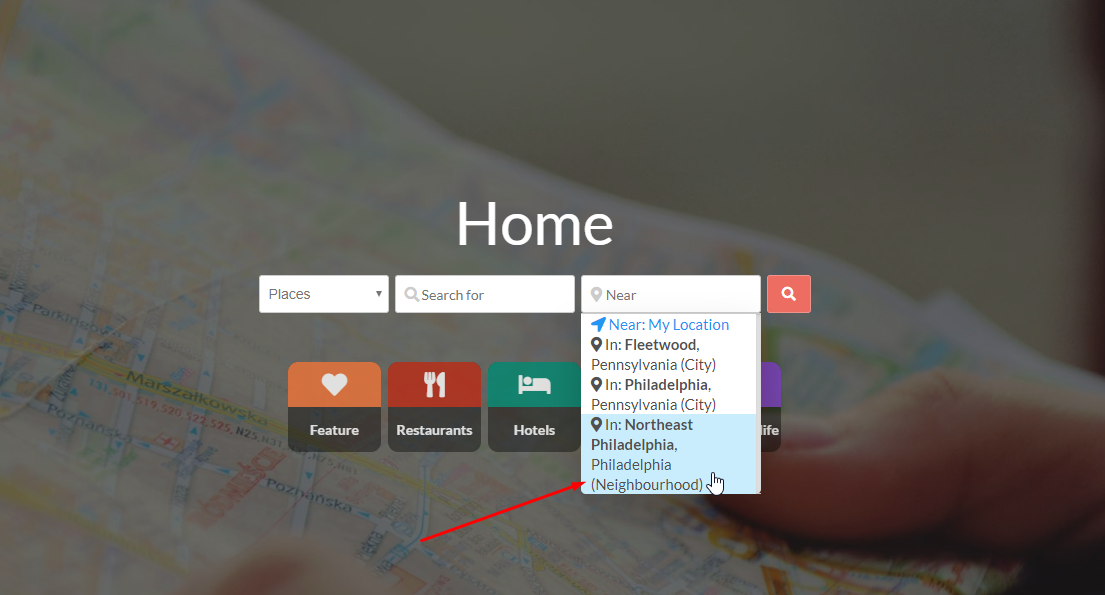
스마트 한 위치 검색. – 디렉토리 검색 표시 줄의 근거리 필드에는 위치 전환기의 동일한 지능형 위치 정보 기능이 있습니다. 위치 검색은 사용자에게 빠르고 쉽습니다.( Smart location searches. – The Near field of the directory search bar has the same intelligent geo-location features of the location switcher. Location searches are quick and easy for your users.)
현재 위치를 표시하십시오. – 검색 창에 현재 위치가 표시됩니다. 사용자는 검색 위치를 정확하게 알고 있습니다. 필드 위로 마우스를 가져 가면 필드를 지우고 사용자가 새 위치를 검색 할 수있는 X가 표시됩니다.( Show the current location. – The search bar will show the current location. Users know precisely where they are searching. Merely hovering over the field will display an X that can clear the field and let the user search for a new location. )
위치 인식 URL. – “Near me”검색은 항상 URL에 GPS를 포함합니다. 위치 전환기에서 내 주변을 선택하면 친구와 쉽게 공유 할 수있는 예쁜 영구 링크가 생성됩니다. /location/near/me/39.952371,-75.163601/( Location-aware URLs. – “Near me” searches always contain the GPS in the URL. Selecting near me from the location switcher will result in a pretty permalink that is easy to share with friends: /location/near/me/39.952371,-75.163601/ )
위치 인식 자동 완성. – 고급 검색 애드온과 함께 사용하는 경우 위치 관리자는 AJAX 검색 제안을 현재 위치로만 제한하도록 필터링하거나 디렉토리 요구에 따라 모든 위치를 검색하도록 설정할 수 있습니다.( Location-aware autocompletes. – When paired with our Advanced Search addon, the location manager can filter AJAX search suggestions to be limited to the current location only (or set to search all locations depending on your directory needs) )
스마트 위치 스위처( Our Smart Location Switcher ) 와 스마트 위치 검색(Smart Location Searches ) 는 검색자의 검색위치를 기반으로 하는 훌륭한 기능입니다. 그러나 PC / 태블릿등에서 사용해 보면 아래와 같이 인터넷 브라우저(browser)로는 위치를 감지할 수 없다는 Error 메제시가 나옵니다. 물론 아래의 이미지의 초록색처럼 등록해 놓은 city 들이 나오므로 선택지는 좋습니다.
ERROR : Location detection not supported in browser
Would you like to manually set your location?
또한 Would you like to manually set your location? 라는 질문에 답하듯 검색자의 위치를 수동으로 아래와 같이 설정할 수 있습니다.
위치를 감지할 수 없는 것이 브라우저의 문제(Location detection not supported in browser)라고 하니, PWA(Progressive Web App)로 사이트를 만들면 어떤 결과가 나오는지 실험해 보고 그 결과는 나중에 다시 올리겠습니다.
여기부터 정리해 주세요.
Advanced Near Me Filtering
Mobile phone GPS support. – When doing a near search on mobile, GPS improves accuracy.
HTML5 Geolocation Support. – Asking users to share their location in the browser (HTTPS Required) provides far greater accuracy than old-style IP geolocation.
Fallback Map Pin Support. – If HTML5 geolocation fails or is denied, the user will be presented with a map to be able to drag a pin to the location they wish to search. This map automatically centers on the geolocation of the IP request, meaning it will never be far off the user’s actual location.
고급 니어미 필터링
휴대폰 GPS 지원. – 모바일에서 근접 검색을 수행 할 때 GPS는 정확도를 향상시킵니다.
HTML5 지리적 위치 지원. – 사용자에게 브라우저에서 자신의 위치를 공유하도록 요청 (HTTPS 필수)하면 구식 IP 지리적 위치보다 훨씬 정확한 정확도를 제공합니다.
대체 맵 핀 지원. – HTML5 지리적 위치가 실패하거나 거부 된 경우 검색하려는 위치로 핀을 드래그 할 수있는 맵이 사용자에게 표시됩니다. 이지도는 IP 요청의 지리적 위치를 자동으로 중심에두고 사용자의 실제 위치에서 멀지 않습니다.
( all our widgets can be used as either a shortcode, widget or block and are page builder friendly )
Location Switcher. – Our location switcher lets users filter the site by database location, near me, or proximity to any location.
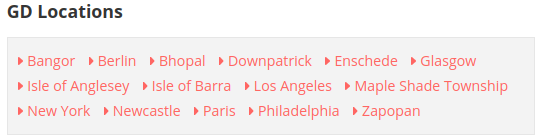
Locations. – This widget outputs either a list or image grid of the locations on your site. Results can be limited to a specific area and can use ajax paging.
Near Me Button. – Show a button anywhere that will take the user to a location page showing listings closest to the user.
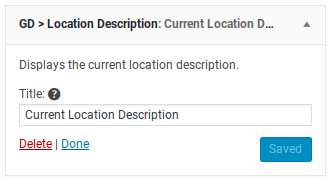
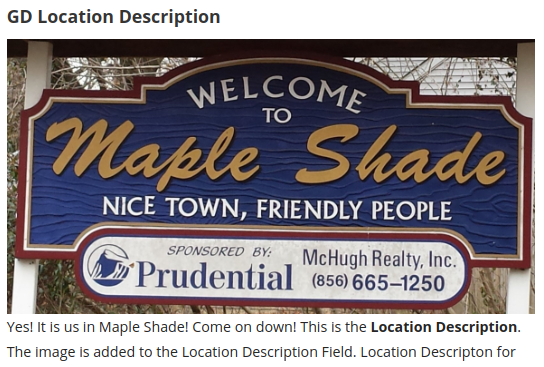
Location Description. – Display the current location description. Used to show a custom description for a location page, edit this under each location in the admin area.
위치 관리자 위젯
(모든 위젯은 단축 코드, 위젯 또는 블록으로 사용할 수 있으며 페이지 작성기 친화적입니다)
위치 스위처. – 우리의 위치 전환기는 사용자가 데이터베이스 위치, 내 근처 또는 모든 위치에 근접하여 사이트를 필터링 할 수 있습니다.
위치. –이 위젯은 사이트 위치의 목록 또는 이미지 표를 출력합니다. 결과는 특정 영역으로 제한 될 수 있으며 아약스 페이징을 사용할 수 있습니다.
내 버튼. – 사용자에게 가장 가까운 업체 정보를 표시하는 위치 페이지로 연결되는 버튼을 아무 곳이나 표시합니다.
위치 설명. – 현재 위치 설명을 표시합니다. 위치 페이지에 대한 사용자 정의 설명을 표시하려면 관리 영역의 각 위치에서이를 편집하십시오.
Search Locations. – Native WordPress table views mean you can effortlessly search and find the locations you want.
Duplicate locations Merging. – Similar locations can end up in your database, either through user spelling or a bad import name. We have a tool that lets you merge these two locations, automatically fixing all permalinks for the listings affected.
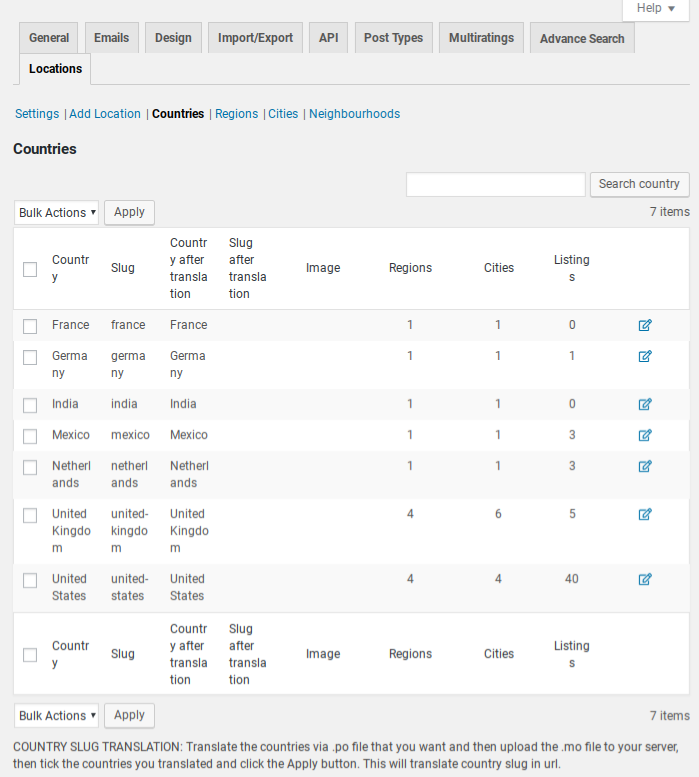
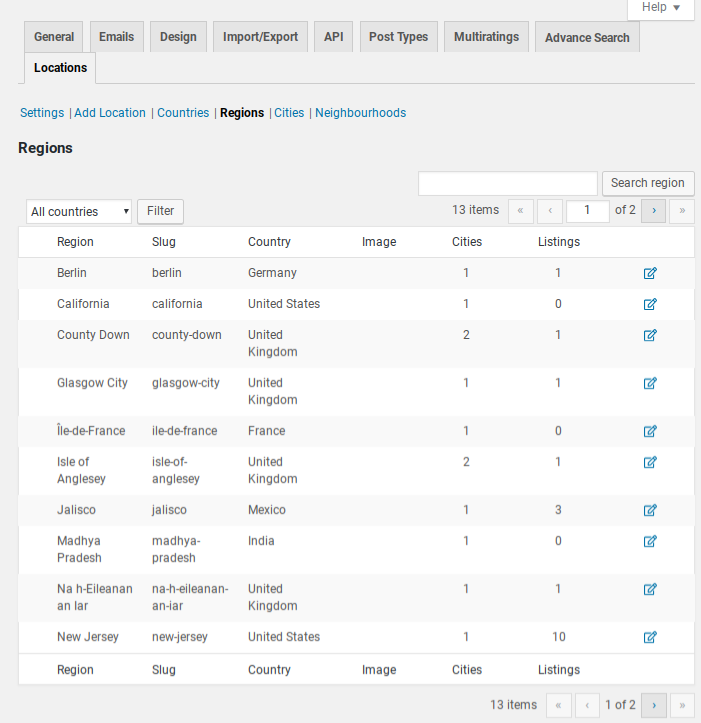
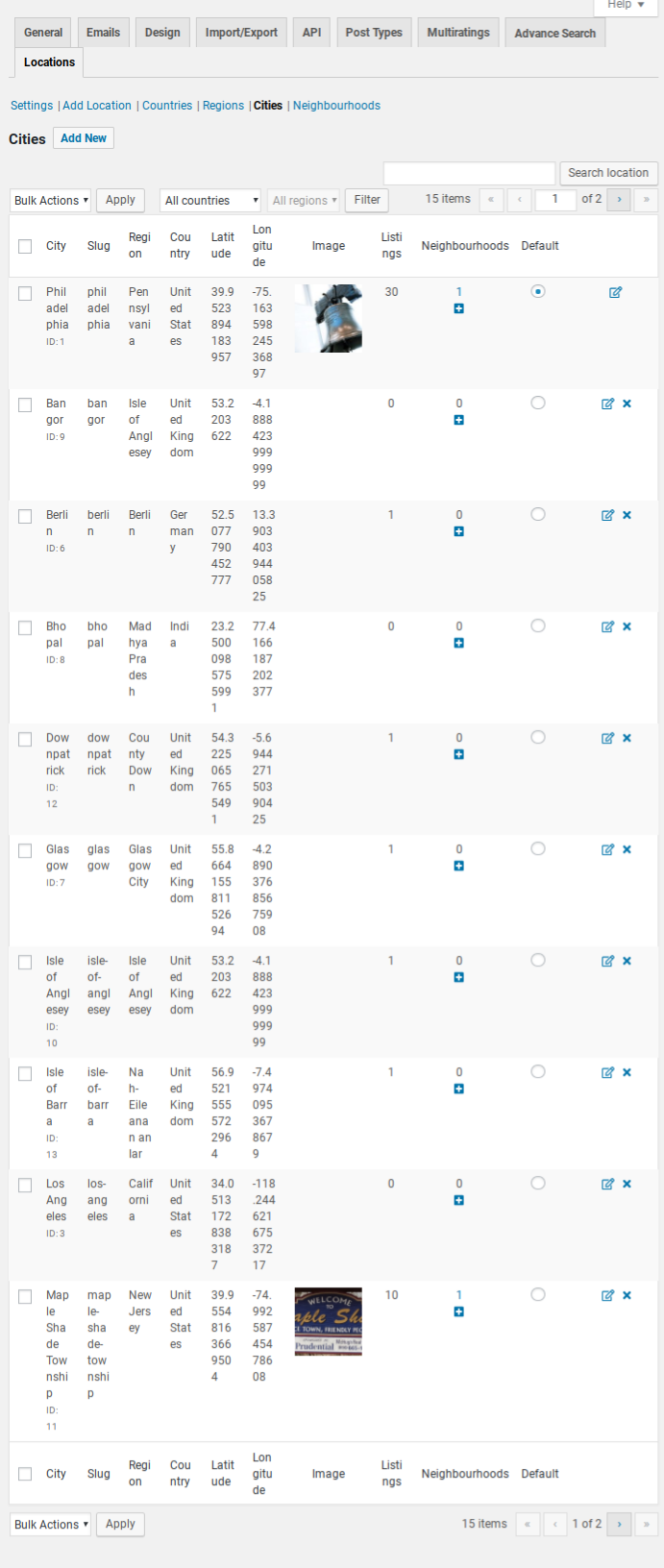
A quick snapshot of numbers. – See exactly how many listings you have in a Country, Region, or City.
단순화 된 관리자 컨트롤
검색 위치. – 기본 WordPress 테이블보기를 통해 원하는 위치를 쉽게 검색하고 찾을 수 있습니다.
중복 된 위치 병합. – 사용자 맞춤법이나 잘못된 가져 오기 이름을 통해 비슷한 위치가 데이터베이스에있을 수 있습니다. 이 두 위치를 병합하여 영향을받는 목록에 대한 모든 영구 링크를 자동으로 수정하는 도구가 있습니다.
숫자의 빠른 스냅 샷. – 국가, 지역 또는 도시에 얼마나 많은 업체 정보가 있는지 확인하십시오.
라이센스 키를 입력하기 위해서는 라이센스 키를 관리하는 아래의 플러그인을 설치하셔야 합니다.
Install AyeCode Connect and forget about entering license keys or downloading zip files.(AyeCode Connect를 설치하고 라이센스 키를 입력하거나 zip 파일을 다운로드하는 것을 잊지 마십시오.) Or for manual install simply go to Plugins > Add New, and search for “AyeCode Connect”.(새 사이트 연결 또는 수동 설치의 경우 플러그인> 새로 추가로 이동하여 “AyeCode Connect”를 검색하십시오.)
선택 사용 – 사용자에게 옵션으로 제공할 특정 위치를 선택하십시오.( Enable Selected – select specific locations to present as options to your users. )
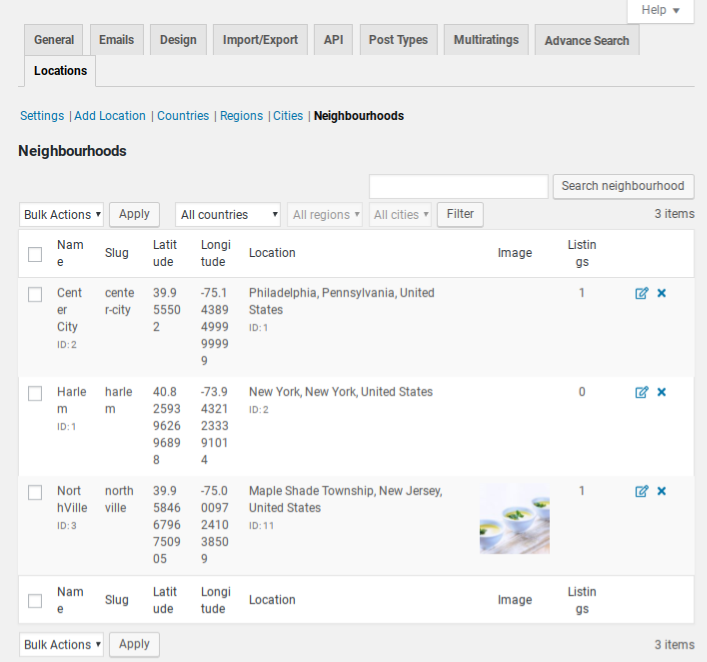
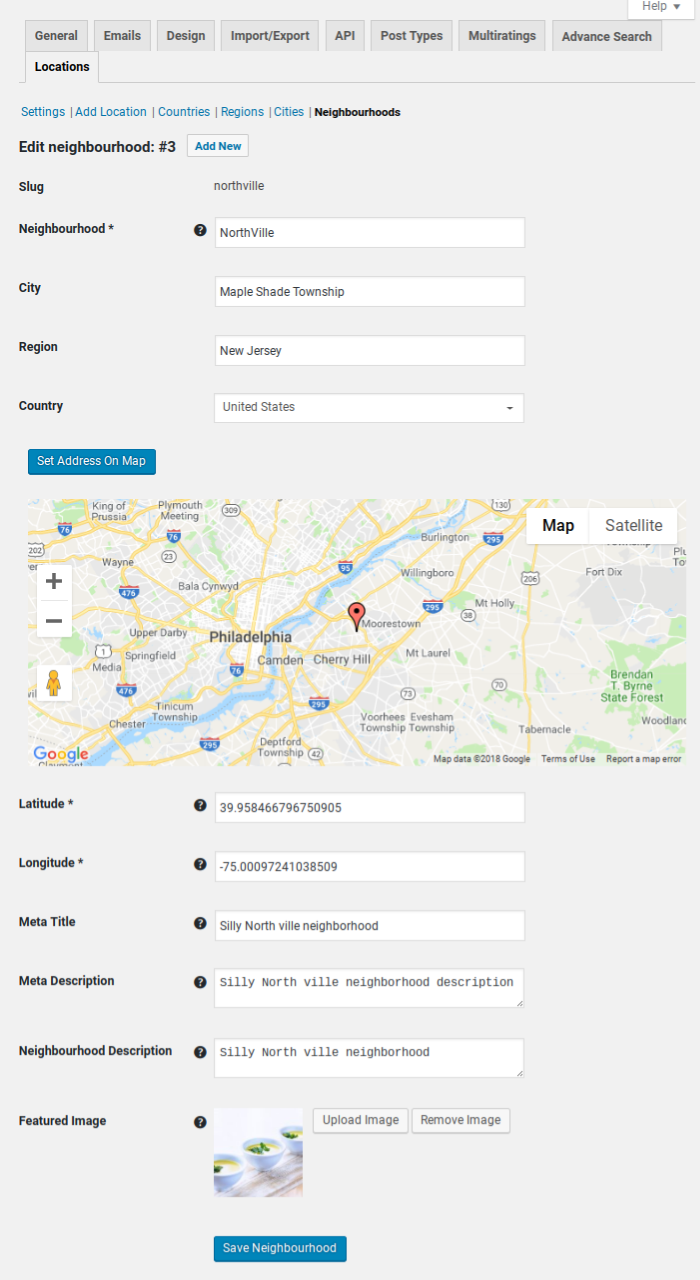
Enable neighborhoods?(이웃을 사용 하시겠습니까?)
활성화하면 도시 탭에서 새 이웃을 추가 할 수 있습니다.
Add listing form(리스팅 양식 추가)
Disable address autocomplete?(주소 자동 완성을 비활성화 하시겠습니까?)
일부 사이트는 사용자의 편의를 위해 자유로운 주소 입력을 허용하려고합니다. 자동 완성을 비활성화하려면이 옵션을 선택하십시오.
Other(기타)
Enable location search autocompleter?
This will enable location autocomplete search on the location search bar.
Min chars needed to trigger location autocomplete(위치 자동 완성을 실행하는 데 필요한 최소 문자)
Disable nearest cities?(가장 가까운 도시를 비활성화 하시겠습니까?)
위치 전환기 및 검색 양식에서 위치 검색 입력에 처음으로 초점을 맞추면 사용자 IP를 기반으로 가장 가까운 도시 결과가 표시됩니다. 처음으로 입력 할 때 이 가장 가까운 도시 결과를 비활성화하려면 체크하십시오.( In location switcher and search form first time focus to location search input shows nearest city results based on user IP. Tick to disable this nearest city results on first time focus to input.)
설명을 읽어 보면 굳이 비활성활 이유가 없습니다.
Disable term auto count?
업체 정보가 많은 공유 호스팅에서 자동 용어 수로 인해 업체 정보를 저장하는 데 시간이 오래 걸릴 수 있습니다. 여기에서 사용 중지하는 경우 호스팅을 업그레이드하고 다시 사용하도록 설정할 때까지 GD Tools (도구)> Location category counts(위치 카테고리 수)를 수동으로 실행해야합니다. 그렇지 않으면 위치 용어 및 리뷰 수가 잘못 될 수 있습니다.(On shared hosting with lots of listings, saving a listing may take a long time because of auto term counts, if you disable them here you should manually run the GD Tools > Location category counts, often until you can upgrade your hosting and re-enable it here, otherwise your location term and review counts can be wrong.). 이 부분은 의미를 잘 모르겠습습니다.
Yoast SEO sitemap
Exclude location pages in xml sitemap(XML 사이트 맵에서 위치 페이지 제외)
저는 Yoast SEO 플러그인을 애용하고 있습니다. 그러나 사이트맵은 Google XML Sitemaps 플러그인으로 생성하여 이용하고 있습니다. 저와 같이 Yoast SEO 플러그인외에 다른 플러그인으로 사이트맵을 생성하는 경우, check해주세요.
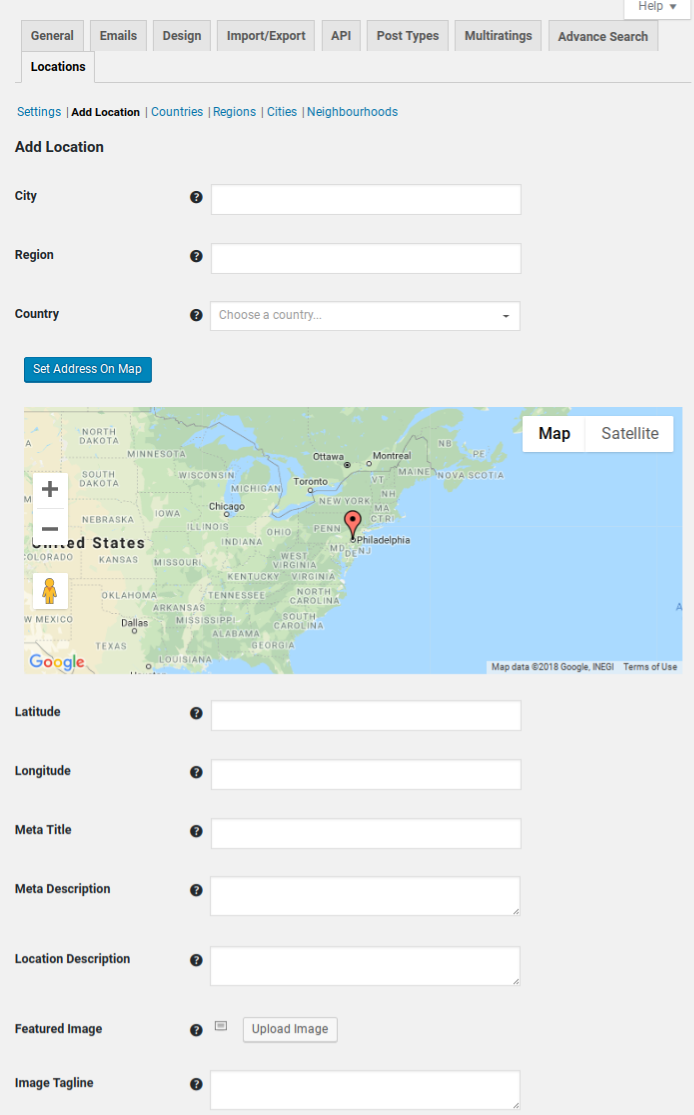
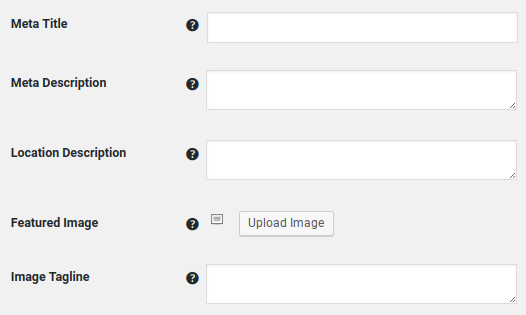
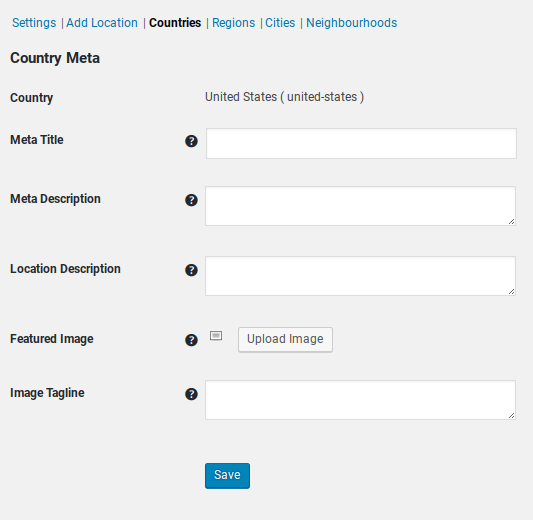
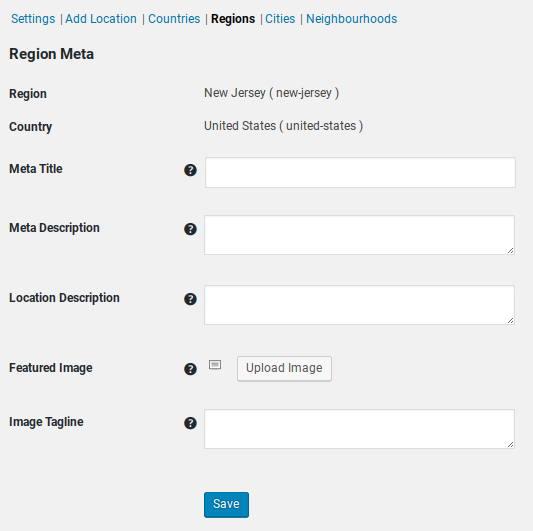
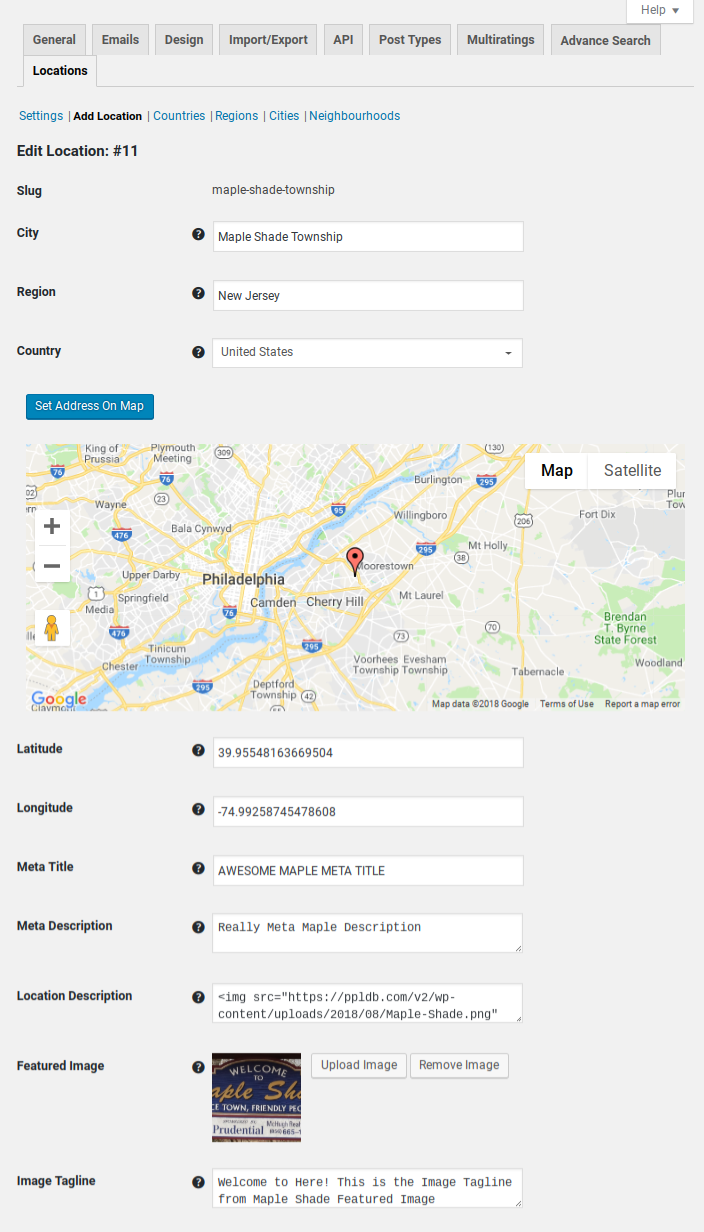
Each location has a set of fields where you can add information specific to that location.
Meta Title
The Meta Title of the page for this location.
Meta Description
The Meta Description of the page for this location.
Location Description
Each location has a Location Description, so, there are lots of ways to add unique content by filling in each location description with unique content about the location.
Enter information about the location. The field supports HTML. This field is displayed with the Location Description Widget or Shortcode.
To enable shortcodes in this field, add this snippet:
Each location type has a Location Description field. Add your HTML into the Location Description field, and then use the widget to display that content to site visitors.
This shortcode can be used on the location page template:
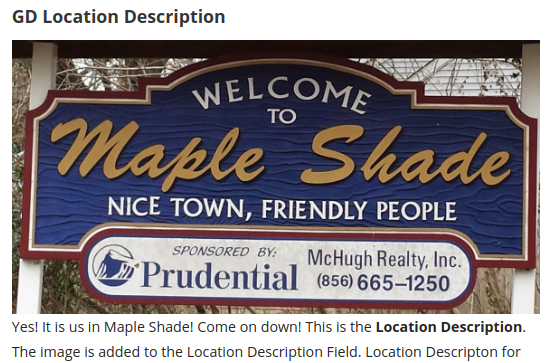
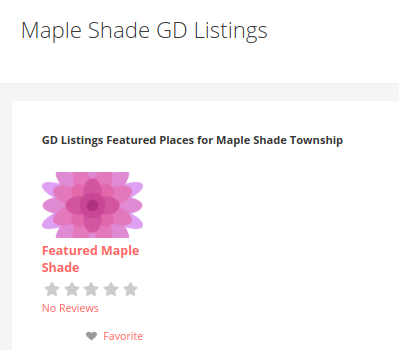
It shows the contents of the Location Description field. For example, here it is showing the Location Description for Maple Shade (City) on the location page for Map Shade city (/location/united-states/new-jersey/maple-shade).
소개글 인천 남동구 서창동에 위치한 프리미엄 아로마 & 스웨디시 전문점입니다. 🌿 전문 관리 서비스 숙련된 전문 관리사가 뭉친 근육과 피로를 부드럽게 풀어드립니다. 고품질 아로마 오일을 활용한 전신 관리로 심신 안정과 깊은 휴식을 경험하실 수 있습니다. 🏠 프라이빗한 힐링 공간 개별 관리실로 구성되어 프라이버시가 보장되며, 은은한 조명과 아로마 향이 어우러진 편안한 환경을 제공합니다. 🅿️ 편의 시설 무료 주차, 쾌적한 Read more...
소개글 ✨ 경기도 평택시 비전동에 위치한 테라피 전문샵 더청담타이입니다. 💆♀️ 전문 테라피스트가 고객님 개개인의 신체 상태와 니즈에 맞춰 스웨디시, 타이, 로미로미, 아로마 테라피 등 다채로운 관리 프로그램을 제공합니다. 아로마 오일과 체계적인 테크닉을 활용하여 심신의 이완과 원활한 순환을 돕고, 일상 속 피로를 해소하는 데 집중합니다. 🏠 프라이빗한 전용 개인실을 완비하여 조용하고 쾌적한 환경에서 관리받으실 수 있으며, 각 관리실 내 Read more...
소개글 🌟 디오빌휴타이: 강남 서초의 프리미엄 힐링 공간 서울 강남과 서초의 중심, 지친 일상에 완벽한 쉼표를 선사하는 디오빌휴타이입니다. 저희는 고객님 한 분 한 분의 온전한 힐링과 최고의 만족감에 집중합니다. 🙏 📍 접근성 및 운영 안내 강남역 5번 출구에서 도보 약 7분 거리! 🚶♀️ 🚶♂️ 차량 이용 고객을 위한 지하 주차장이 완비되어 있습니다. 🚗🅿️ 운영 방식: 고객님의 편안함을 위해 Read more...
소개글 경기도 안양에 위치한 아로마 & 림프 관리 전문샵입니다 🌿 연화스웨디시는 일상의 무게를 내려놓고 진정한 휴식을 원하시는 고객님을 위한 프리미엄 힐링 공간입니다. 숙련된 전문 테라피스트가 아로마 오일을 활용한 전신 스웨디시 관리와 림프 순환에 집중하는 림프 케어를 제공하여, 몸 전체의 피로와 스트레스를 효과적으로 해소해드립니다 💆♀️ 저희의 핵심 강점은 부드럽고 섬세한 관리 스킬을 통해 근육의 긴장을 풀어주고, 순환 촉진 및 Read more...
소개글 🌟 디오빌휴타이: 강남 서초의 프리미엄 힐링 공간 서울 강남과 서초의 중심, 지친 일상에 완벽한 쉼표를 선사하는 디오빌휴타이입니다. 저희는 고객님 한 분 한 분의 온전한 힐링과 최고의 만족감에 집중합니다. 🙏 📍 접근성 및 운영 안내 강남역 5번 출구에서 도보 약 7분 거리! 🚶♀️ 🚶♂️ 차량 이용 고객을 위한 지하 주차장이 완비되어 있습니다. 🚗🅿️ 운영 방식: 고객님의 편안함을 위해 Read more...
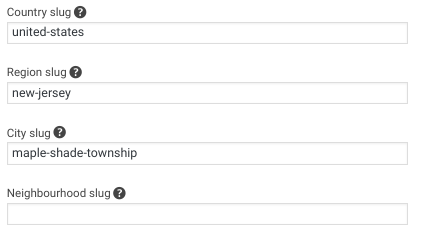
These are the additional options in the shortcode builder. Note here that the slugs used are for one city location, with the correct region and country slug to match that city location.
And the output
Note: This feature is not compatible with the “Enable Location Filter” which will further filter the results based on the location of the currently viewed page, most likely results in 0 results.
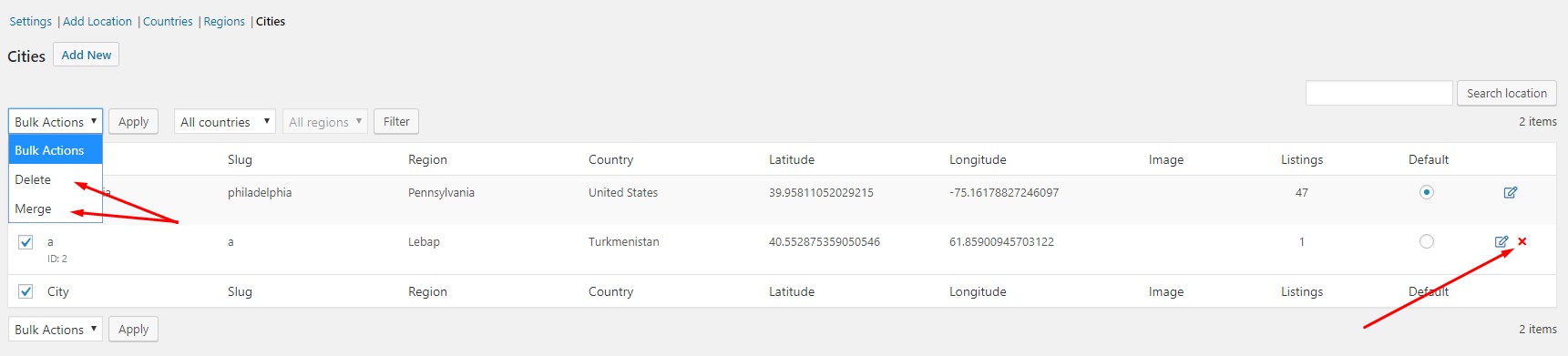
Inside the lsit of countries/regions/cities you can use the checkbox to select two or more and then choose “merge” from the bulk actions dropdown. Merging will give you the option to choose where listings should end up. You can merge 100 cities into one and it will move all the listings and change their city and region and country at the same time.
It is recommended to merge locations as a rule, and to avoid even considering deleting them. The reason is to avoid even the potential for deleting a location with listings because that will ‘orphan’ the listings.
Choose country/region/city subtab Select one or more locations From bulk actions choose merge When the page reloads, choose the ‘destination’ location. All the listings will be merged into this location. Done
Customize
For more about customizing with CSS and PHP snippets see the doc about customizing.
Topics
Example snippet to add region to the GD Search bar as a dropdown – Forum topic
What follows are conditional PHP statements that can be used to retrieve the location data on those pages for use in your own customizations.
Examples:
geodir_is_page( 'location' ) – Determines whether current page is location page.
geodir_location_get_current( 'location' )  – Current location. Current Country or Region or City or Neighbourhood. Depends on current location type.
geodir_location_get_current( 'location_slug' ) – Current location. Current Country slug or Region slug or City slug or Neighbourhood slug. Depends on current location type.
geodir_location_get_current( 'id' )    – Location id. Only if city is set.
geodir_location_get_current( 'type' )  – Location type. One of from "country, region, city, neighbourhood, me, gps".
geodir_location_get_current( 'is_default' )    – Is default location. Only if city is set.
geodir_location_get_current( 'country' )   – Country name. Ex: United Kingdom.
geodir_location_get_current( 'country_slug' ) – Country slug. Ex: united-kingdom.
geodir_location_get_current( 'region' )    – Region name. Ex: Greater London.
geodir_location_get_current( 'region_slug' )   – Region slug. Ex: greater-london.
geodir_location_get_current( 'city' )  – City name. Ex: London
geodir_location_get_current( 'city_slug' ) – City slug. Ex: london.
geodir_location_get_current( 'neighbourhood' ) – Neighbourhood name. Ex: Camden Town.
geodir_location_get_current( 'neighbourhood_slug' )    – Neighbourhood slug. Ex: camden-town.
geodir_location_get_current( 'latitude' )  – Latitude. Only if city or neighbourhood or gps/me is set. Ex: 51.4587232758
geodir_location_get_current( 'longitude' ) – Longitude. Only if city or neighbourhood or gps/me is set. Ex: -0.1956555088
geodir_location_get_current( ‘location’ ) – Current location. Current Country or Region or City or Neighbourhood. Depends on current location type. if you are on /country/region//city page then
City name if you are on /country/region/page then Region name if you are on /country/page then Country name
geodir_is_page( ‘location’ ) == ‘Philadelphia’ – for name similarly you can filter by geodir_location_get_current( ‘country’ ) or geodir_location_get_current( ‘region’ ) or geodir_location_get_current( ‘city’ ) if you want to do it by particular country/region/city ex: geodir_location_get_current( ‘country’ ) == ‘United Kingdom’ ex: geodir_location_get_current( ‘country_slug’ ) == ‘united-kingdom’ geodir_location_get_current( ‘region’ ) == ‘Greater London’ geodir_location_get_current( ‘region_slug’ ) == ‘greater-london’ geodir_location_get_current( ‘city’ ) == ‘London’ geodir_location_get_current( ‘city_slug’ ) == ‘london’
In the case that you are starting a new directory and want to limit your directory to one region or country and perhaps several cities, here is how to go about setup:
Visit the Locations tab and enable Multi Countries, Regions, and Cities
Go to Places – Add New and add a listing in each of the Countries, Regions, and Cities that you want to use
Return to the Locations tab and choose “Selected” Countries, Regions, and Cities, selecting for each the locations you want to use
Why can’t I add locations manually?
If you name the country/region/city even the slightest bit different from the Map API you are using, then a new country/region/city will be created instead of the one you are using. Locations with custom names must be maintained manually by merging new duplicate locations into them, thereby moving the listings in those locations into the manually created location.
How can I manage custom locations?
It is possible to manage custom locations with Location Manager.
The way you do it is to create your custom city location, and then merge other cities into that custom location.
One of the issues with this approach is that the custom location is not returned by the map API, so, new listings will may be located in previously merged cities. For this reason custom locations is not a common solution. We do have plans to create an addon to make it easier to manage custom locations but we don’t have a timeline for that.
소개글 인천 남동구 서창동에 위치한 프리미엄 아로마 & 스웨디시 전문점입니다. 🌿 전문 관리 서비스 숙련된 전문 관리사가 뭉친 근육과 피로를 부드럽게 풀어드립니다. 고품질 아로마 오일을 활용한 전신 관리로 심신 안정과 깊은 휴식을 경험하실 수 있습니다. 🏠 프라이빗한 힐링 공간 개별 관리실로 구성되어 프라이버시가 보장되며, 은은한 조명과 아로마 향이 어우러진 편안한 환경을 제공합니다. 🅿️ 편의 시설 무료 주차, 쾌적한 Read more...
소개글 ✨ 경기도 평택시 비전동에 위치한 테라피 전문샵 더청담타이입니다. 💆♀️ 전문 테라피스트가 고객님 개개인의 신체 상태와 니즈에 맞춰 스웨디시, 타이, 로미로미, 아로마 테라피 등 다채로운 관리 프로그램을 제공합니다. 아로마 오일과 체계적인 테크닉을 활용하여 심신의 이완과 원활한 순환을 돕고, 일상 속 피로를 해소하는 데 집중합니다. 🏠 프라이빗한 전용 개인실을 완비하여 조용하고 쾌적한 환경에서 관리받으실 수 있으며, 각 관리실 내 Read more...
소개글 🌟 디오빌휴타이: 강남 서초의 프리미엄 힐링 공간 서울 강남과 서초의 중심, 지친 일상에 완벽한 쉼표를 선사하는 디오빌휴타이입니다. 저희는 고객님 한 분 한 분의 온전한 힐링과 최고의 만족감에 집중합니다. 🙏 📍 접근성 및 운영 안내 강남역 5번 출구에서 도보 약 7분 거리! 🚶♀️ 🚶♂️ 차량 이용 고객을 위한 지하 주차장이 완비되어 있습니다. 🚗🅿️ 운영 방식: 고객님의 편안함을 위해 Read more...
소개글 경기도 안양에 위치한 아로마 & 림프 관리 전문샵입니다 🌿 연화스웨디시는 일상의 무게를 내려놓고 진정한 휴식을 원하시는 고객님을 위한 프리미엄 힐링 공간입니다. 숙련된 전문 테라피스트가 아로마 오일을 활용한 전신 스웨디시 관리와 림프 순환에 집중하는 림프 케어를 제공하여, 몸 전체의 피로와 스트레스를 효과적으로 해소해드립니다 💆♀️ 저희의 핵심 강점은 부드럽고 섬세한 관리 스킬을 통해 근육의 긴장을 풀어주고, 순환 촉진 및 Read more...
소개글 🌟 디오빌휴타이: 강남 서초의 프리미엄 힐링 공간 서울 강남과 서초의 중심, 지친 일상에 완벽한 쉼표를 선사하는 디오빌휴타이입니다. 저희는 고객님 한 분 한 분의 온전한 힐링과 최고의 만족감에 집중합니다. 🙏 📍 접근성 및 운영 안내 강남역 5번 출구에서 도보 약 7분 거리! 🚶♀️ 🚶♂️ 차량 이용 고객을 위한 지하 주차장이 완비되어 있습니다. 🚗🅿️ 운영 방식: 고객님의 편안함을 위해 Read more...
단축 코드 작성기의 추가 옵션입니다. 여기에 사용 된 슬러그는 하나의 도시 위치에 해당하며 정확한 도시 및 국가 슬러그는 해당 도시 위치와 일치합니다.
그리고 출력
참고 : 이 기능은 현재 표시된 페이지의 위치를 기준으로 결과를 추가로 필터링하는 “위치 필터 사용”과 호환되지 않으며 결과는 0입니다.
국가 / 지역 / 도시 목록에서 확인란을 사용하여 둘 이상을 선택한 다음 대량 작업 드롭 다운에서 “병합”을 선택할 수 있습니다. 병합하면 리스팅의 위치를 선택할 수있는 옵션이 제공됩니다. 100 개의 도시를 하나로 병합 할 수 있으며 모든 리스팅을 이동하고 동시에 도시와 지역 및 국가를 변경합니다.
위치를 원칙적으로 병합하고 삭제를 고려하지 않는 것이 좋습니다. 그 이유는 업체 정보를 ‘고아’하기 때문에 업체 정보가있는 위치를 삭제할 가능성을 피하기 위해서입니다.
국가 / 지역 / 도시 하위 탭 선택 하나 이상의 위치 선택 대량 작업에서 병합 선택 페이지를 다시로드 할 때 ‘대상’위치를 선택하십시오. 모든 업체 정보가이 위치로 병합됩니다. 끝난
커스터마이즈
CSS 및 PHP 조각으로 사용자 정의에 대한 자세한 내용은 대한 문서 참조 사용자 정의를 .
다음은 사용자 정의에 사용하기 위해 해당 페이지에서 위치 데이터를 검색하는 데 사용할 수있는 조건부 PHP 명령문입니다.
예 :
geodir_is_page( 'location' ) – Determines whether current page is location page.
geodir_location_get_current( 'location' )  – Current location. Current Country or Region or City or Neighbourhood. Depends on current location type.
geodir_location_get_current( 'location_slug' ) – Current location. Current Country slug or Region slug or City slug or Neighbourhood slug. Depends on current location type.
geodir_location_get_current( 'id' )    – Location id. Only if city is set.
geodir_location_get_current( 'type' )  – Location type. One of from "country, region, city, neighbourhood, me, gps".
geodir_location_get_current( 'is_default' )    – Is default location. Only if city is set.
geodir_location_get_current( 'country' )   – Country name. Ex: United Kingdom.
geodir_location_get_current( 'country_slug' ) – Country slug. Ex: united-kingdom.
geodir_location_get_current( 'region' )    – Region name. Ex: Greater London.
geodir_location_get_current( 'region_slug' )   – Region slug. Ex: greater-london.
geodir_location_get_current( 'city' )  – City name. Ex: London
geodir_location_get_current( 'city_slug' ) – City slug. Ex: london.
geodir_location_get_current( 'neighbourhood' ) – Neighbourhood name. Ex: Camden Town.
geodir_location_get_current( 'neighbourhood_slug' )    – Neighbourhood slug. Ex: camden-town.
geodir_location_get_current( 'latitude' )  – Latitude. Only if city or neighbourhood or gps/me is set. Ex: 51.4587232758
geodir_location_get_current( 'longitude' ) – Longitude. Only if city or neighbourhood or gps/me is set. Ex: -0.1956555088
geodir_location_get_current ( ‘location’) – 현재 위치. 현재 국가 또는 지역 또는 도시 또는 이웃. 현재 위치 유형에 따라 다릅니다. / country / region // city 페이지에 있다면
도시 이름 당신은 / 후 국가 / 지역 / 페이지에있는 경우 지역 이름 당신이 / 국가 / 페이지 다음 경우 국가 이름
geodir_is_page ( ‘location’) == ‘Philadelphia’– 특정 국가 / 지역별로 원하는 경우 geodir_location_get_current ( ‘country’) 또는 geodir_location_get_current ( ‘region’) 또는 geodir_location_get_current ( ‘city’)로 필터링 할 수 있습니다. / city 예 : geodir_location_get_current ( ‘country’) == ‘영국’ 예 : geodir_location_get_current ( ‘country_slug’) == ‘united- kingdom’geodir_location_get_current ( ‘region’) == ‘Greater London’geodir_location_get_current ( ‘region_slug’) = = ‘더 큰 런던’ geodir_location_get_current ( ‘city’) == ‘런던’ geodir_location_get_current ( ‘city_slug’) == ‘london’
새 디렉토리를 시작하고 디렉토리를 한 지역이나 국가 및 여러 도시로 제한하려는 경우 설정 방법은 다음과 같습니다.
위치 탭을 방문하여 여러 국가, 지역 및 도시를 활성화하십시오.
장소 – 새로 추가로 이동하여 사용하려는 각 국가, 지역 및 도시에 목록을 추가하십시오.
위치 탭으로 돌아가서 “선택한”국가, 지역 및 도시를 선택하고 사용하려는 각 위치를 선택하십시오
위치를 수동으로 추가 할 수없는 이유는 무엇입니까?
국가 / 지역 / 도시의 이름을 사용중인 맵 API와 조금이라도 다르게 지정하면 사용중인 국가 / 지역 / 도시 대신 새 국가 / 지역 / 도시가 생성됩니다. 새 중복 위치를 병합하여 사용자 지정 이름을 가진 위치를 수동으로 유지 관리해야합니다. 따라서 해당 위치의 목록을 수동으로 만든 위치로 이동합니다.
맞춤 위치를 관리하려면 어떻게해야하나요?
위치 관리자를 사용하여 사용자 정의 위치를 관리 할 수 있습니다.
이렇게하는 방법은 사용자 지정 도시 위치를 만든 다음 다른 도시를 해당 사용자 지정 위치로 병합하는 것입니다.
이 접근 방식의 문제 중 하나는지도 API에서 맞춤 위치를 반환하지 않기 때문에 이전에 병합 된 도시에 새 업체 정보가있을 수 있다는 것입니다. 이러한 이유로 사용자 정의 위치는 일반적인 솔루션이 아닙니다. 사용자 지정 위치를보다 쉽게 관리 할 수 있도록 애드온을 만들 계획이 있지만 이에 대한 일정은 없습니다.
















1 Comment
[…] 위치 관리자 애드온(Location Manager2.0.1.0 ) : GEODirectory의 add on […]